Showing posts with label CRM. Show all posts
Friday, 16 June 2017
4 Ways to Marry Your Email Marketing and Website Optimization Strategies
Do you hear that? It’s getting louder. It’s the sound of millions of emails, targeted ads, and personalized web experiences fighting for relevance. Despite the noise, B2B and B2C brands succeed at delivering relevant information to their target audiences. According to Direct Marketing Association, for every $1 spent on email marketing, the average return-on-investment is $40.56. But there’s a difference between threading the needle and really creating something.
In many cases, data is being used to deliver personalized email campaigns with fantastic results. The Aberdeen Group says that personalized emails improve click-through rates by 14% and conversion rates by 10%. With results like these, the motivation to test, segment, and personalize email campaigns will no doubt increase. However, the success of these incremental improvements to email marketing depends largely on the next steps customers take after engaging with your email. Whether you’re sending them to a specific landing page or inviting them to take advantage of a personalized offer on-site, the work doesn’t end in your customer’s inbox.
By looking at how you use data to improve email marketing from the broader perspective of your web or mobile experience, you can multiply the impact of your targeting. And it’s worth it. According to Steelhouse, using correct targeting and testing methods can increase conversion rates up to 300%.
Break Down the Barriers
Closing the data loop and breaking down the organizational divisions between email marketing and website optimization is increasingly common. Marketers are adopting this strategy, particularly as facts about open-rates on mobile come to light and digital teams unite forces. But any brand making a significant investment in email marketing will soon be throwing good money after bad without an optimized, personalized mobile experience. Eisenberg Holdings says that companies typically spend $92 to bring customers to their site, but only $1 to convert them. Instead, make your money count twice by investing in a strategy that combines data from email marketing with on-site behavior for a comprehensive approach to optimization.
According to EConsultancy, 64% of companies would like to improve their personalization, 64%, their marketing automation, and 62%, their segmentation. The key is to unify these three key areas for a strategy that will keep your communications relevant and your audience engaged. Here, I’m going to share four ways your website’s optimization strategy can enhance your email marketing efforts, and vice versa! Let’s get started…
1. Use Website Data to Validate Email Segmentation
Segmenting your audience for email marketing is not an uncommon practice. However, the segmentation of your website traffic is often treated as a mutually exclusive effort.
Try This: Use your website data to validate predefined segments for email marketing campaigns with a URL parameter. By doing so, you can find out whether your segments behave how you expected them to with metrics that look at their behavior from first click to exit.
2. Use Email Marketing Attributes to Create a Better On-Site Experience
The data from email and websites can interact in either direction. One leading travel brand worked with Maxymiser, a website and app optimization solution, on an email campaign designed to bring users to the site by converting email prospects with a featured destination that best reflected their preferences (either collected or expressed.) Using Maxymiser’s optimization solution, the brand selected 36 destinations to offer and used each one as a specific variant of the test.
Try This: Segment visitors who came from email and determine which predictive attributes will make their visit the best possible experience. In the above instance, the brand took the attributes generated by an email campaign and used them to test and target on their site—and you can too.
3. Map Email Engagement and CRM
With the right tools, you can map the unique identifier to a CRM file and target specific individualized content to that visitor.
Try This: The data-driven marketer (you!) could place an individualized identifier in the URL of an email campaign. You can also match up an individual from the aforementioned unique URL to segments or visitor groups defined in the CRM file.
4. Test and Target from Email to Landing Page (Mobile or Desktop)
Using your optimization solution, you can test custom content on your predefined email segments by redirecting them from email to a specific landing page.
Try This: Optimize both your emails and landing pages in a single test and combine your analytics for a clear perspective on your user’s behavior. This might be a particularly interesting test to run on a mobile landing page.
In Q1 2014, more email was opened on iPhones (38%) than all desktops combined (34%). You can be sure that these percentages have only increased in the last 12 months. With that being said, if you’re hoping to convert a visitor with email, you have to optimize your mobile landing pages. A website optimization solution like Maxymiser can run the aforementioned desktop landing page test on mobile as well. A unified optimization and email marketing team could easily work together to generate a rich tapestry of insights by segmenting email audiences and testing the optimal experience on desktop or mobile, depending on where the user comes from.
So, don’t just think about the connection between email marketing and optimization; plan for success by aligning your strategy with a multi-channel approach like the one I have described above. On the road to becoming a holistic digital marketing organization, the marriage between email marketing and website optimization is one of the most valuable steps.
Source
Sunday, 28 May 2017
101 (Neatly Organized) Marketing Tools For Nearly Any Marketing Task
Looking for a definitive list of “marketing tools”? Then look no further.
We’ve painstakingly researched, refined and distilled hundreds of them.
The result: this fully-categorised list of what we believe to be 100 of the best tools out there.
But, before we get to the tools, here are a couple of things to keep in mind:
It would be impossible to create a list of every tool, so this wasn’t our focus. We instead focussed on collating the most popular and widely-used tools (and categorizing them).
We’ve put a lot of focus on SEO tools. Why? Because we’re talking about online marketing here, and SEO is a HUGE part of it.
OK, let’s get to the tools!
Analytics Tools
Without analytics, there’s no way of knowing how your visitors are reaching or interacting with your website.And, if you don’t know this, you’ll be in the dark about what’s working and what isn’t.
This is a dangerous place to be, as it can lead to all kinds of errors.
For example, you may continue spending money on that PPC campaign that isn’t generating a return on investment. Or keep creating content that nobody is actually reading.
Analytics tools allow you to gain insight into these areas, so you can base your marketing strategy on cold, hard data (rather than guessing).
They can tell you where your visitors came from, who they are, and the traffic sources that convert best.
And that’s just the tip of the iceberg.
These days, there’s an analytics tool for virtually everything.
Here are a few of our favorites:
Google Analytics — comprehensive analytics platform from Google (we recommend all websites use this!)
KISSMetrics — digs deeper into your visitors/customers behavior.
MixPanel — helps you learn more about your users. Great for product development and/or increasing conversions.
HotJar — shows how visitors are using your website with heatmaps.
Competitive Research Tools
Sometimes, you’ll be working on a site and realize one thing: your competition is absolutely crushing it.It can be depressing, but remember this:
If you can just reverse engineer what they’re doing (i.e. everything responsible for their success), you can then implement similar tactics on your site.
But, here’s the problem: it’s almost impossible to do manually.
This is where tools come in handy.
Competitive research tools can tell you everything you ever wanted to know about your competitors, including:
Which content has the most backlinks?
Which content has the most social shares?
What terms are they bidding on in AdWords?
What keywords are they ranking for?
It’s also possible to identify “content gaps” (i.e. content your competitor has, yet you don’t) for your own site.
Here are our favorites:
SimilarWeb — estimates traffic and engagement statistics for any website.
SEMRush — shows the keywords your competitors are ranking for, the terms they’re targeting with ads and much more.
Ahrefs — lets you see who’s linking to your competitors, their most popular content, and more.
SpyFu — spy on your competitors and find their most profitable keywords (in both organic and paid search).
Link Prospecting Tools
Building backlinks is never an easy task.It takes time, effort and a meticulously personalized approach to outreach.
Even then, you’re still only going to convert a handful of your prospects.
Therefore, successful link building requires two things:
A large list of prospects.
A way to meticulously vet these prospects.
Here are a few of the best tools for any serious link prospector:
Google Results Extractor (by Chris Ainsworth) — scrapes Google search results into a neat, copyable list.
LinkClump — lets you open a bunch of links in one fell swoop (perfect for vetting large lists of prospects).
Check My Links (for Chrome) — checks for broken links on any web page from within your browser.
NoFollow (for Chrome) — check for nofollowed links on any web page (i.e. links that pass no SEO value).
SEERS SEO Toolbox — adds insanely useful SEO-focussed formulas to Google Sheets.
URL Profiler — crawls and scrapes content from websites. It can also pull in data from Moz, Ahrefs, Majestic, and a ton of other data sources.
Backlink Research Tools
Links remain one of the most important ranking factors.Many studies (including our own) have confirmed this.
But, building links (without buying them!) can be extremely difficult.
And, if you don’t have access to a backlink research tool, it will be even harder.
Why? Because nearly all link building strategies that work (e.g. broken link building, etc.) rely heavily on data from such tools.
For example, you might want to reverse engineer the top 10 Google results (in order to figure out why they’re ranking) then copy their strategy.
But, with links (still) being a crucial ranking factor, you can bet that any site ranking in the top 10 has a ton of links.
So, you’ll probably need to reverse engineer (and copy) their backlinks to stand any chance of outranking them.
And the only way to find out who links to a particular piece of content is by using a backlink research tool.
Without relying on metrics (e.g. DR, UR, etc.) from such tools, it’s also pretty difficult to figure out the potential value of a link.
So, here are our 3 favorite backlink research tools:
Ahrefs Site Explorer — finds backlinks pointing to any domain or URL. It also has great filtering, shows anchor text, and even surrounding link text. Yeah, we’re biased, but this guy isn’t.
Majestic — the closest competitor to Ahrefs when it comes to “backlink research”. It has a few useful metrics such as TrustFlow and CitationFlow.
Open Site Explorer (from Moz) — backlink checker created by Moz.com. It has the smallest index of the three.
Keyword Research/Discovery Tools
Many people begin creating content without first conducting keyword research.This is a big mistake.
Without comprehensive keyword research, your content typically won’t stand a chance of ranking for anything worthwhile.
And, if it doesn’t rank for the right terms (i.e. the keywords/phrases your target audience are searching for), you won’t get the traffic you deserve.
This means that the time, money, and effort you put into creating your content will be wasted.
Keyword research is actually a two-step process, consisting of:
Discovery
Research
Sidenote.Here’s a great 19-step process if you’re seriously about learning more, but we’ll keep things simple for the purpose this post.
Discovery involves finding as many keywords (related to your niche) as possible.
Finding related keywords from a “seed” keyword is one way of doing this.
Research involves looking at things like search volume (i.e. how many people search for a keyword each month) and keyword difficulty (i.e. the effort required to rank for a keyword).
And using this information to decide which keywords to target.
Both of these processes are equally important, so here are our favorite keyword discovery/research tools:
Ahrefs Keyword Explorer — grabs search volume and keyword difficult for any keyword. It also suggests related keywords and has great filtering options.
SEMRush — show a ton of information for any keyword (including search volume).
Long Tail Pro — grabs keyword volume, determines keyword competitiveness, and pulls in metrics from Majestic.
KeywordTool.io — amends your seed keyword with hundreds of variations, then scrapes Google’s related searches to find thousands of similar keywords.
AnswerThePublic.com — finds questions people are actually searching for (from your seed keyword).
On-Page SEO / Crawl Tools
Most “on-page SEO” tasks fall into one of these two buckets:Finding errors (or optimization opportunities)
Fixing them
When you’re working with a small website (<5 pages), manually searching for and fixing problems is pretty easily done.
You load up a page, inspect the HTML, and note down any areas for improvement.
Simple.
But, with a large site (say 10k+ pages), doing this manually could easily take weeks or even months. It would also be pretty boring.
This is where web crawlers and various other on-page tools are needed.
Web crawlers make finding errors en masse as simple as hitting a “crawl” button — the program does all the work for you.
But, there’s another problem: big sites typically have big (i.e. many) problems.
Diving into the HTML to fix hundreds of problems would be pretty time-consuming. Fortunately there are a tons of other on-page tools/plugins that make life a lot easier.
Here are a few must-have tools:
Screaming Frog — powerful website crawling application that’s perfect for discovering on-site issues (e.g. broken links, etc.)
DeepCrawl — powerful industry-leading website crawler (also cloud-based, unlike Screaming Frog)
Yoast SEO (WordPress Plugin) — gives you the ability to easily edit on-page meta information (e.g. title, description, etc.) without sifting through the code.
OnPage.org — crawls your website, finds on-site/technical errors, and kicks back a detailed report.
Beam Us Up — powerful crawling application (somewhat similar to Screaming Frog, but 100% free),
Xenu Link Sleuth — lightweight website crawler with a focus on finding broken links (only for Windows).
Rank Tracking Tools
Knowing where you rank for your target keywords is super-important.Without tracking this information, you’ll never know where to prioritize your efforts.
For example, if you rank #1 for a particular keyword, you probably don’t need to launch a massive link building campaign for that page/keyword (as it can’t get any higher).
But, if you’re ranking at the bottom of page 2, that page may benefit from such a campaign.
What’s more, if you have clients, they’re going to expect a “ranking” report every month.
And, with most websites ranking for hundreds — sometimes even thousands — of keywords, it would be crazily time-consuming to do this manually.
So, here are a few of the best rank tracking tools on the market:
Pro Rank Tracker — track up to 50,000 keywords with daily automatic updates. They also support both local and mobile rank tracking.
STAT — track an unlimited number of keywords, all with daily tracking. Mobile and local SERPs included.
SERPWoo — track up to 4,000 keywords (includes mobile + local). It also lets you track the top 100 positions for any query.
AWR Cloud — daily rankings for desktop, mobile and local searches. You can also generate white label ranking reports.
Accuranker — fast rank checker (updates in seconds). It also tracks social metrics and integrates with Google Analytics.
Content Research Tools
Millions of blog posts are published every single day.And here’s the truth: most of them go completely unnoticed.
Why? Because most people never research the type of content that is likely to work well in their industry.
They simply start writing and hope for the best.
So unless you want to waste time creating content that your target audience won’t care about, you need to do your research.
This is where content research tools come in.
These tools allow you to gain insight into your industry before you write a single word.
Just type in a keyword or phrase and you’ll be able to see things like:
Number of social shares
Number of backlinks/referring domains
The exact wording your target audience uses when searching for a topic
And from this, you can make informed, data-driven decisions about the best way to attack your chosen keywords/topics.
Here are a few of our favorite tools:
Buzzsumo — easily find content with the most social shares and backlinks (you can also filter by content type and time period).
Ahrefs (Content Explorer) — find niche-specific content with the most social shares, backlinks, and traffic. Also lets you get super-granular with the filtering (e.g. filter by publish date, languages, etc.)
Reddit — popular community site where you can find tried and tested ideas for your content.
Email Discovery/Verification Tools
Many marketers still search for email addresses manually.They spend countless hours sifting through hundreds of websites, social profiles, and other web properties, searching for that elusive email address.
This takes a ton of time.
Simply finding the contact information for, say, 100 people can easily set you back a full working day.
This is where “email discovery/verification tools” come in handy.
Using super-smart algorithms, they visit, parse, and scrape sites to gather contact information.
Many of them will find a person’s email address in seconds — all you need is their name and website.
But, here’s the bad news:
None of these tools are 100% accurate (most claim 80–90% accuracy), so occasionally they won’t find anything.
This is where email guessing and validation tools come in handy.
Here are our 5 favorites:
Hunter.io (formerly EmailHunter.co) — tackles both email discovery and verification. It has a clean UI, API access (which works in Google Sheets), and a Chrome extension.
Voila Norbert — discovers and verifies email addresses (very similar to Hunter.io). It has an API, but no Chrome extension.
FindThat.Email — claims an 85% delivery rate on all email addresses it finds. No API access, but there’s a Chrome extension. It also works within Ahrefs Dashboard.
MailTester.com — will verify the existence of an email address by pinging the server. It’s ugly, but it works.
Guesser.email — does what it says on the tin: it’s guesses someone’s email address (from their name and website).
Email Marketing Tools
Email marketing tools have come a long way over the last few years.No longer are they restricted to bland broadcast emails (i.e. an “email blast” to your entire list).
You can now:
Segment easily
Get extremely granular with campaign monitoring
Create smart action-based autoresponder sequences
This is why email is reported to have a 3800% ROI.
So, if you’re serious about email marketing, you need to invest in email marketing tools.
Here are a few of our favorites:
MailChimp — email marketing made simple. Offers easy integration with a ton of third-party apps/services (e.g. UnBounce, WordPress, etc.)
ConvertKit — conversion focussed email marketing for bloggers.
InfusionSoft — email marketing platform focussed on smart automation (also incorporates a CRM).
GetResponse — claims to be the “world’s easiest email marketing” platform. It also offers some automation features (although not as advanced as InfusionSoft).
Outreach Tools
Manual outreach is one of the most effective ways to promote new content.It’s also a great way to build links.
But, if you take the fully manual approach, it can take hours to compose and send just a few outreach emails.
This is because generic email tools (e.g. Gmail) aren’t built for mass outreach. So, you’ll end up writing each and every email from scratch (this is crazily time-consuming).
Outreach tools make everything much simpler and quicker.
Many have features such as auto follow-ups, email open tracking, pre-built templates, and even mail-merge capabilities.
They can also drastically simplify the process of discovering relevant prospects.
Some even allow you to discover hundreds (or even thousands) of targeted prospects in seconds.
Here are our favorites:
Buzzstream — find prospects and send outreach emails with ease. Includes a basic CRM and lets you track all emails sent.
Pitchbox — outreach platform focussed on automation and scaling.
ContentMarketer.io — lets you send and track outreach emails using Gmail. Includes a ton of templates.
JustReachOut.io — allows you to discover and pitch to journalists easily. Integrates with HARO.
NinjaOutreach — all-in-one influencer discovery and outreach management tool.
Local SEO Tools
If you’re involved in “local” SEO, things like citation building, reviews, and reputation management will be a big part of your life.But, here’s the problem: these tasks can be extremely time-consuming, boring, and repetitive.
For example, It can take hours to find local citation opportunities. And when you do find them, you’ll then have to spend even more time submitting to each of them. One. By. One.
It’s the same story with local blogger outreach, attracting reviews, and virtually any other “local SEO” task, too.
But, what if all this could be simplified, or perhaps even automated?
With “local SEO” tools, you can automate tasks such as, local rank tracking, and even finding local citations.
Here are a few useful “local SEO” tools:
BrightLocal — pulls your local SEO data into one dashboard. Offers a ton of tools including citation auditing and online review monitoring.
WhiteSpark — offers three main tools: local citation builder; reputation builder; and local rank tracker. There’s also a link prospector.
Moz Local — helps you ensure that your local business listings are accurate and correct.
FreeReviewMonitoring.com — monitors your businesses reviews on all the major review sites, daily.
Mobile Analytics Tools
If you don’t know exactly how people are using your mobile app, something needs to change.Sure, looking at the number of downloads gives you a basic insight.
But, if you’re looking to optimize your app for UX (as you should be) or analyze where mobile users are falling out of your funnel, you need to dig deeper.
This is exactly what mobile analytics tools allow you to do.
They’ll help you figure out who your users really are; what they’re clicking; and even the exact features they’re using.
You can then use this data to improve UX, guide your feature implementation strategy, and even increase your bottom-line.
Here are a few great tools:
Apsalar — app analytics platform focuss
LeanPlum — comprehensive mobile analytics platform that helps to drive app engagement and ROI.
App Annie — app analytics and marketing data intelligence platform.
Online Mention Tracking Tools
Most businesses are constantly being mentioned online.Some people will be talking about their experience(s) with you, others will be asking questions about your product in forums, and so forth.
Now, it’s easy to see how monitoring these mentions could be beneficial; for example:
You could follow-up and answer questions from potential customers in forums
You could reclaim links from those mentioning you, but not linking to your site (thus helping with SEO)
You could promote future content to those who’ve mentioned you in the past
But monitoring these mentions manually is literally impossible.
The solution: mention tracking tools.
These tools constantly monitor the web for mentions of, well, whatever you ask them to monitor the web for.
You can enter brand keywords (e.g. “Ahrefs”), competitor keywords (e.g. “SEMRush”), or even topics (e.g. “marketing tools”).
Whenever they spot a new mention, they’ll let you know.
Here are a few of our favorites:
Google Alerts — lets you monitor the web for any keyword/phrase (completely free!).
Ahrefs (Alerts) — monitor alerts for any query and get updates in real-time (or daily/weekly).
Mention — monitors mentions of your brand on the web. It also helps uncover influencers and allows you to react instantly.
TalkWalker — listens for brand mentions on social platforms. It also tells you whether those mentions are positive or negative.
Social Mention — real-time keyword monitoring and analysis.
Social Media Marketing Tools
Facebook has 1.7+ billion monthly active users.Twitter has 313 million.
Even Pinterest has 100+ million.
So it’s clear that social media marketing is a must for all businesses, regardless of size.
But, managing a Facebook page, Twitter account, Pinterest board, and LinkedIn group is a time-consuming process.
And here’s the truth: most small business owners simply don’t have the time or budget to do this.
I mean, if you’re doing everything manually, it can easily take an hour just to post one link across all your social media channels.
Luckily, social media marketing tools can help streamline the process.
Not only can they help with management, but many use smart algorithms to determine the best time for posting.
They even automate the entire process.
Here are a few of the best:
Buffer — allows you to queue your social media posts and publish to multiple platforms in one place.
CoSchedule — lets you build a smart content marketing editorial calendar.
HootSuite — helps you to manage all your social platforms from one place.
FollowerWonk — helps you to analyze your twitter followers (e.g. who they are, and where they’re from). Also useful for discovering “influencers”.
Landing Page Tools
Landing pages have one job: to convert visitors into leads.In fact, a good landing page should convert at 20%-40%.
But, here’s the problem: each time you promote something new (e.g. ebook, webinar, “cheat sheet”, etc.), you’ll need a completely redesigned landing page.
But, most businesses can’t afford to shell out a couple of hundred bucks for a custom landing page design every few weeks.
Landing page tools solve this problem by offering sets of pre-designed, easily editable landing page templates.
Most also keep track of conversion rates, allowing you to gain some insight into how well your pages are converting.
Some even allow you to create and optimize entire funnels, which ultimately leads to a nice increase in revenue (when used wisely).
Here are a few we love:
LeadPages — a landing page builder (with a ton of templates!). Integrates with most email marketing platforms.
ClickFunnels — map out your entire funnel and build all the landing pages (and more) you need.
UnBounce — a simple landing page builder with over 200 templates.
Instapage — build, publish and continually test (with A/B testing) landing pages.
A/B Testing Tools
Most people are quite “trigger happy” with their ideas.For example, when they have an idea for increasing conversions on their sales page, they’ll waste no time implementing that idea.
This is a huge mistake.
Why?
Because that change could just as easily decrease conversions. And if that happens, it will have a negative effect on your bottom-line.
A/B testing solves this problem by offering a data-driven approach to any changes.
Here’s how it works:
Instead of simply implementing a change and hoping for the best, A/B testing tools will create two versions of a page.
The first version is the original page (no changes), and the second is identical to the first, but with one change.
These two pages are then tested against each other — you can then choose whichever performed best as the winner.
Here are a few great A/B testing tools:
VWO — easily run A/B tests (and multivariate tests) on your website. It also helps you target and personalize content to different types of visitor.
Optimizely — run A/B tests and personalize web content with ease.
Convert.com — enterprise-level A/B testing with “seamless” Google Analytics integration.
Marketing Automation Tools
Most businesses use a ton of different marketing tools.But, there’s a problem: most of these tools aren’t very good at talking to each other.
For example, if a customer purchases something via PayPal, getting that information into your CRM can often be a manual, time-consuming process.
Wouldn’t it be easier if these services could talk to each other?
Marketing automation tools make use of APIs and other smart technology to connect seemingly unrelated tools to one-another.
So, automatically importing form-fill data (e.g. from TypeForm) into a spreadsheet (e.g. Google Sheets), for example, is now possible.
And that’s just one example — you can create your own triggers and actions to do almost anything you can imagine.
Here are a few of the best tools:
IFTTT — connect hundreds of different services with a simple “If [THIS] then [THAT]” formula.
Zapier — automate tasks between seemingly unrelated apps with “zaps”.
Marketo — create, automate and measure marketing campaigns (across a number of different channels).
Center.io — automate tasks based on the actions your leads take (created by LeadPages).
Hubspot Marketing — all-in-one marketing automation platform (it literally does everything).
Webinar Tools
Webinars are powerful lead generation tools.According to these stats, 20%-40% of webinar attendees turn into qualified leads.
So, if you can get 100 people to attend your webinar, that’s potentially 20–40 qualified leads for your business.
Convert those leads at, say, 50%, and that’ll be 10–20 new clients.
For an SEO company charging a monthly retainer of $500 (which is apparently the most common figure), that could be an additional $5k-$10k in MRR from hosting just one webinar.
But, here’s the issue: many businesses struggle with the technicalities of hosting a webinar.
Luckily, webinar software has come a long way over the years. There are now many webinar tools that are both feature-packed and easy-to-use.
Some of them even help you to monetize your webinars with certain features.
Here are a few of the best:
WebinarJam — an enhanced version of Google Hangouts, heavily focussed on increasing webinar revenue.
GoToWebinar — lets you host and record webinars with live Q&A’s (and much more!).
ClickWebinar — lets you educate your prospects with branded webinars.
WebinarNinja — create a webinar in as little as 10 seconds.
Lead Capture Tools
Traffic is great, but it doesn’t always directly correlate with revenue.Some sites get hundreds of thousands of visitors per month and only make a few hundred dollars. Others receive a fraction of that and make tens of thousands.
So what gives?
Well, the sites making real money are typically the ones that understand the importance of lead generation.
Remember, you can have all the traffic in the world but if it doesn’t convert, you’re fighting a losing battle.
Lead generation tools essentially help you to convert visitors into business leads.
They make implementing common lead acquisition strategies (e.g. content upgrades; overlays; pop-ups, etc.) easier by handling the technicalities.
Most have a user-friendly UI, which allows you to implement advanced lead generation tactics in seconds (without needing to know how to code).
Here are a few of the best:
SumoMe — a suite of lead generation tools (including various opt-ins).
OptinMonster — build, test and analyze lead generation forms.
Thrive Leads — add “content upgrades” and other opt-ins to your WordPress website with ease.
PPC Management Tools
Facebook alone earned $1.51 billion in revenue (from advertising) in the first 3 months of 2016.And Google’s ad revenue recently hit $19 billion.
With PPC networks like this (and yes, Facebook and Google are effectively PPC networks) making such astronomical amounts, it’s clear that PPC advertising can be hugely profitable for businesses.
If it wasn’t, businesses wouldn’t be willingly handing over such crazy sums to these companies.
But, here’s the problem: when you start to scale your PPC spend, things become increasingly difficult to manage.
It gets to a stage where your messy spreadsheet just won’t cut it.
This is where PPC management tools come in super-useful, as they drastically simplify the management process.
But, that’s just one feature.
Many of these tools also have sophisticated algorithms built-in. These constantly analyze campaign performance and give you recommendations for improvements (e.g. cutting that unprofitable ad before it costs you dearly).
Here are a couple of must-have tools for those involved in PPC:
WordStream — helps you create, manage and optimize your PPC campaigns.
AdEspresso — optimization tools for Facebook ads (includes A/B testing and detailed analytics).
Optmyzr — manage and optimize PPC campaigns (including keyword, bid, and ad optimization).
CRM Tools
Sales management can be a messy process.It’s usually fine in the early days (when you’re dealing with very few customers).
But, when you start getting more leads, things can turn to chaos pretty quickly.
I mean, when you’ve got a few thousand people in your sales funnel (all at different stages), you need a robust management system.
Without one, customers are going to fall through the cracks, and you’ll be leaving money on the table.
CRM (Customer Relationship Management) tools solve this problem by pulling all your data into one robust management application.
You can then keep track of every touchpoint, every interaction, and every sale in one place.
Many also automatically pull in data from other platforms (e.g. MailChimp).
Here are a few of the best:
Salesforce — possibly the most powerful CRM application on the planet.
Hubspot CRM — 100% free CRM for up to a million contacts.
Close.io — a CRM for salespeople (focussed on helping you make more sales).
Pipedrive — a sales management application for small businesses.
Customer Communication Tools
Many marketers spend the bulk of their time chasing new leads but remember: existing customers are the lifeblood of your business.Here’s a quote from Market Metrics:
The probability of converting an existing customer is 60 percent to 70 percent. The probability of converting a new prospect, on the other hand, is only 5 percent to 20 percent
Market Metrics
Clearly then, it’s important to keep in contact with your existing customers.
But how do you do this, at scale?
Customer communication tools solve this by automating the customer communication process.
So, we’re talking things like website live chats (that ping you on demand).
And even fully-automated marketing solutions that send personalized messages to customers based on their activities.
Here are a few great tools to consider:
Intercom — communicate, engage with and solve the problems of your visitors (in real-time).
LiveChat — clutter-free live messaging application for your website.
Customer.io — automate your customer communication based on visitor engagement.
Miscellaneous (but still useful) Tools
And, finally…Here are the tools that didn’t fit neatly into the categories above, but are still super-useful:
Google Tag Assistant — a Chrome extension for troubleshooting the installation of various tags in Google Tag Manager (e.g. Google Analytics).
DownNotifier.com — alerts you when your website is down. Simple.
BuiltWith — find out what any website is built with (e.g. WordPress, Magento, etc.).
Microdata Generator (by Schema.org) — a structured data generator for (almost) anything you could ever need!
JetPack (for WordPress) — speeds up image loading, adds extra security, and gives visitor stats for self-hosted WordPress websites.
WebCodeTools.com — generate web code for just about anything you can imagine!
Did We Miss Anything?
Leave us a comment and let us know.
The Only 14 Startup Tools You Need to Build a Unicorn
Imagine if you had to send marketing emails manually, or keep your records in a tattered binder on your desk.
Every company, even startups, needs to make a minimum investment in SaaS tools for work like email marketing, project management, and tracking sales.
But the catch is that some of these startup tools can cost huge amounts of money, and when you’re a young startup you don’t want to be forking out in excess of $2,000/user/month for just one piece of software.
The point of this post is to explain the minimum viable SaaS stack your startup should invest in, based on what we’ve found out at Process Street in our many (many, many, many) tool-testing escapades. I’ll even do the math for you, and collate the estimated annual cost at the end.
Ready to start building up your toolbox with the best SaaS out there?
Here we go:
Database management: Airtable
Without Airtable, we’d still be storing data in various random spreadsheets, constantly having permission issues, and be unable to get a proper picture of all our data. With it, we now store all of our marketing and product data in one place that connects to over 750 different apps via Zapier.Airtable takes you a step further than spreadsheets because it’s a relational database.
Setting up a database sounds harder than it actually is, probably because databases used to have to be made in complex apps or by using something like SQL.
Thanks to Airtable, everyone can have access to the power of a database that can hold everything from SEO data to customers and marketing contacts, all linked together so you can keep the data in a single, automatable, accessible place and stop scrambling to find what you need on your hard drive or inside Google Drive.
Pricing: free, or $12/user/month
Marketing automation & support: Intercom
Intercom is an all-in-one platform for communicating with your customers, both for marketing and support. Last year we were using MailChimp for marketing automation, and Intercom for support, but we recently switched over to purely running our email marketing through Intercom.Intercom consists of three products: Respond, Engage, and Educate:
Respond is an awesome support solution, with assignments, notes, automation, team inboxes, and performance metrics. It’s priced from $53/month for 250 customer contacts, but the price doesn’t rocket up as your business grows, it climbs gradually. For example, it’ll cost you $101/month for 4,000 customer contacts (and unlimited team members at every level).
Engage is Intercom’s marketing automation side. It lets you send messages manually at any time, based on user activity (perfect for SaaS and subscription businesses), or drip out a sequence of messages to anyone added to your blog subscriber list. In short, it does everything you’d expect from a marketing automation/email marketing service, but also has the layer of user insights because it’s linked to your product or service, too.
Total pricing for Intercom’s Respond and Engage products: $150/company/month for 1,000 contacts
Integrations: Zapier
Zapier is a platform that builds integrations between apps that wouldn’t usually integrate. For example, Intercom doesn’t have a natural integration with Sumo, but we need to send all blog subscribers (some of which come in through Sumo pop-ups) to Intercom. To solve that, we use Zapier to connect the two together.
And that’s just one of the hundreds of use cases. We even use Zapier with our own product, Process Street, to run checklists and add assignments to tasks when an action happens in another app.
Some of my own Zapier use cases at Process Street include:
Add new tagged Airtable URLs with titles to multiple Buffer accounts at once
Create a Google Sheet of incoming emails for analysis
Listen for the words ‘run meeting’ in our content creation Slack channel to fire off a Process Street meeting checklist
Run a Process Street pre-publish checklist when a blog article card is moved into a Trello list
Automatically tweet all RSS feed content
Add Trello cards in the ‘inbox’ list to Todoist with the same due date
So, as you can see, it’s a tool that helps you cut down on masses of data entry. Want to learn more about Zapier? We’ve written a huge ebook on the topic! Get it here.
Pricing: free, or $18.33/month for 20 zaps and 3,000 tasks
Process management: Process Street
The scalability of your startup depends on how well new hires can pick up the pace, learn your processes, and start being efficient. Without documented processes, it’s practically impossible to scale because you’ll be spending time explaining tasks to new hires over and over again. Wouldn’t it be easier if you could just hand them a process and check their progress quickly?That’s where Process Street comes in. With Process Street, you can transfer your company’s knowledge to checklist templates that explain exactly how your team is expected to get the work done. This is great for things like sales qualification, blog pre-publish, employee onboarding, or client onboarding. That’s because all of these tasks have a structure and margin for error.
Here’s an example of an employee onboarding checklist built inside Process Street:
As you can see, each step has a checkbox and can contain form fields, images, videos, text, and more — all to help you explain the tasks that need doing, or to capture structured data.
A library of up-to-date, properly documented processes means you can scale your team with little effort and quickly check the work of your organization at a glance from the Process Street dashboard, which shows you how far each task is progressing:
Process Street also has a Zapier integration, which means you can either link checkboxes to actions in other apps (like sending all form field data to a spreadsheet when a task is checked) or run and assign checklists automatically (e.g. when a new card is labeled in Trello or when you get an email with certain text in the subject line).
Pricing: free, or $12.50/user/month
CRM: Close.io
A CRM is where sales and marketing teams can add leads, communicate with them, and track conversations in one place. It’s an alternative to separate email inboxes, and Close.io is our CRM of choice here at Process Street.Even the cheapest package comes with unlimited leads, contacts, and opportunities, meaning there’s no cap on the number of companies you can reach out to. But what really sets Close.io apart is its amazing search functionality. Using the app’s own variables (or even custom variables you add yourself), you can quickly filter your leads to get a targeted list. For example, you could get every lead in New York City who you haven’t emailed in the past week but have spoken to on the phone at least once.
I find it useful for marketing, too. We use Airtable to collate contacts we’ve mentioned in our blog posts, then use Zapier to automatically add them to Close.io with a tag; when you search the tag, you get a list of everyone to email telling them they’ve been mentioned, and you can bulk email them a template using the tag as a snippet for the URL of the promoted post.
We also use it in conjunction with Process Street for sales qualification.
Close.io might seem expensive at first, but it also covers the cost of calls and won’t need to be purchased for every member of the organization, like a lot of these tools do.
Pricing: $59/user/month
Chat: Slack
Slack is a chat app for teams — check our review here. With it, you can cut email out of the equation entirely and focus on using the most efficient kind of interface instead of the long-outdated email.Inside Slack, you can direct message your co-workers and create channels for each team inside your company. For example, we have a content creation channel where we share resources, have a quick morning catch-up chat, post our WIP articles, and generally communicate a lot more than we would do with just email.
Slack also has a ton of integrations meaning you could take it from being just a chat app like Facebook Messenger to being a fully-fledged dashboard for your notifications.
For example, you can link Slack to Trello and get a constant flow of notifications fed into the relevant channel. If you often work with someone in particular on a board, you can add a Trello integration to that channel and automatically update each other alongside the chat.
Pricing: free, or from $6.67/user/month
Cloud storage: Google Drive
Cloud storage is one of the most basic requirements for modern businesses. Without it, you’re stuck in the ancient days where files had to be emailed from your hard drive, or accessed through the company intranet. I was always under the impression that most businesses used cloud storage, but when a recent study revealed that only 8% of companies share documents using cloud services, I was shocked.Here are the usages and benefits of cloud storage:
Store files outside of company servers, minimizing risk of losing resources
Access files anywhere that has an internet connection
Use another server’s bandwidth, don’t clog up your own company’s
Save money on internal storage space
Control permissions and access to all your company’s resources
And, while there are a ton of different cloud storage services out there, we chose Google Drive because it gives you the best value for money and natively integrates with the rest of the tools we use in the Google suite, like Gmail, Sheets, and Docs.
Pricing: $10/user/month including unlimited storage and all G Suite features
Google Suite vs. Office 365
This little section could be an entire article, but for the purposes of this article it’s worth quickly mentioning that Google Suite and Office 365 are parallel products as far as the tools go (Docs = Word, Sheets = Excel, etc) but the best way to create email accounts and control access for your company domain is to use Google Suite. You can get a plan that we use at Process Street that costs $5/user/month.However, in some cases it might make more sense to get both. With Office 365, you also get Microsoft Flow (which can replace Zapier in some situations), Microsoft Teams (Slack alternative), and Microsoft Planner (Trello alternative).
I’ll talk more about this later on when we get to pricing, but due to their dominance it’s obvious some companies are looking for a Microsoft-heavy solution.
Project and task management: Trello
Trello is a kanban board app that you can imagine like an infinite amount of sticky notes, lists, and boards.
We divide our team’s functions up into boards, and use lists to denote progress through the flow, from ‘idea’ to ‘work in progress’ to ‘done’. With Trello, all of our team’s work is centralized and it’s easy to quickly see the status for particular tasks or add tasks from other apps using their integrations.
Trello is such an open-ended app you can use it to organize pretty much anything: make an editorial calendar, a list of blog post ideas, a list of growth hacking experiments, or just your personal to-do items. Because of that, it organizes a lot of our day-to-day work at Process Street and has just about every feature you could need.
Here’s an example of a Trello board we use at Process Street for managing our editorial calendar and our blog article creation process at the same time:
Pricing: free, or $12.50/user/month
Payment processing: Stripe
For subscription businesses (SaaS included), ecommerce, or anywhere that collects payments from customers over the internet, Stripe is an essential tool. Basically, it’s a payment processing API you can build into your software or website to let users put in their credit card details, be charged, and then notify you.
With Stripe, you can accept debit and credit card payments from customers in any country in over 135 currencies. Without Stripe or a similar API, it’d be a pain in the ass.
Pricing: 2.9% of charge + 30 cents per transaction
Source control: GitHub
Most startups are in the software industry, so it makes sense to assume you need source code control and a repository.
While GitHub is most well known as a network for open source software, it can also be used privately as an internal tool to control edits and rollbacks on collaborative coding projects. At Process Street, we use GitHub to push updates live to the server after they’ve been through the review process. That way, we basically make sure nothing’s going live that will break everything.
Pricing: $9/user/month for the teams plan
Design prototyping: InVision
If your startup is involved with any kind of digital design, whether that’s UI design or web design, you’ll find it hard to get anywhere without a product like InVision.InVision was built to combat the problems designers have when trying to show clients and team mates how their design will work, and what it’ll feel like to use. By uploading screenshots of your design, you can build working prototypes inside InVision complete with clickable elements.
And, when you get feedback from your team, they can comment directly on the part of the interface they’re referring to, eliminating a frustrating clarification process.
InVision is priced per active prototype, which means that if you only work on one project at a time, you can use it for free. If you need more, the pricing starts at $15/month.
Pricing: free, or from $15/month
Accounting: FreshBooks
FreshBooks is a full accounting suite for startups and SMBs. It includes invoicing, expense tracking, time tracking, tasks/projects, and reporting (for profits, expenses, etc.)It’s an alternative to managing your accounts using spreadsheets, or even an alternative to hiring an accountant because much of what FreshBooks does negates the need for a dedicated accountant, especially in a small startup.
Scan receipts, request payments, and have everything automatically logged in one place so you don’t run into any compliance issues.
Pricing: from $15/month
Social media management: Buffer
For an organization without a dedicated social media team (or at least a member of the marketing team that spends a certain number of hours per week managing social media), maintaining multiple social channels can be a huge drain on your company’s time, but with Buffer you can run social media on autopilot.At Process Street, we combine Buffer with Zapier to automatically add new RSS feed items and new Airtable records. We also have a zap that adds any newly Buffer’d article to all of our Buffer social channels at once. These methods are much more effective than manually adding content, especially for use cases such as adding new posts to every employee’s Twitter feed, too.
Pricing: $10/month
SaaS metrics: ProfitWell
ProfitWell is a 100% free tool from the creators of Price Intelligently. It works with Stripe, Braintree, and Zuora, all of which are tools for processing payments. So, whenever a customer pays you for your SaaS product, you get free metrics that guide the future of your product and give you an indication of its health. Pricing: free forever
The total annual cost for your startup: free plans where possible
The cost of a SaaS stack is different for every startup, so there’s not an entirely accurate way to estimate costs, especially when some tools are priced per company, some are priced per user, and some will only be used by one member of the organization.Regardless, I’ve tried my best to make an estimate based on assumptions like: the CRM will only be used by one person, Airtable will be used by everyone, etc. In this estimate, I’ve assumed that a startup consists of 10 people, but there’s also a per user cost breakdown for tools the whole company will use.
Phew. Here goes:
Notes:
Intercom costs the same no matter if one person uses it or the whole company uses it. What you pay for is $X/contact, and this example assumes 1,000 contacts
I’ve listed the necessary users for Close.io as 1 because it’s likely to be a shared account with multiple email addresses connected
Stripe has been omitted from the list of costs because it’s impossible to calculate
The total annual cost for your startup: premium plans without Office 365
Because of the nature of freemium, any growing company will get too big for the free plan in time. For a company of 10, it’s likely some of the tools will need to be paid.Using the same estimated user counts and going by annual pricing, here’s what you’d pay to use these tools on the premium plan:
Notes:
I’ve kept Trello on the free plan because it’s not absolutely necessary to upgrade when there’s so many great unlimited features already.
Alternatives: Microsoft Office 365
While we were brainstorming for this article, we realized that some of the tools listed here are bundled together in Microsoft’s Office 365 suite. Namely: Microsoft Flow replaces Zapier
OneDrive replaces Google Drive
Microsoft Planner replaces Trello
Microsoft Teams replaces Slack
It’s cheaper to get the full Office package than pay separate charges for every product ($12.50/user/month) — but only marginally, because you’ll still need Google Suite otherwise you’ll be using gmail.com email addresses at your workplace. Here’s a version of the table with Office 365 substituting out similar products, saving $120 annually.
While it makes financial sense to opt for Office 365, you’ll still need to pay $5/user/month for G Suite if you want to use a company email and bulk-control the Google accounts of your employees.
So, in conclusion, it’s possible to pay just $2,600 annually for a high quality SaaS stack for your startup. Some tools, like CRMs and marketing automation, don’t come cheap. In contrast, a lot of tools are available for free.
Friday, 5 May 2017
How and why you should use Email Marketing Automation
Marketing Automation was one of the top trends of 2016, here is how to use it in 2017
Anyone who has run an online business, even for a short time, knows that digital marketing offers a wide range of possibilities. A survey of marketers by Regalix tells us that website and email are the most effective channel of online communication. For every retailer email is the primary tool for bolstering sales, however sending generic newsletter campaigns tends to be less and less appealing to subscribers. FreshMail’s research shows that highly personalized campaigns achieve better results and that’s our subject here.
It’s important to get to know the real needs of your customers and to send interesting, engaging content based on advanced personalization and optimization of email marketing campaigns. The potential of Email Marketing Automation (EMA) helps marketers send effective messages suited to the needs of subscribers in a defined contact or communications strategy like a welcome or nurture sequence. With offers tailored specifically to their interests the achievement of your sales goals is just a matter of defining them and allocating the resource to set them up and optimise.
Download Expert Member resource – Email sequence template
Quickly define a contact strategy for a welcome or nurture sequence to help brief designers or copywriters.
Access the Email sequence contact strategy template
What is Email Marketing Automation?
Email Marketing Automation is an ecosystem of tools and mechanisms that helps to automate ongoing conversations with customers and maintains delivery of a high degree of personalized content. This allows you to make sure that subscribers receive tailored content they simply want to read.
An important element of EMA is integration of your email marketing system and website with Google Analytics or other proprietary tracking analytics system. For the purpose of this article we will be using the free to use Google Analytics as a working example. This enables marketers to gather information about subscribers beyond the standard metrics that are part of email campaigns. All you have to do after integration is set specific goals in Google Analytics. While monitoring traffic to your site, Google Analytics pairs the email addresses with cookies in the subscriber’s browser. Later, the data of identified recipients is available in the email marketing platform. The information collected this way allows you to create more effective campaigns that are targeted on the basis of user behavior and the preferences of individual customers.
Campaigns based on GA data can be sent using specially designed autoresponders or a dedicated mailing prepared specifically for subscribers who have completed an established goal or set of goals. Both methods are highly effective in supporting the sales process. You can achieve a similar effect through the use of tracking codes - small pieces of code script that you place on an internet page. This enables you to see whether a particular page has been visited and helps to evaluate the conversion rate of email marketing campaigns.
Using data from email marketing campaigns, user behavior on web pages and individual purchase histories, marketers can plan fully personalized communication. They can identify groups of subscribers with common characteristics and target them with messages that appeal directly to their needs. Functionalities of EMA allows you to run a highly effective lead nurturing programs. You can, for example, design a newsletter with a special structure that contains one part with the main offer for all subscribers. Also an additional offer with dynamic content, which is entered automatically according to sales data ascribed to particular personas and email addresses. This way you can be certain that every newsletter contains something interesting for a particular recipient.
How to use Email Marketing Automation:
Campaigns based on behavioral data from your website
Why do visitors spend time on your website? It’s not always to buy something or to contact a company. They often simply want to see what’s new, gather information about a products and services or check a price. The lead nurturing process of turning interest into a sale can last for a few days or many months. Information gained from the use of data from Google Analytics and tracking codes lets marketers craft targeted, tailored messages that match the interests and page view history of individual customers. This makes cross-selling and up-selling much more effective.
Let’s say, for example, that particular subscriber visits your page from time to time to look at televisions, although he didn't buy anything yet. You can send him a special campaign that specifically promotes televisions at a discounted price, larger televisions at the same price, top seller from this category or highly recommended models. You can employ the same strategy in your regular newsletter as well by dedicating part of it to dynamic content that features discounts or rebates on televisions. Remember to carefully monitor your results and to stop this kind of targeted promotion after a conversion.
Autoresponders and automatic follow-ups
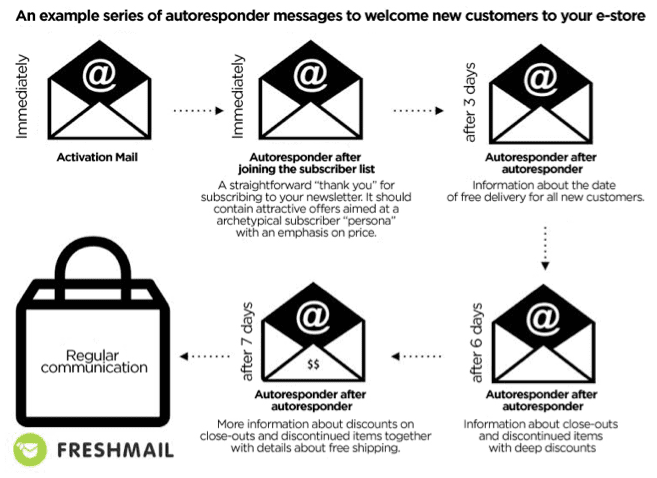
One of the best and simplest examples of EMA is the creation of welcoming emails. This is a cycle of messages sent at different time intervals to new subscribers to your newsletter. The goal of the campaign is to encourage recipients to complete their first purchase with unique, dedicated offers. This kind of gradual process not only leads to conversions but allows you to gain knowledge about the preferences of your customers.
Abandoned carts
Abandoned carts are something we all have to deal with and there is no one-size-fits-all solution. Each customer is different therefore you have to create personalized, automatic reminder messages that can later be expanded into a sequence of messages. Since price is often the issue with abandoned carts, some kind of discount can be an effective solution for enticing a customer to complete transactions. You can use a static code for all customers or dynamic codes to generate one for each customer.
Product recommendations
Using behavioral data from your website, you can easily create 4 kinds of personalized messages -
“Customers who purchased this product also purchased these products.” Remember not to display products that have already been purchased by the customer.
“Other customers bought this product together with….”. This allows you present related products.
“The most frequently purchased products in this catergory are…”. Show what’s popular and in demand.
Messages dedicated to abandoned carts and recommended products. These are based on products that have been discarded. Customers are presented with top products from the abandoned category together with the product they left behind.
Such recommendations can also be used in cyclical newsletters as a second primary message. It’s important to remember to rotate your dynamic content so that recipients don’t feel that they receive the same offers over and over.
Who should use EMA?
Every business with an online presence needs to automate their promotions with highly personalized product offers to match individual customer profiles. This is absolutely essential to succeed in online sales. You can only reach your sales potential by sending the right offer to the right person at the right time. Regular email marketing lets you personalize your message and your offer to a fairly high degree but using behavioral data about the activities of users on your site makes more precise customer profiles possible and drives conversion rates even higher.
The sales process is multidimensional and implementing as many of the tools and strategies listed here as possible in order to maximize the flow of information between them is ideal. Good email marketing systems offer dedicated integrations with CRM platforms and ecommerce by sharing API codes. Apart from these integrations, you can also sync multiple apps via Zapier through an easy drag and drop interface that doesn’t require advanced technical knowledge.
Saturday, 15 April 2017
Why Facebook Is the King of Paid Social Media Traffic
THERE are a variety of ways you can drive traffic to your website. Among the most notable are organic search, direct traffic, paid advertising, solo ads, and social media.
And one of the hottest ways to drive heaps of traffic to your website is through social media.
I’m not talking about posting pics of cats or the latest meme which won’t necessarily drive visits from your target audience.
Instead, when used properly – social media can deliver your message at the right time to the right person.
But with so many different social media channels, how do you decide where to spend your time and money?
For me, it’s a no-brainer. Facebook.
And in this post, I’ll highlight how you can use Facebook to drive the right traffic to your business.
Your Audience is on Facebook, You Just Need To Find Them
As of the second quarter of 2016, Facebook has over 1.71 billion monthly active users. I’d say the odds are pretty high that your target audience is among those active users.
So how can you find your audience on Facebook?
Easy – through Facebook Ads.
Check this out:
Facebook Ads have the most advanced targeting options out of any paid channel platform.
- Want to target only local customers?
- Interested in advertising to customers in your CRM?
- Looking to reach people who like a competitor’s page?
- Need to advertise to users who are celebrating an anniversary soon and have a newborn child?
As you can see, with Facebook Ads you can get pretty granular with your requirements.
Don’t believe me?
Here’s proof you can target people celebrating an anniversary and have a newborn:
Pair that up with geolocation and you can fill up the calendar of your bed and breakfast, massage business, or fine dining establishment.
Once you have built out your ideal audience(s), it’s time to make your pitch.
Get The Most Out of Your Facebook Ads
Online just about everyone is being marketed to. And with so much competition for the click, how do you stand out among the noise?
The best way is to test out your ads.
This is rather easy with Facebook Ads in that you can create different versions of your ads to test.
The most common test is what is called split testing, or what is known as A/B testing. Here’s an example of two ads being split-tested:
You can see that the ad on the right outperformed the other by 143%. More information on this test as well as everything you ever wanted to know about split testing on Facebook can be found here.
The key item that was changed was the image as well as the text above it.
As you can see, when you properly test your ads the outcomes can significantly impact the effectiveness of the campaign.
As with just about anything digital, you should always be testing.
I don’t recommend only running a single version of an ad.
For example, what if it is not resonating with the audience (low CTR)? You could be throwing money away at something that is not working.
Instead, you will want a second ad to measure against. This will help you better gauge the effectiveness of each ad.
Another thing to note is that you will want to pay close attention to your relevance score. In short, having a higher relevance score will help reduce the cost you pay to advertise on Facebook.
And who doesn’t want to save some money?
Choose The Right Action for Your Facebook Ads
Unlike most other paid advertising platforms, Facebook allows you an assortment of actions for a user to take.
For example, most platforms simply allow for a “click” on your ad.
With Facebook, you can pick from actions (called objectives) like:
- Clicks to your website
- Website conversions
- Brand awareness
- Lead generation
- App installs
- Offer claims
- And more
Most people choose the objectives “clicks to website” or “website conversions”.
And they might be happy with their results.
However, the lead generation objective might be the most overlooked of the group that can bring the biggest impact to their business.
Let me tell you why…
Hidden Gem of Facebook Ads
The lead generation objective is what I consider the hidden gem within Facebook ads.
Here’s why:
When you use this approach, you are able to gather personal information from the user. For example, first name, last name, email, etc. in exchange for the deliverable they get from your call to action.
Your call to action can be a free guide, e-book, or even a consultation.
And once you have that information, you can reach out to them with the contact information they provided.
Some of you might be thinking, “Why don’t I just link the ad to a landing page on my website?”
You could do that, but you should always be cautious when linking within your ads – be sure you are familiar with the Facebook Advertising Policies before linking to outside offers.
That said, did you know that each click you require someone to take significantly reduces the likelihood of them completing the process? You are asking them to click the ad, go to your page, fill out the form, and click the submit button.
Plus it will require you to build out a landing page, write content, incorporate a form and more – all of which you will need to complete before you even launch your ads.
Aside from staying on Facebook, form fields will be auto-populated with the user information should it already be part of their profile. Things like names and email addresses.
However, if you start asking for additional detailed information the user may have to add this themselves which could hinder conversion rates.
Now there is one caveat to this approach. It’s that you have to manually download your lead data.
Getting Lead Data Out of Facebook
Once you have launched your lead generation ads and started accumulating leads, you will need to export them out of Facebook to load up into your CRM or autoresponder.
It’s important to note that Facebook will only keep your leads for 90 days. So it’s best to establish a recurring task to ensure your leads are downloaded frequently. I prefer doing this daily as the leads are hot and you don’t want them to sit too long before engaging with them.
You can export your leads from your page, ads manager, or power editor.
Once downloaded you can add these leads to your CRM or autoresponder in order to continue engaging with them through various marketing automation approaches.
While you can manually download these leads, you do have other options.
One option is to learn how to use the Facebook API to automatically send your leads to your CRM or autoresponder. If coding is not your thing, Facebook does offer a few integrations with some platforms like Infusionsoft, Marketo, or Maropost.
These are most likely platforms you don’t use or can’t afford.
Luckily there is an option to fill this gap.
It’s called LeadsTunnel – and it makes it drop-dead easy to automate the export of Facebook lead data to your favourite platform. It integrates with over 20 email marketing/webinar tools including Sendlane, Aweber, GetResponse and MailChimp.
Once setup, your Facebook leads will be automatically added to your connected platform instantly. No longer will you have to manually export leads or build out some custom API program to do this for you.
And best of all, using LeadsTunnel is fully compliant with Facebook as it is an approved app.
But no matter what route you decide to go when exporting your Facebook lead data, just be sure to do it often so you don’t lose the momentum you started in the first place.
King of Paid Social Media Traffic
While each platform may have its own unique set of benefits, I think that Facebook Ads rules them all. In part of their sheer size and targeting options, but also due to the ability to generate leads directly in their platform.
This is huge.
Sure, you can generate leads in Twitter or LinkedIn with a similar approach, but the granular targeting of Facebook is tough to match. Pair that with the size of Facebook and you can see why it comes out on top.
So, I would like to know:
Have you used Facebook lead generation ads before?
Do you find the export process to be clunky and time-consuming?
If so, grab an automation tool like LeadsTunnel and access your new Facebook leads almost immediately!
Subscribe to:
Posts (Atom)