Showing posts with label campaign. Show all posts

Monday, 17 July 2017

The Art & Science of a Successful Modern Marketer


It is no simple task for a business to be successful at marketing today.
Marketers no longer have the luxury of specialization. In order to compete and thrive, they need a wide variety of skills – skills that incorporate both creativity from the right hemisphere of the brain and analytical thinking from the left hemisphere.
In short, today’s successful marketer must be both artist and scientist, because what works in marketing is both an art and a science.
Salesforce created a fantastic infographic that breaks down todays modern marketer. Here are eight key skills they identified, in greater detail (four artistic and four analytical) that every modern marketer must develop to ensure they adapt and flourish in today’s rapidly evolving world of marketing.

The Modern Marketer


Part Artist

Written Content

Writing as a skill has become vital for modern marketers.
Content marketing, often in the form of written articles, is now a big component in many brand’s sales funnels. It plays a very important role in how brands are able to be found (through search engines or social media platforms) and then build relationships with their target market. This written content helps their market to know, like and trust them, which is a necessary step before most people will consider a purchase.
Whether or not you are naturally skilled at writing, you can develop this skill with practice. Good research and topic knowledge is vital. It also pays to have one or more good editors review your work to ensure that your content is professional.

Visual Assets

Content marketing is not just written content. It also includes a much broader scope that includes visual assets like video, images, graphics, memes and infographics (like the one in this article).
People love visual content. It is quickly consumed and easily shared.
It has the ability to connect emotionally and covey an entire story, in seconds.
Modern marketers need to be comfortable creating (or at the very least curating) visual marketing that will appeal to their target market.
Great tools for creating your own visual content (that I often use) include apps such as Adobe Spark Post and Canva.

Social Media

The power of social media is that it is often the best place to locate and or build relationships with your target market.
Let’s be honest… most people own a mobile device that travels with them everywhere they go and the chances are very good that that your target market uses one or more social media platform on their device.
You need to know which platforms those are and how to use them efficiently and effectively to reach and engage with your prospects and clients.
Social media can be an amazing marketing tool – if you know how to use it properly. Anyone who has spent any time on social media knows just how easy it is to lose precious time in the time vacuum that is social media. That is having clearly defined goals for social media, understanding what platforms you need to be using and how to use them effectively in the time you have is SO IMPORTANT.

Email Marketing

Despite what you may have heard, email marketing is not dead. Far from it.
It is still a very important asset and tool of successful marketers.
Let me give you one extremely good reason for this:
You OWN your email list.
I will say it again. You own and control your email list – unlike social media platforms where you are at the mercy of their constant changes. You could literally build up an entire audience on a social media platform and lose access to them with one sudden change to the platform. This happened in the not so distant past on Facebook, when they adopted their business model to a ‘pay to play’ model.
Those that created and maintained their email list were not as hard hit as those who didn’t, as they still had access to their audience through their email list.
Don’t let all your hard work building an audience go to waste. Besides, email is far superior in terms of actual conversion.

Part Scientist

Performance Tracking

While creating content, using social media and incorporating email marketing is absolutely essential to successful marketing, not everything you do will be equally successful. Some of the things you do, when you take time and cost into account, will produce a poor ROI (return on investment).
By tracking the performance of all of your activities and campaigns, you can identify the low ROI activities and either modify them to produce better results or eliminate them and replace them with activities that produce a higher ROI.
Your time and money are far too precious to waste on costly or ineffective marketing methods.
Operations
Usually, the larger the company, the more complicated the running or overseeing of the marketing operations will be. Whether you are a part of a large marketing department or a small business owner, it is likely you will need to understand and work within the strategy created and budget allotted for marketing.
Depending on the size of the company and your position, you may be required to create and or run the marketing operations, which can include tasks such as creating a marketing plan and budget, managing and tracking spending at a detailed level and managing project collaboration and execution.

Analytics

While tracking the performance of your activities is crucial, you need to be able to make sense of the data you collect.
Thankfully there are a number of analytics tools that can help you do this. These range from event based tools like KissMetrics (behavioral analytics) to traffic oriented tools like Google Analytics (a free and widely used website analytics tool), to search engine analytics tools like Google search console (also free and lets you analyze your organic search traffic), to marketing dashboard tools like Cyfe (an all-in-one dashboard) and many others.
While some of these tools are, free or have free versions, the paid tools can be worth the investment to ensure that what you are doing is working or producing the results you want.

Campaign Performance

Campaign performance looks deeply into the ROI of each marketing campaign you run.
Simply explained, ROI is how much revenue you get back for each $1 you spend. A positive ROI means that you are making more than you spend and a negative ROI means you are losing money on your marketing campaign.
To properly track and analyze your campaign performance you will need to determine the channels you are going to track (email, paid, social, organic search, referral, direct, etc.) and the metrics you want to measure (lead conversion, individual visitors, click through rate, bounce rate, social media effectiveness, email opening, etc.). Again, you can do this with a number of tools, which range in features and cost.

Wrapping Up

The modern marketer needs to possess a wide range of skills in order to adeptly navigate today’s quickly and ever changing world of marketing. Thankfully there are many tools, apps and various software, which can assist you to competently create content and engage your market, all the while tracking, measuring and analyzing the results of those efforts. This will allow you to make informed decisions to improve your results in the future.
What challenges have you encountered as a modern marketer? Is there a particular tool that you couldn’t live without? Let me know in the comments below.

Wednesday, 21 June 2017

Tips on How to Win at Social Media Marketing


With the growing number of businesses using social media for their marketing campaigns, how can yours stand out? Read on and discover the arsenals that can help you win at social media marketing.

Whether your business is only starting or one that’s been up and running for decades, social media marketing – when done right – can help you significantly expand your market and customer base.

Marketing your brand or business in various social media networks and platforms can positively contribute to your acquisition of customers, and eventually, sales.

The Basics
Every success starts with a goal and the foundations that ground them. The same thing is true for social media marketing; you need to understand the social media marketing fundamentals. To get you started on the right foot, here are ten social media marketing laws developed by Susan Gunelius, an author and the CEO of a marketing communications company.

• Listening. Before you think of creative campaigns, get to know and listen to your audience first. Figure out their needs, interests, and the things important to them. A campaign no matter how great will be useless if it won’t add value to your audience.

• Focus. Focus on what your brand is about and how it can add value to the lives of your target audience. Ground your campaigns with your goals. Don’t attempt to be all things for all people. Refrain from being a jack-of-all-trades. Keep your focus.

• Quality. A huge number of followers is nothing if these followers don’t engage with you. Pursue quality relationships with your audience. Engagement is more important than mere numbers of followers. Pursue and work on long-lasting connections.

• Patience. Take your time and don’t be too hard on yourself because, as cliché as it may sound, success doesn’t really happen overnight. And as you practice patience, never let your commitment to your business’s success die down and quiver.

• Compounding. This law goes with the law of quality. If you commit yourself to sharing quality and valuable content, it will also yield quality and valuable followers in return – aka those who will share, talk about, etc. your content to others as well.

• Influence. Finding appropriate influencers to partner with in your social media marketing campaigns can greatly improve your brand’s marketing, leads, traffic, and sales. With the help of influencers, it’ll be easier to reach new and larger audiences.

• Value. In sharing your content, products, and services online, try your best not to be too sales-y. If you bombard people with promotions instead of value, you will lose them. Focus more on providing them valuable content. Build lasting connections.

• Acknowledgement. Never neglect and be a snob to people who try to reach out through a comment, message, etc. Never forget to acknowledge these people and reply. If you always make them feel noticed, you’ll be able to keep them for good.

• Accessibility. Always be present and available to your audience. Making a disappearing act is a big no-no. You must be consistent not only in sharing and publishing valuable content, you must also keep the connection through engagement.

• Reciprocity. To be successful in social media marketing, you shouldn’t only talk about yourself and your business. You also need to allot some time to share and talk about the content of others too. In the long run, they’re most likely to the same.

In any social media marketing campaign you will do for your business, always go back to the fundamentals and basics. This way, you’re sure to start and finish strong.

Go-to Tools
Because social media marketing is no easy task and one that never sleeps, you will surely need some help. To run your social media marketing campaigns smoothly 24/7, you can utilize various social media marketing tools to make your social media marketing tasks a bit easier and more manageable. With that, here are some of the must-have tools you must try:

• Canva. With this nifty visual content tool, anyone – even those without any background in graphic design – can create capturing graphics. This tool’s drag-and-drop function, templates, and other design elements makes graphic design easy.

• Hootsuite. If you find it hard to manage your social media accounts, you’ll find Hootsuite extremely helpful. With this tool, you can manage and schedule all your social media posts on all your accounts all in one place. This tool has analytics as well.

• CoSchedule. This tool is more than just a tool; it’s a toolset you can use to centralize your entire marketing strategy. CoSchedule offers a plethora of tools for all types of marketing – content, blog management, social media, and a lot more.

• Buzzsumo. One way to practice the law of listening as explained above is through utilizing Buzzsumo. With this tool, you can do content discovery, brand monitoring, influencer marketing, content research and curation, competitor research, etc.

Conclusion
Social media marketing is an inevitable trend that keep’s on growing. If you don’t join in on the trend, you’ll miss out on the great potential it can bring your business. However, joining in on the trend isn’t enough. You have to win it and stand out amongst your competitors. So, give the above tips and tools a try and make your first step in winning at social media marketing.


Source

Sunday, 11 June 2017

Social media tools and tactics for email marketing


Email marketing and social media go well together. But where is the catch? If your company is active with email marketing and on social channels, there is an added bonus. You can combine them. But there are quite a few challenges. So how do you combine email and social for your company?


Your challenge

So what are the challenges in combining social and email? It largely depends on the tools available to you and your own tactics and market. Integration of social media in your email marketing strategy is a bit different for different companies and industries.

Based on the available tools and tactics you first need answers to these questions:

Can we combine customer data from multiple sources?
Can we plan campaigns and follow-ups beforehand?
Can we monitor what, where and how people are interacting with our brand?
Can we bring our message to scattered audiences across the various channels?


Social and email tools available to you

For each of these questions, it is even more important to consider whether it can be easily done. It doesn’t matter if the tools and tactics are available. It matters if they are available to you, right now and in a form that is simple enough to use – and that’s after factoring the stress on the budget, knowledge level and other in-company limitations.


In social media marketing channels, companies need to pay attention to the tasks that add value as an extension of their digital strategy. The adoption of channels is defined by the amount of effort in relation to the added value they bring.

Easy implementation is required if more marketers are going to use it. E-mail marketing / Twitter / Facebook / Company Blog / LinkedIn / Google + etc. are all channels that can work effectively together. But…. not every company has the resources to do it well.


The good news for email marketers

There is some good news for email marketers. These days, social media features are a standard addition to email tools. This increases the array of tactics an email marketer can easily employ, bridging the combination of email + social and making multi-channel communications simpler.
Barbara Ulmi wrote a white paper comparing the interaction of email & social to a tango. With the added social media features in email marketing software, it becomes more about the client, than about the tools.

Next time I will dig deeper into the type of social media tools and functions that are available in bulk email solutions.


Source

How Twitter & Email Marketing Work Together


 Many small businesses understand they need to get on the “social media bandwagon” but you might not know how to start, or better yet, why to even do it. You just hear about social media and think, “My business needs a Facebook presence and a Twitter account” but you don’t really know why. If you’re reading this blog, chances are you’ve got a website and you’re probably email marketing. So you might be asking, “If I’m already doing email marketing, how does Twitter fit in?”
We’ll today, I’m uncovering ways for you to use Twitter and how it could benefit your email marketing campaigns, as well as how your email marketing campaigns benefit your Twitter followers.
Ready, Set, Email, Twitter!
For the newbies: Twitter is a free social networking service that enables its users to send and read messages known as “tweets” that are no more than 140 characters long.
Get Started
Many of you might just be starting out on Twitter. What do you twitter about? Who reads your tweets? Many businesses set up a Twitter account, and write about new things that are happening in their business, what’s going on in the industry, or they retweet articles they might find interesting. So how might this work together with your email marketing campaigns?
Get Followers
Contact Info
You may have people that visit your site or location that aren’t on your email list but they  might be if they knew all of the cool stuff or the “Email Only” offers you publish in your emails. So in order to get more followers you’ll want to post your Twitter handle on your site, in your email marketing campaigns, on your business card, and in your email signature so that people can easily click on your link and follow you. For instance mine is: http://twitter.com/janinepopick or @janinepopick. Then start to track the number of followers you get.
Email + Twitter = A Perfect Match
Now, here are a few things you can do to combine your Twitter presence with your email marketing campaigns.Janine Popick's Twitter Profile
Twitter Your Subject Line – Now that you’ve created your email you sent it out to your  lists, take your subject line, which is hopefully less than 140 characters, and twitter it, then included a link to your hosted version of your email campaign. You’ll likely be reaching part of an audience you never knew you could have. If they like your content they’ll click through and read it, then they may even sign up to your list.
Think About Search on Twitter – Depending on the way people search for things on  Twitter and the content of your subject line, (check out the free service calledTweetDeck that enables you to search and filter on keywords), people that never knew anything about you might see your tweets.
One example would be a winery might be having a sale on their wines, and anyone that might search on “wine” using a tool like TweetDeck, would be exposed to any tweets that include the word “wine”. This is a great way to get even more eyeballs on your tweets and ultimately your email marketing campaigns.
VinDivine Email
Include “Follow” Links in Your Email Marketing Campaigns – Make sure you include a “Follow Us on Twitter” link in all of your email campaigns. With the velocity at which emails get forwarded, a newcomer might want to “try you on for size” by following you on Twitter before making the commitment to join your email list.
Get Them to Sign Up – You may also consider adding a “Sign Up to Receive Our Emails” link so that those coming to the hosted version of your email for the first time from Twitter have a place to add themselves to your email list. Entice them to sign up by having “Email Only” offers or notices.
Use Twitter for Research – If you use free twitter tools that help shorten your links like http://bit.ly/ & http://tr.im/ (remember your entire tweet is limited to 140 characters) you can track how many people click on links that you include in your tweets. Then you can see which articles, offers or stories that you twitter about should be included and above the fold on your email newsletter.
If you’ve got any ideas for how you’re using Twitter with your email campaigns we’d love to hear them!

3 New Places to Include Facebook, Twitter & Linkedin Icons


 As a small business owner, it’s imperative that you work at building your prospect and customer lists. And it’s OK to have separate contact lists. We all do. Some customers like to be reached via email, some through social media and some still through the mail!
This post gives you a few new ways to get your customers to help you build those lists by using their social media streams. One way to do this is to add social media iconsthat encourage your customers or followers to talk about you to their networks. Like that great Faberge Organics commercial where the spokeswoman kept telling two friends (I may have just dated myself!).
One way to easily do this is to try out a free sharing tool called “AddThis.” It’s a code you put on your website that allows your users to share your content and pages to their social networks with just one click. It also gives you analytics as to how many times your page is shared. As an example, see our VR Button Builder page below. AddThis enabled us put the sharing icons on our pages in just minutes.
VR Button Maker
If someone clicks Tweet, for instance, this page will come up:
VR Tweet Generator
The post will go out to your Twitter followers if you tweet it. Pretty cool.
So here are 3 pages to place your new social media share code and enable your customers to get the message out to their followers!
1. Your Confirmation Page – After a customer orders from you online, give them an opportunity to tell their friends that they just got the latest and greatest from you!
2. Newsletter Landing Page – When someone signs up for your newsletter, present them with a page that says, “I just signed up for the Widgets Newsletter! You should too!” Then give them a link to your opt-in form.
3. Your Registration Process – If you require your customers to sign up and have an “account” with you, give them an opportunity to easily share their registration with their friends and followers. Include a link directing their networks to a page where they can register, too.
Bonus! Don’t forget to add these icons into your email marketing campaigns. This enables your recipients to share your messages with their networks. Your recipients social networks can even re-tweet or share, too. VerticalResponse and many other ESPs enable you to easily do this with social sharing features. You don’t need any special code, it’s built right in the email.
Happy Sharing!

Saturday, 3 June 2017

3 Emails Your Business Should Be Sending


 Are your emails scheduled and sent like clockwork, or are they a little sporadic? (Don’t worry, we won’t tell!) Do you only send out one type of email, or do you have a variety of emails for every transaction or occasion? You don’t want to inundate your customers, readers, and/or leads, however, you do want to establish a relationship, build rapport, educate and of course, make some money. So, how do you accomplish all of this? By consistently sending out these three emails below – We’ll also tell you how often to send them and the best ways to execute. Let’s dive in:
1. Welcome Email
Are you rolling out the red carpet for your new customers? A recent study by Return Path found that 80% of companies now send out welcome emails, up from only 40% in 2008.
What to include in your welcome email:
  • What to expect. Warmly welcome readers to your mailing list and set expectations immediately. Let your readers know what you’ll share with them in your future emails, and how often. For example, you may offer advice and how-to articles, as well as some promotional offers. You may send bi-weekly, monthly, or another frequency. Stay true to whatever you promise! (You can get even more tips on send frequency here.).
  • A special offer. Want a little more love? Give your new subscribers a discount, offer, or gift for simply being a subscriber. Then, let your new subscribers know that as a subscriber, they’ll receive special email-only offers they can’t get anywhere else just by being on your list. They’ll be far more likely to open your future messages for enticing discounts.
*Timeliness is key when sending a welcome email. You want to send it out to your new subscribers as soon as possible after they subscribe.
2.  Newsletter
Many of our customers ask us about the difference between an email promotion/campaign and an email newsletter. The words are often used interchangeably, but an email promotion or campaign tends to communicate one single topic or idea, such as your current sale, or a new product, while an email newsletter often has multiple topics and tends to educate (vs. sell) and builds rapport with your readers. Your newsletter should always offer readers valuable information.
What to include in your newsletter:
  • News. Press releases, blog articles or other publications that will help your readers. (It’s a good idea to summarize longer articles in a few short sentences and create a call to action button for the reader to view the entire article on your website or blog.)
  • Upcoming events or webinars. These may be events you’re hosting or participating in. You may also announce speaking engagements such as interviews with your executives on radio shows, at college campuses and the like.
  • Important announcements. Include improvements to your products or services, new management, or new business practices. (If you are letting your customers know you are responding to their feedback and improving something for them, that’s always great news!)
  • Ways to connect on social media.  Include social networks you’re actively engaged on and updating regularly, as this is added value for your followers.
  • Images. Keep your newsletter interesting with images relating to your content.
  • Calls to actions.Tell your readers what you want them to do with clear calls to action such as read morelearn more, and register now. You can easily create call to action buttons for your website or emails and newsletters here.
Even though the word “newsletter” suggests a more lengthy communication, remember it’s still  an email amongst many others in the inbox! Try to avoid including too much information and text in one email. A good rule of thumb is no more than would fit on one page of a word document. Because newsletters are more comprehensive, once or twice a month is typically a good practice, however, depending on your business, and how much content you produce, weekly might work as well. If you want more information about newsletters, we have a handy webinar titled: Creating a Significant Email Newsletter
3. Promotional Emails
Everyday, most of us receive tons of emails from various companies and let’s be honest, most customers want to know “What’s in it for me?”. If you don’t provide real value, it’s very easy for subscribers to click that little unsubscribe button! How can you help avoid that? Offer something valuable and unique…
What to include in your promotional emails:
  • A NEW offer. Emphasis on the word new. If you offered 10 percent off all window frames last month, it’s old news this month! If you do repeat a certain offer, don’t repeat it back-to-back or multiple times in a row (you’re readers will think you’re a one trick pony!).
  • A compelling offer. Discounts are great, but does the discount you’re offering compel your readers to click through all the way to the shopping cart? Try testing different offers to see which ones are the most effective. Enticing customers with specific products or services can be more effective than a set discount amount off all items or services. This is especially true of seasonal items.
  • Clear calls to action. Make it as easy as possible for the reader to get the promotion. This may mean buttons leading to a shopping page on your website or links to pages with already inserted promo codes or registration forms. Just make sure as few steps as possible are involved in going from reading your email to purchasing the product. Don’t make it hard to buy.
*Be cautious not to send promotional emails too often. Once every 2 weeks or once a month are good general practices.
By including these three types of emails in your email marketing plan, you can help keep your subscribers engaged, loyal and spending. You can get more helpful email marketing resources here including free guides, webinars are more.
Are there any other types of emails you think are important to include in your email marketing plan? Share in the comments!

Wednesday, 31 May 2017

From subject lines to email templates, it’s time to spring clean your email marketing efforts


Spring is officially here, heralded by the spring equinox yesterday. The sun is peeking out and it’s spring cleaning season — time to air out closets, clean house, and switch your wardrobe for warmer weather. It’s also the perfect time to air out your subject lines and freshen up your email campaigns with seasonal flare.
Just as you’re ready to be done with being bundled up in a winter coat, hat, and scarf, the folks on your email list might be getting tired of the same old subject lines. They’re probably also ready for something light and refreshing in their email inboxes after the months of hard selling they endured during the lead-up to the end-of-year holidays. Spring gives you a chance to breathe new life into your email campaigns. You can do this with subject lines that capture attention as well as the spirit of the season, and with compelling campaigns that capitalize on what people are experiencing as the seasons change.


Breathe fresh air into subject lines

Anyone who’s ever engaged in email marketing — or opened a promotional email, for that matter — knows subject lines make all the difference in getting your message opened and read. An eye-catching, curiosity-piquing subject line convinces recipients to open your email. Dull ones mean the recipient will delete your email before the next one in the queue loads on the preview screen!
Spring clean your email subject lines with these four tips:

1. Lighten up with some humor

The dark days of winter are slipping away and the bright colors, sounds, and scents of spring are here. People are feeling lighter, and they’re ready to enjoy a chuckle — or a belly laugh. Give it to them by infusing humor into your subject lines. You can do this in a number of ways, from connecting together two things that don’t normally relate, to poking fun at current events. For more advice on how to infuse humor into your subject lines, check out our blog 25 Comical Subject Lines + Tips for Funny Writing.

2. Try out some new action words

All marketers have their go-to words that they rely on to create interest and excitement in their subject lines. You probably have some too, but spring is a great time to try out some new action words. Active verbs and vibrant nouns capture the reader’s attention and encourage recipients to open up your email. Need some ideas for fresh word choices? Check out our blog on choosing words that sell.

3. Tug on their heart strings

Sure, Christmas gets the accolades for being the most joyous time of year, and Valentine’s Day is all about love, but spring is also full of some very emotional cultural events. With Easter, Mother’s Day, graduations, and Father’s Day piling up throughout spring, speaking to recipients’ emotions is a great way to freshen up your subject lines during this warm, fuzzy season! (Pro tip: Check back next week for a whole post on springy subject lines!)

4. Move things along faster … or better

Spring is a great time to practice making your subject lines shorter and pithier. A Marketing Sherpa study found that subject lines of 61-70 characters (about 15 words) get read the most. However, the second-highest read rate goes to subject lines of 91-100 characters and 51-60 characters, and the third-highest for shorter ones of 10 characters or less. What do these wildly divergent results tell you? Generally, brevity is better but if you’re going to go long, be brilliant! Just be sure to double check you’re not writing a “subject line sin.”

Spring ahead with seasonal email campaigns

Whatever your product or service, chances are there’s a seasonal element to your business. If you’re in retail, maybe your emails in the last quarter of 2015 were full of special offers and sales pitches. If home repair is your bag, you might have spent the end of last year sending informational emails on common winter maintenance tasks. If you’re an accountant, you probably barely have time to read your email, let alone send any out, between Jan. 1 and April 15; but once tax season dies down, you might turn your attention to financial education.
Spring means it’s time to seasonally adjust your email campaigns to give recipients information that’s relevant to them at this time of year. Here are three ways to spring ahead with seasonal emails:

1. Update the look

Email providers like VerticalResponse offer a variety of templates to choose from when you’re crafting your email campaigns. If you’re still using the same template and colors you chose for winter promotions, why not switch things up by trying something new? A clean, fresh design in brighter or lighter colors will fit well with seasonal content. We took a look at our six most popular email templates if you need inspiration.

2. Offer something relevant to the season

What’s on your customers’ minds this spring? Are they thinking of buying or selling a house? Getting a child ready for graduation? Enjoying some time outdoors on their decks or working in their yards? Finding just the right gift for Mother’s Day or Father’s Day? Tie your email campaigns into what’s going on in their lives this season. For example, an email newsletter with spring cleaning tips or an offer for a Mother’s Day discount on select merchandise will appeal to customers with information that’s relevant to them at this time of year.

3. Work on freshening your mailing list

Spring is a great time to freshen up your email list to make sure you’re sending to valid addresses and to ensure you’re reaching the right customers with the right offers. If your website doesn’t already have a page where new and existing customers can sign up to receive your emails, it’s time to add one. If you already have one, review how well it’s doing. Is it compelling? Is it easy to find on the site and does it make enrollment simple? Check your open, read, click-through, and bounce rates. Weed out bouncebacks and send out a ping email asking subscribers if they’re still interested in receiving email from you.
It’s also a good idea to revisit how you segment your list. Are there new ways to crunch customer data and organize customer groupings to reach new groups with fresh information? Consider targeting based on different common demographics, from geographical location to buying habits.

Before you know it, the light, refreshing days of spring will sizzle into summer. Taking steps now to freshen up your email marketing efforts can help ensure you won’t have to sweat to get results come summer!

Source

Put a Hashtag on It!


Hashtags, those little yet powerful pound signs (#), are a common way of making a social media marketing campaign more effective. Several social media platforms actively use this small tool, including Twitter, Instagram, Pinterest, Tumblr and even Facebook now has jumped on the hashtag bandwagon. Lisa Kalner Williams recently wrote an article on Business 2 Community, titled, The Art and Science of a Hashtag Campaign, in which she discusses how hashtags are “…not only a great way to spread brand awareness, but they’re easy to search.” The following tips will have you hashtagging successfully in no time:

1. Determine what you want to do with your hashtag campaign:

– Do you want to become more well-known, or is the purpose to share your username (which should remain consistent on hashtag-friendly channels)?
– Do you want to emphasize a specific aspect of your brand/ product?
– Do you want to document an experience?

2. When creating a hashtag for your campaign, keep it simple. The easier it is to remember and write, the more likely people will use it. If it takes up too many characters, it will most likely be excluded from tweets, thereby defeating the purpose. #thisisanexampleofaterriblehashtag

3. Use lowercase letters. Unless your brand or purpose requires capital letters (#YOLO), make it easy for all users to enter your hashtag, #likethis.

4. Make sure your hashtag is available. Using one that’s already taken is like trying to move into an occupied apartment, #awkward. Also, it’s confusing for followers and detrimental to your tracking. Check, double check and triple check. This is a time when social media marketing tools come in handy, and make sure to use them before, during and after your campaign takes place. Make sure to track every aspect of your hashtag, if it already exists, how long it’s been in existence, who has used your hashtag (including social power players), which social channels it’s showing up on more often, and several other features.

5. Spread the word. Williams exclaims, “Encourage use across all your hashtag-friendly platforms. Consider making an investment in Twitter ads that tell new leads about your hashtag-tinged campaign.”

Have any additional hashtag advice of your own? Tell us in the #comments!

Monday, 29 May 2017

Four Email Marketing Myths Debunked

 
Just like old wives’ tales, myths about what does and doesn’t work in email marketing can outlast unbelievers. We’ll let the medical establishment debate whether wet hair and cold weather gets you sick, but we think it’s time to set the record straight on some of the most common email marketing myths.
We sat down with Jerry Jao, the co-founder and chief executive of Retention Science, to clear the myth-filled air. His company helps small businesses keep customers around for the long haul by crunching marketing data. Jao says four myths seem to live on despite evidence that they’re not true and he’s more than happy to dispel them with numbers and facts.
Myth: Sending emails first thing in the morning is best
Many marketers insist that sending an email to a customer in the morning means they’ll open it as soon as they sit down at their computer. That has led to the general rule of thumb that the morning is the best time of day to send a marketing email. There may some logic behind the idea, says Jao, but it’s simply not true.
By combing though 100 million online transactions, 20 million user profiles and 100 email campaigns, Retention Science found that the afternoon is actually a better time to send an email. According to their research, most online shoppers are active later in the day but typically receive shopping-related promotional emails early in the morning. Other research supports this. At best, the rule of thumb about sending early is harmless. At worst, you’re killing your conversions.
Solve this conundrum by testing different times with similar or identical messages.
Myth: Emails sent on Mondays are the most successful
Sending emails on Monday is another rule of thumb that may have a logical underpinning but little in the way of convincing proof. Marketers assume that everyone has a case of the Monday blues. Since no one really wants to jump back into work, people are more likely to sift through their email on Monday, or so they think.
Retention Science’s data showed the opposite: Tuesday and Friday had the highest conversion rates. Test out different days to see if they make an impact on open rates and conversions.
Myth: More frequent email is better
If you send a bunch of emails to your customers they’re bound to open some of them, so why not send a dozen, right? Wrong. Jao says this is a common myth that needs debunking.
“It’s important to understand that less is more when it comes to email campaigns,” he says.
Of course, finding the right email frequency is tough. There isn’t a definitive number that works for every business, but Jao suggests testing your email frequency while watching unsubscribe rates to make sure you find the right balance.
Myth: Subject lines packed with info get opened
A subject line is important, no question about it. However, some people believe that packing a subject line full of information leads to high open rates. Untrue.
While you can squeeze about 70 characters into a subject line, that doesn’t mean you should. Rather than cramming the header full of words, focus on making the subject line conversational, Jao suggests.
“A subject line should sound like something a friend would say,” he says. “Don’t be wordy or pitchy, just be conversational.”
While there isn’t a plug-and-play formula to create a killer subject line, there are practices that you should avoid. Don’t use all capital letters, don’t be deceiving, ditch any symbols or emoticons, take it easy with punctuation and refuse to be boring. If you stay away from these no-nos, your open rates will improve.
When in doubt, A/B test your subject line to see what kind of wording works best for your customers. In fact, it’s a good takeaway message. Testing email content can give you statistics to back up your marketing moves, Jao says. It will not only give you an insight into the habits of your customers, but it will keep you from falling victim to marketing myths.
This post contributed by guest author, Lisa Furgison. Furgison is a media maven with ten years of journalism experience and a passion for creating top-notch content.


Tuesday, 23 May 2017

The Foundational Guide to Your Online Marketing and Sales Funnel


Online sales and marketing is complex. I mean seriously complex.
I’m going to try my hardest to dumb it down. Not because you’re dumb, but because it’s complicated.
This guide will be broken up into 5 stages, taking you step-by-step through a comprehensive breakdown of the online marketing and sales funnel from top to bottom:
To skip straight to the section you're interested in most, just click on the link in the table of contents above.
If you have any questions let me know in the comment section.
Let’s get into it!
If you want to download this article as a PDF to keep it as a resource, just click here!

Marketing and Sales Funnel Stage One: Driving Traffic


The first step of your online sales funnel is making all about driving traffic to your website.
There are two primary ways to do this, SEO and advertising: organic traffic and paid.

1. Use SEO to drive people to your blog and website

SEO, or search engine optimization, is a broad term for an endless number of strategies all focused on getting your business to the top of a search results page (SERP) when someone types in something related to your business.
SEO is the foundation of content marketing: creating content (usually a blog) which answers the questions your target market has.
For instance, it’s entirely possible you found this article by typing something like “simple guide to marketing funnels” into Google. This article appears because it contains the keywords you typed in, as well as dozens of other reasons (like link-building, page authority and more).

2. Use advertising to drive traffic to your website

The alternative to SEO (though of course they can be done at the same time) is paid ads: paying for people to see your business.
First option is to pay for Google Ads...
Depending how much you pay, this will guarantee your business is on the first page of Google search results for your target keywords.
marketing and sales funnel guide
Google ads also include “display ads,” which are predominantly those top and side-bar banner ads you see everywhere online.
Important Points about Google Ads:
They’re often referred to as PPC Ads, which stands for “Pay-per-Click”. This is because the dominant budget structure is based on your business paying every time someone clicks on your ad.
The amount you pay changes based on how competitive your keywords are (as in, how many people want to have their ads shown when someone types them in) as well as how prominently you want your ad to be featured.
Pricing varies, somewhere between $1 a click and $75.
Second option is to pay for Facebook Ads…

Facebook Ads feature on the Facebook newsfeed, either right in the middle amidst user’s statuses and updates, on the sidebar below the trending stories, or on mobile newsfeed (which doesn't have a sidebar).
One of the coolest features of Facebook Ads is its targeting. Where Google allows you to drive traffic from people searching for something related to your business, Facebook allows you to show your brand exclusively to people likely to be interested in it.
Important Points about Facebook Ads:
They’re cheaper, but have about around 1/10th the click-through-rate of Google Ads.
My first recommendation for getting the most out of Facebook advertising is to inform yourself as much as possible.
Look up “custom audience targeting,” “website custom audience targeting,” and “lookalike audience targeting.” Build an audience at least 100,000 people strong, but no more than 300,000. Create many different ads (try Facebook's Power Editor Chrome plugin for that) and test them against each other until you find the design that works for your target market.
For more on Facebook ads, check out my article “How B2B Content Marketers can Use Facebook Ads to Generate Leads." Alternatively, check out "5 Facebook Ad & Landing Page Combinations Critiqued.
No matter what strategy you choose to drive traffic to your website, you need to ensure that, when they get there, they engage with you in some way (to keep them on the path to becoming customers).
Which leads us to generating leads…

Marketing and Sales Funnel Stage Two: Generating Leads


Lead generation is the stage of your funnel in which an anonymous website visitor becomes a real person - someone you can communicate with and show how awesome your business is.
And it’s a critical component. After all, it doesn’t matter if you’re getting one website visitor a month or one million, if none of them are becoming customers you’re in the same position either way.
Lead generation puts you on the right track to positively influencing the chance of a website visitor becoming a customer. Without it you’re just crossing your fingers and hoping.
There are a few major pieces of the lead-gen funnel you need to know about: 
1. Free-trial lead generation 
2. Opt-in lead generation 
3. Landing pages

1. Free Trial Lead Generation:

Free-trial leads are considered “warmer” leads than opt-in leads or subscribers. They’re likely shopping around between your business and competitors.
The act of moving a free trial lead to a paid plan is called “onboarding” and is done a couple primary ways: account managers/sales associates and email nurturing.
Account Managers: Facilitate (generally B2B) onboarding through personal email, platform demos and sales calls. This strategy for onboarding is time-heavy and works best for high-priced services. That said, it can be made easier with an automation and CRM platform which allows for in-depth lead details and keeps a schedule of communication.
Email Nurturing: For companies whose free-trial numbers are a bit beyond the capability of even the largest account manager department, the best option is a complete email-marketing strategy. Ideally triggered by the action of your leads, your business sends emails based on your free trial lead’s interests.
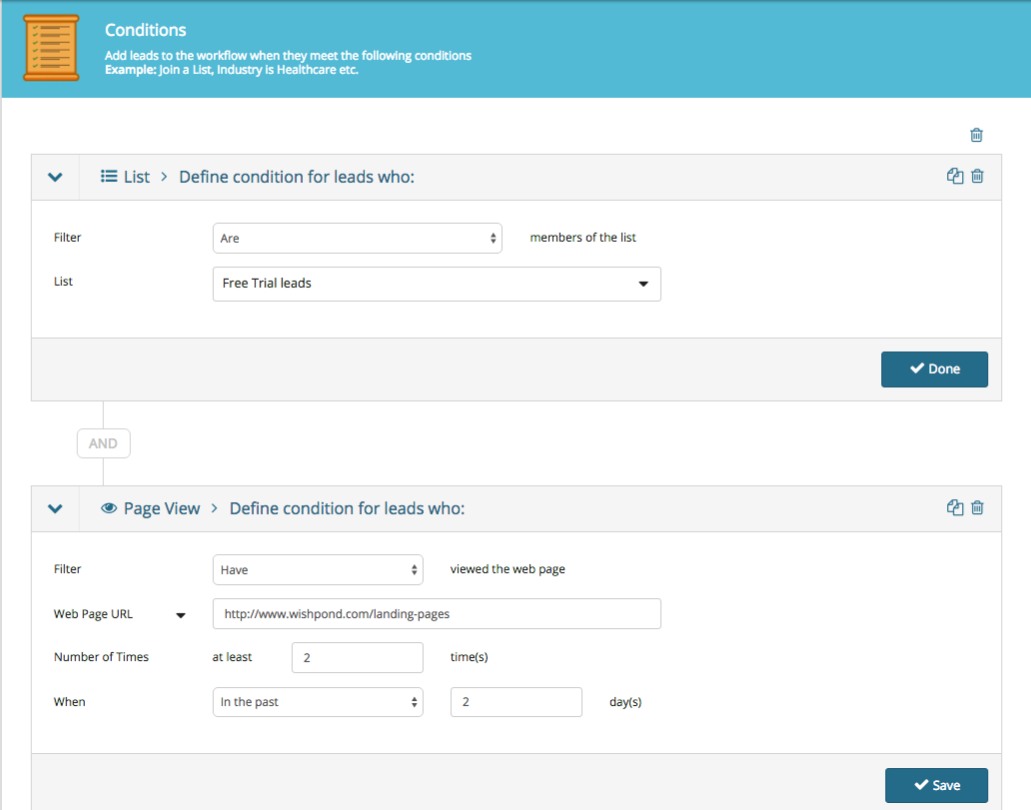
For instance, let’s say your free trial lead visits one of your business’ product pages twice in two days. You might want to send them an email asking them if they have any questions about the product or offering a platform comparison sheet focused on that specific product.
Here’s the simple set of conditions you’d set to trigger that email being sent in a marketing automation platform:
marketing and sales funnel
I’ll get into the actions this might trigger below.
Important Points about Free trial Leads:
To onboard a free trial lead it’s essential you give them each and every selling-point your business offers. But it’s equally essential you do this in a less-than-salesy way. I recommend delivering buying guides, case studies, competitor comparison charts, and making your exchange as personal as possible.
For more on onboarding free trial leads, see the section on late-stage lead nurturing below.

2. Opt-in Lead Generation:

Your business can generate opt-in leads by offering valuable content to people in exchange for their email address.
Essentially, your business creates valuable, educational content interesting to your target market. Either through blog subscription (i.e. a reader of your business’ content decides they want to receive it regularly and subscribes via a form or website popup) or email-gated content (i.e., a visitor to your site or blog is incentivized to provide their email address in return for an email-gated comprehensive resource).
Important Points about Opt-in Leads:
Opt-in leads aren’t equivalent to free-trial leads (which are already semi-nurtured) and as such they’ll need more nurturing before they become clients or customers.
Even so, the benchmark percentage of opt-in leads who end up actually closing is lower than 10%.
Which is why we need to generate as many of them as possible, and also ensure they’re as qualified as they can be. That, of course, brings us to landing pages….

3. Landing Pages:

Landing pages are how you get the opt-in of most of your leads. For the purposes of this guide, I’ll be more accurately describing squeeze pages in this section (which are simply landing pages optimized for lead generation).
For instance… 
marketing and sales funnel guide
Creating a landing page like this one places a visitor’s attention on the single conversion ask: there’s no navigation bar, no sidebar links, and the focus of the page is on the CTA button.
Software company Axway increased their marketing ROI by 291% and saved $100,000 per year by building custom landing pages for their PPC ads. Instead of sending traffic to their homepage they built a dozen landing pages designed for conversion. It just makes sense. 

Click here to check out Wishpond’s landing page platform and start building your own optimized funnel, completely free up to 200 leads.

Marketing and Sales Funnel Stage Three: Nurturing Leads


Just like there’s no point in driving traffic to your website if you’re not converting them into leads, there’s equally no point in generating leads if you’re not going to turn them into sales.
The best strategy of email marketing is what’s called an email drip campaign, so called because of those fancy irrigation systems which slowly drip water onto a plant or seed.
Essentially, you deliver a set series of emails (6, initially) over the course of a couple weeks from the moment your lead gives you their information. These emails are designed to inform and educate your lead, develop trust and a relationship, and ultimately encourage them to find out more about your business and eventually become a customer.
Let’s get into the specifics...

Email Drip Campaigns:

A critical component of lead generation is segmentation: you need to know what your leads are interested in so you can effectively nurture them towards a sale.
For many businesses this will be straightforward (particularly if you do one thing). For others (Wishpond for example) it’s a bit more complicated.
Businesses might have a few different selling-points. If a lead is particularly interested in one of them, selling them on another might be completely ineffective.
The best strategy for nurturing opt-in leads is to do so based on the subject they converted on initially. For instance, let’s say someone converted on an opt-in page for an ebook on landing pages, here’s how we’d set up an email drip campaign on that subject:
Firstly, write your emails… Although you should test the frequency and content of your lead-nurturing emails, the rule of thumb is 4:1:1: four educational, one transition email, and one sales email:
  1. First article: Basic - simple but highly relevant
  2. Second article: Transparency - builds rapport
  3. Third article: Resource - highly valuable for every business
  4. Fourth article: Personal - “Mistakes I’ve made and what I learned” with some business exposure
  5. FIfth article: Comprehensive - long-form, shows your business clearly
  6. Sales: Personalized and informal. Prompt a conversation, VIP demo, or free trial.
For a lead interested in landing pages, they might look like this:
  • Email #1 Subject Line: “The next step for your landing pages”
  • Email #2 Subject Line: ”We just did something with our landing page that you have to try”
  • Email #3 Subject Line: ”Free image resources we've compiled since 2013”
  • Email #4 Subject Line: “My most influential landing page A/B tests from 2015”
  • Email #5 Subject Line: “How to set up a sales funnel with multiple landing pages (step-by-step guide)”
  • Email #6 Subject Line: “Setting up a time to talk landing pages”
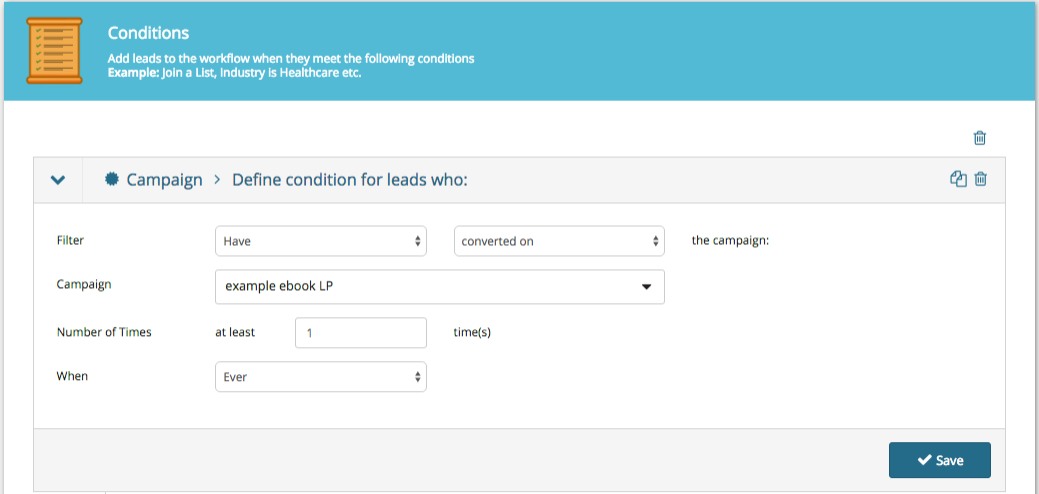
Secondly, set the conditions of your email drip campaign.
guide to marketing and sales funnels
This basically just says that all leads who have converted on an opt-in page (in this case, for a landing page ebook meet our conditions and will be sent our nurturing emails.
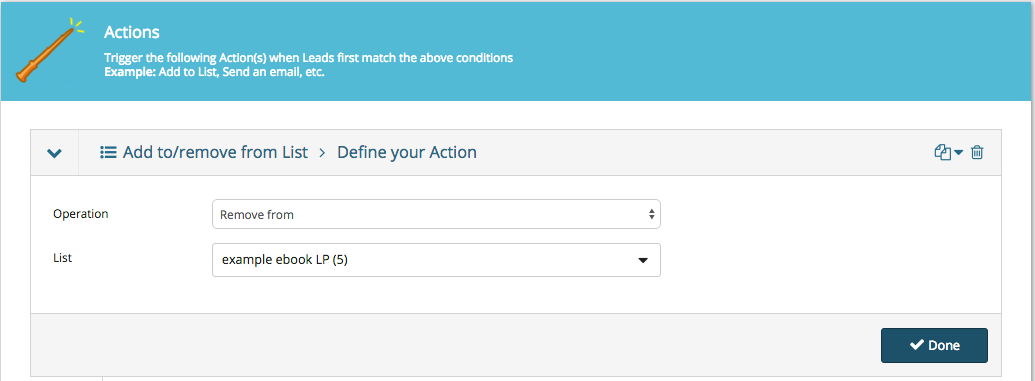
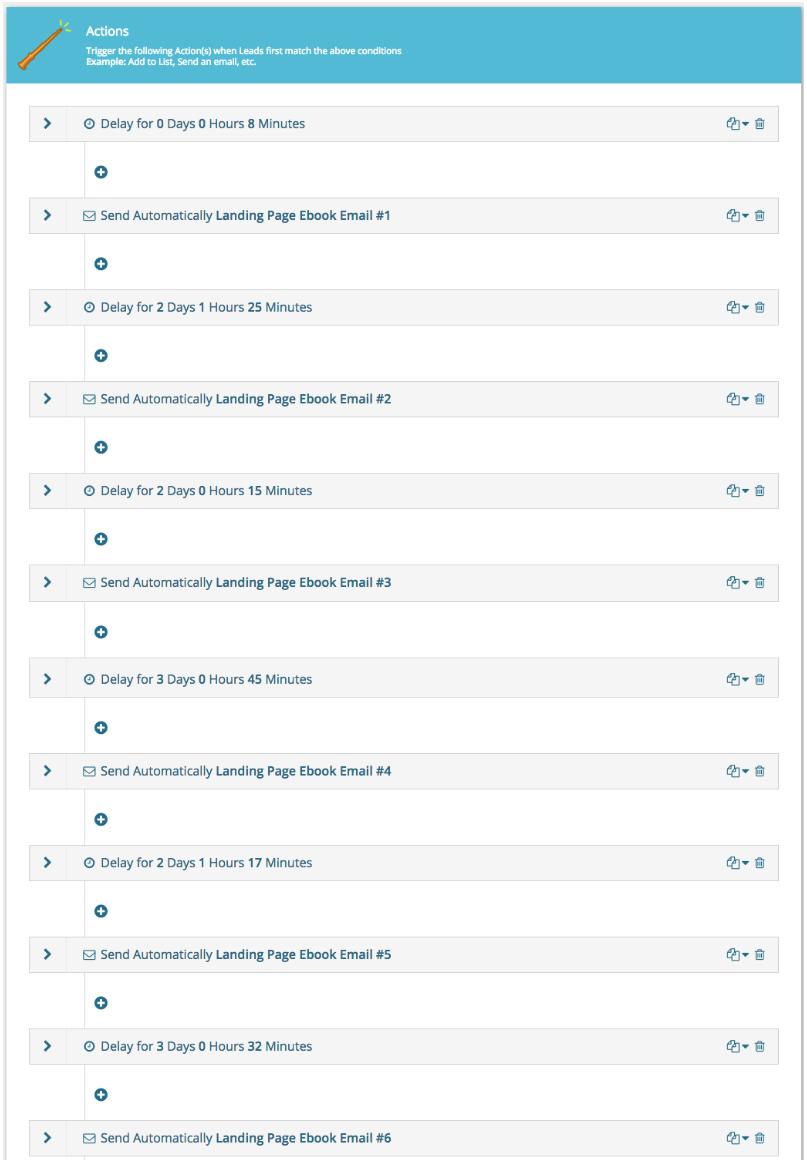
Thirdly, set the actions for this workflow. We need to determine what happens when someone meets the conditions above:
guide to marketing and sales funnels
I’ve set a 7 minute delay after the initial condition is met (conversion) and then two or three days between all the subsequent drip emails being sent. I send them around the same time every day to better personalize the campaign.
Next we have to set a separate condition to stop our workflow and move our leads to the next stage of our sales funnel...
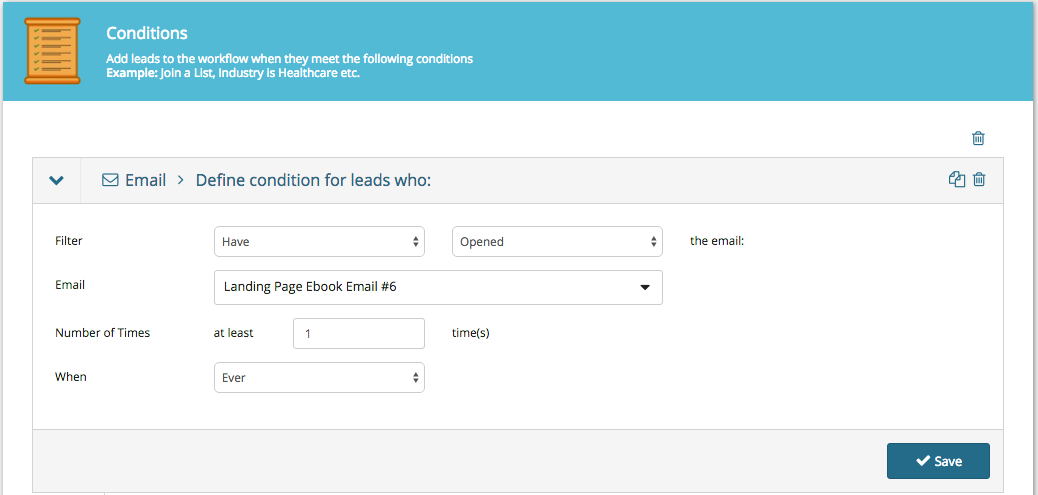
guide to marketing and sales funnels
Important Points about Email Drip Campaigns:
The most crucial part of email marketing drip campaigns is testing your content. You’d be amazed how impactful a simple subject line change can be on a campaign’s open or click-through rates.
A few lead-nurturing best-practices to keep in mind:
  • Keep it personal. Use first names, casual language, and prompt a back-and-forth. It’s far harder to unsubscribe or refuse a request from someone you’ve spoken to personally or have a relationship with.
  • Keep it focused on the subject they’re interested in. Segment carefully. Test the resource email I’ve recommended above.
  • Keep it short and to the point. Tech and B2B leads receive dozens of emails every day (at least). Make yours easily skimmable and ensure it communicates value quickly.
  • Have someone monitoring the “from” email account. If a lead being nurtured does respond don’t let that communication be lost.
For more on creating email marketing drip campaigns, check out my article "How to Create Email Drip Campaigns to Nurture Leads"

Marketing and Sales Funnel Stage Four: Closing Leads


Now it’s getting exciting. We’re a simple step away from turning a hot lead into a closed lead. They just need that little nudge.
This next stage is a short and simple one, very similar to the one before...

Late-stage Lead Nurturing Campaigns:

A late-stage lead is someone who has expressed interest in your platform beyond the fact that you produce valuable content.
This is a delicate stage, as it’s essential that your business is paying attention to the actions of your leads, or you could miss the moment they’re most interested in a paid conversion.
Another term for a late-stage lead is “hot.”
Here are a few common actions of leads who might be heating up:
  • They’ve visited your company’s product, pricing or plans pages. You can set this as a condition by choosing “URL + contains.”
  • They’ve downloaded one of your more sales-oriented pieces of content, like a buyer’s guide or competitor comparison table.
  • They’ve gone to your “About Us” page.
  • They’ve attended a webinar and asked a service-focused question in the Q&A session. The webinar host can manually make note of this in their lead profile.
Similarly to the early-stage lead nurturing, late-stage is a simple email drip. This time however, the content is a bit different.
We’re trying to answer three primary lead questions with late-stage lead nurturing:
  • How does your platform address my pain points?
  • What do you offer that your competitors don’t?
  • How does your service or platform work?
Here’s my recommendation for the five emails of a late-stage email drip campaign:
  • Email #1 Subject Line: “2015 marketing automation platforms buyer’s guide”
  • Email #2 Subject Line: “5 use cases to inspire”
  • Email #3 Subject Line: ”Some kickass case studies from the past few months”
  • Email #4 Subject Line: “A video breakdown of the Wishpond platform from top to bottom”
  • Email #5 Subject Line: “Re: January discount for people we like”
Remember, all of these emails need to be tested. The recommendations I have above (for buyer’s guides, use cases, case studies, platform breakdowns and a promotion) are simply that, recommendations.
Once this campaign is finished, your lead will have either converted to a paid plan or not. Simple.
If they don’t, your funnel can’t simply forget about them.
A lead who doesn’t convert when you want them to isn’t a lost lead, but simply a lead working to their own schedule.
As a result, you need to move them (rather than drop them)...
guide to marketing and sales funnels
This keeps your leads within your brand’s communication strategy and keeps you top of mind.
Important Points about Late-Stage Lead Nurturing:
Often by the time your lead becomes “late-stage” they will already be exploring your business as possibly addressing their pain-points. As such, you don’t want to keep nurturing them if they’re already ready to convert.
The simplest way to ensure your business reacts at the right time (and doesn’t under or over-shoot) is to set up something called lead scoring.
Lead scoring is a feature of marketing automation which assigns values to the actions of your leads.
If a lead goes to your pricing page a couple times in one day you know they’re thinking about a paid conversion. You don’t want to keep communicating with them like they’re a new blog subscriber, but rather push them to act now (perhaps through an exclusive, time-constricted discount or something). 
Lead scoring allows you to do that. Two visits to a pricing page might be the conditions for a lead-score setting of 10, which triggers a late-stage email series or even a sales call.

Marketing and Sales Funnel Stage Five: Retaining Customers


That’s where most sales funnel articles would stop. We’ve generated our lead and nurtured them to a sale.
But this ain’t no ordinary article.
Let’s take it a bit further, because it’s really not too much work to optimize your retention strategy with marketing automation...

Top-of-Mind Campaigns:

It’s substantially cheaper to re-sell to previous customers than to generate new ones (five to ten times cheaper) and they spend around 60% more on average.
So investing in retention is a good policy, particularly because it’s so incredibly easy to set up...
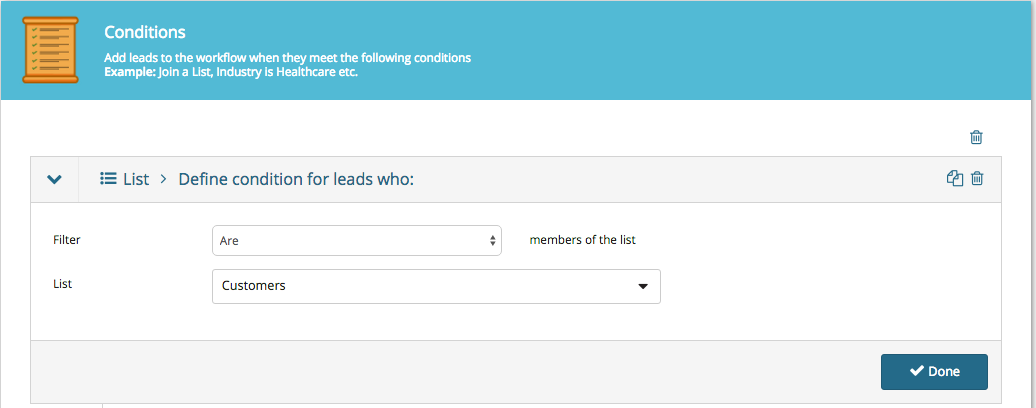
For B2B companies, every time your salespeople or drip campaigns secure a lead’s patronage, their contact details should be added to a “Customers” list (either automatically with a simple workflow, or manually by a sales associate/account manager).
Create a workflow for all people who are added to your “Customers” list:
guide to marketing and sales funnels
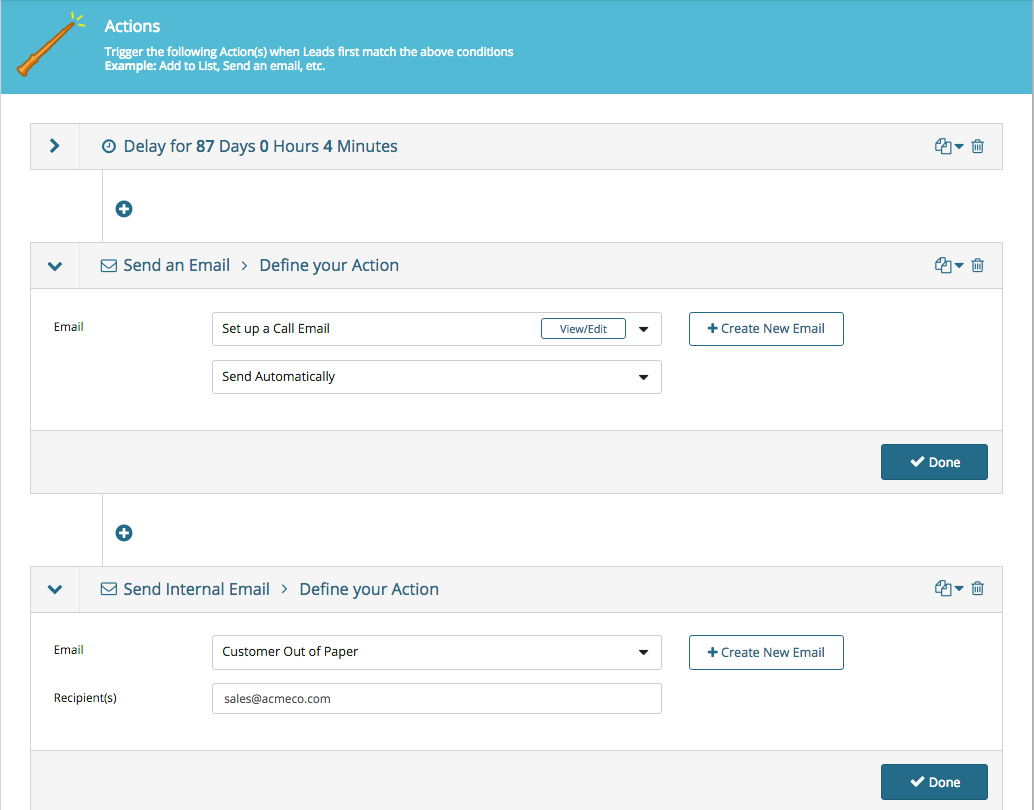
Every time you add someone to your “Customers” list they’ll meet the workflow’s conditions and the actions below will be started:
guide to marketing and sales funnels
The image above is more an example for B2B companies with three-month sales cycle (for instance, you market a company which sells stationery or paper which runs out roughly every 3 months). We set an automatic “are you ready to buy more paper?” email with an 87-day delay.
You’ll also see that we’ve added the action of sending an internal email to the sales team notifying them that one of their accounts needs to be called.
For SaaS or B2C customers, it’s more likely that we’d simply send a marketing newsletter when a sale or platform update is coming up.
That said, you can absolutely automate monthly or bi-monthly “touching-base” emails with marketing automation workflows.
For more on re-engaging leads and customers, check out my article "5 Ways to Engage Email Subscribers that Won't Be Ignored".
Important Points about Top-of-Mind Campaigns:
Marketing automation should make your life easier. It allows you to schedule and optimize communication without thinking about it.
That said, it shouldn’t pinhole you into one single strategy which can’t be changed.
Your marketing automation platform should be flexible and easily-altered. Have a new email or subject-line which has better open or click-through rates? You should be able to plug it in. Have a new lead-generating campaign or ad campaign? You should be able to easily add those new leads to an existing workflow, List, or drip campaign.
10 years ago the problem of marketing automation tools was that they were too rigid.
Yes, if you spent six months (and had a developer) you could create something which did what you wanted it to, but changing it seemed to break the whole process, like a popsicle stick castle - sure it looked pretty, but try to add a new campaign to the bottom and the whole thing topples to the ground.
Fortunately, that’s no longer the case. Check out Wishpond’s marketing automation platform (totally free up to 200 leads) if you don’t believe me.

Conclusion


Hopefully this comprehensive guide has given you a better idea of how a marketing and sales funnel works, as well as how your business might implement one.
If you have any questions about any stage don't hesitate to reach out in the comment section below.