Showing posts with label email ads. Show all posts

Thursday, 25 May 2017

7 Email Testing & Delivery Tools for a Biz on a Budget


You hear so many rumors about what you can or can’t include in your email if you don’t want it to land in spam. But a lot of those are exactly that, rumors.

Using an ESP, like VerticalResponse, is an excellent start to ensuring inbox placement, but spam filters look for various things in emails to determine where they end up. Are there too many links in your email? Did you use the word “Free” one too many times? To help dispel the myths, we put some email testing and delivery tools to the test using the same HTML code and subject line from one of our recent newsletters. Here’s what we discovered:

Puts Mail

Puts Mail is a basic testing application, but you can get some good information about your HTML using this tool. First, they send you a test of your email, so you can see it in your inbox. If you’re using an ESP, you probably have this feature already, but if you don’t, it allows you to see your how your email will appear in the inbox of your choice. Then the tool goes through your code and detects if there’s anything that could cause an issue and what that might be. Our newsletter checked out okay, though anyone using Lotus Notes or Eudora may have some issues with the CSS that was included.

CSS is something that can be tricky in different email programs; if you’re using CSS, be sure to keep it inline to ensure it will work across a variety email programs. For more tips on HTML for emails, check out our HTML Tips for Designing Your Email guide.

Email on Acid

We’re fans of this tool because of the various email program display views. It’s always important to know how things will appear for all of your readers and the different programs they use. Email on Acid offers a free version that shows what your email looks like in Gmail and Outlook 2003, plus they take a look at your HTML and let you know if there are any issues. The paid versions offer more inbox examples, more analysis, and check for spam filter triggers. Our newsletter looked great with the free trial test on these two programs, but as we learned from the previous tool, there could be some rendering issues on older email programs.

Email Reach

Email Reach takes a different approach to testing emails by providing a seed list of addresses to test. The nice thing about this service is that they can test email programs around the world and on mobile.

You just need to download the list they provide, upload to your ESP and then send test emails to that seed list. They’ll give you reporting on how your email works in all the different accounts that they monitor. They offer a 24-hour free trial and then a paid version once that expires. They also check for spam folder placement and will analyze content and HTML for possible spam problems.

Lyris ContentChecker

If you’re worried about specific content that could cause your email to land in the spam folder, this is the free tool for you. Lyris checks the HTML and the content of your email and gives you score based on where the email will end up. Zero is the best, anything over 3.0 and they recommend changing your content to help ensure your email doesn’t get marked as spam. They’re checking through SpamAssassin, a very popular spam filter, for anything that is usually associated with spam. Their website gives you a quick analysis and then they send an email with more info and links to help you understand email delivery and how you can improve yours.  Our newsletter got a zero; we like to practice what we preach!

Litmus

Litmus

Much like Email on Acid, Litmus offers a limited free test and a paid version with more bells and whistles. The free test covers pretty much any email program your readers could be using, plus mobile ones. While the other tests are done in seconds, this one takes awhile, but for free we were willing to wait a bit. There is also a subject line checker, to see how your From label and subject line will look in different email programs, landing page links and again, HTML analysis. There is one test per email address, but the paid version allows unlimited testing for all the features mentioned. As with the test on Puts Mail, our CSS was trouble but otherwise the email looked good.

Email Spam Test

Email Spam Test is another free tool that provides you information about whether your email may go to a spam folder. They don’t provide much detail, but if there was a potential issue with your code or content they let you know. Our newsletter did fine, although they weren’t sure about the subject line.

When we actually sent this newsletter, the subject line performed on target and our opens/clicks stats were right on the mark.

Postmark

This is also a free spam test, but it requires a bit more info than you may have. Not only do you need to paste in the HTML from your email, but you also need to include the full headers as well. It makes for a much more thorough test but also more time consuming. Just like Lyris, they’ll give you your SpamAssassin score and let you know how close to spam your email is.

There are many applications out there to test your email; these are just a few to get you started. Continue to test different things with your email and content especially if you find any problems getting delivered to the inbox.

We also have free guides to help you, and for more anti-spam specifics, check out our webinar, How to Avoid the Spam Folder.

Have you checked out any recent email testing apps yet? Let us know in the comments.


Source

Wednesday, 17 May 2017

6 Email Subject Lines That Really Work


6 Email Subject Lines That Really Work. In this video Jesse Forrest shares how to write email subject lines that get opened. Email copywriting and email subject lines can get your emails opened and read.

15 Email Marketing Best Practices 2016


15 email marketing best practices 2016. Top tips for better conversions and more sales. 

In this video, you will learn about some of the best email marketing practices for boosting sales. The email marketing tips include things like shortening email lengths, using a tease in the subject line, subscribing to other top brands to learn how they email, etc. If you use all 15 of these, you will be much more likely to see a nice increase in email marketing ROI. Enjoy the video!

Monday, 15 May 2017

Email Deliverability: How to Make Sure You Land in the Inbox


No matter how amazing your email content might be, if it never reaches your subscriber’s inbox, all your work will forever go unnoticed. No one will find out about your products, you won’t gain that strong trust with your potential customers, and it will be extremely difficult to make a living with your online business. But finding your way into an inbox isn’t as simple as just sending an email. You have to take email deliverability into consideration.
When it comes to email marketing, email deliverability can be one of the most confusing concepts. So to help you know how to get your content from your email service provider (ESP) to your subscriber’s inbox, today I’m breaking down the basics of what email deliverability means, how it affects your sending, and how to increase your chances of good deliverability.
First off, there will be some words and concepts that might sound like gibberish to anyone new to this topic. If you fall in this category or just want a little refresher about what I’m talking about, here’s a handy cheat sheet of deliverability terms you can download now to reference as you read.

What is email deliverability and how is it determined?

Deliverability is a partnership between your IP/domain reputation, your email content, and your subscribers' email provider. As an ESP, our goal at ConvertKit is to get you in the door, meaning inbox deliveries within email providers like Gmail, Outlook, and Yahoo. There are quite a few factors that determine how your email is filtered once it’s received by an Internet Service Provider (ISP), but your IP/domain reputation are likely the most determining factor on whether your messages are delivered into an inbox or a spam folder.
While your IP/domain reputations are determined through a combination of factors, research within our industry has shown that the most important factors are: Subscriber Engagement, Limiting Negative Metrics, Authentication, and Content. So let’s talk about how these four things come into play in terms of your email deliverability.

Subscriber Engagement

These days ISPs are paying close attention to how previous customers of that provider have interacted with email sent from your domain/IP. That means the future of your deliverability can depend on what your subscribers do with your emails right now.
For example, Gmail often will make assumptions on where to filter your email based on trends seen from their customers. That means if the majority of subscribers are deleting your emails without opening them, marking the messages as spam, or taking no action on it all, Gmail will make the determination to increase spam or promo folder filtering for your IP/domain and will lower your overall reputation with Gmail.
On the other hand, if a lot of people are opening and clicking (showing positive engagement), Gmail is more likely to deliver future messages from your domain and IP into their inbox. This makes it extremely important to make sure that subscribers are receiving email content they actually want and on an expected schedule established upon signing up for your email list.

Limiting Negative Metrics

High levels of user spam complaints and hard bounces can be the quickest way to go from good IP/domain reputation to bad. Spam complaints at high levels (> 0.3%) give email providers indicators that a marketer is potentially sending unsolicited content, which is a violation of CAN-Spam or CASL regulations . Marketers observed exhibiting this type of behavior will lose trust in the eyes of ISPs, which will typically result in very poor inbox placement levels.
When ISPs observe spikes in hard bounce levels this often raises questions about the marketer's list collection and hygiene (or cleaning) processes. Purchasing or using third party lists can often result in high levels of hard bounces based on the fact that many of these types of subscribers are un-verified. Many companies that provide these types of lists use web-scraping tools to gather email addresses from all over the Internet (many of which are spam traps), and they sell them to marketers that are looking to grow their client base. This is a huge ‘No-No' in the eyes of an ISP and will often result in drops in your reputation.
Sending to older segments of subscribers can also show spikes in hard bounce levels. A general rule of thumb is that if a subscriber or list hasn't been sent to in over a year, it's best to get rid of that group. While this can be a scary thought, as many marketers never want to throw away subscribers, we have to remember that ISPs value quality over quantity.
We have to always look at the big picture here. Sending to an older list may provide you with a small amount of conversions, but if it results in all of your Gmail subscribers receiving their email in their spam folder going forward, is it really worth it?

Authentication

ConvertKit offers assistance in setting up your SPF and DKIM records to align with sending through our platform. Whether you're sending your email through convertkit.com or through a custom domain setup (ck.yourdomain.com), we look to make sure that emails sent through your account show ‘Passes' for SPF and DKIM authentication levels.
Before an ISP delivers an email they first examine the email headers of that message, looking for permission for your domain to be sent across our IP addresses. If the SPF and DKIM records show failures within the message headers, your domain does not give permission for it to be sent across any of the IPs that are not stated within these records.
Here’s how it works:
By default when you get started with ConvertKit, you're sending on one of our sending domains. It usually looks something like ckmail2, 3, 4, etc. We have about five of these spread out among customers so multiple ConvertKit customers can be using the same sending domain. There are both benefits and disadvantages to how this affects you and your email deliverability.
If you're just starting to build your domain's reputation, using a sending domain other customers are using and have been using is a great thing. It quickly helps build up your reputation. However, it is possible that the consequences of another customer's poor sending practices can impact you negatively.
We have a lot of controls in place to prevent that from happening and we regularly redistribute our customers across our sending domains, but it’s still possible that a shared sending domain will negatively affect your deliverability.
For our customers who are most serious about deliverability, we offer a custom sending domain that allows you to rely solely on your own domain reputation. To find out more about custom sending domains and how to set one up, contact our Customer Success team.

Content

Your content plays a big role in how an email is delivered as well. Think of a typical newsletter you receive from a retailer, like Target or Bed, Bath and Beyond. They usually contain a ton of pictures with really complex HTML that almost mimics visiting their webpage in your browser. When Gmail sees messages like this, with primarily images and complex HTML, they will often filter it as a promotional email. At Convertkit, we put a major emphasis on simple emails like the ones you write to a friend, which helps us avoid those promo filters.
Simple, plain text emails are more likely to be delivered into a primary inbox, period. Even though we recommend sending plain text emails to improve your deliverability, there still aren't any absolute changes that can be made to guarantee inbox placement within the Primary Tab.
Recent studies have shown that the usage of Gmail Tabs has dropped to roughly 33% (a 66% decrease in users since 2013). The prevailing thought here is that this filtering will have less of an impact going forward because those Gmail users that are savvy enough to set this up are usually the same users that will routinely check these folders.
Now that you know what affects email deliverability, let’s increase your chances of hitting those primary inboxes, shall we? The four high level deliverability concepts we’ve covered can be broken down into actionable, daily takeaways. Here’s how…

10 email deliverability best practices

Email deliverability doesn’t have to be rocket science. There are very easy practices you can put into action every day and with every email you send to help increase your deliverability chances. Here are 10 (easily actionable) email deliverability best practices.

Don’t buy lists (Seriously, don’t be THAT lady)

Like I said earlier, purchasing and using third party lists will result in high levels of hard bounce based on the fact that many of these types of subscribers are un-verified. So while you have a big list of, let’s say 50,000 subscribers right up front, the trouble is that they didn’t choose to be on your list. A vast majority of those emails will go straight to the SPAM folder, many more will mark them as SPAM once they’re opened, and then another large number will unsubscribe immediately. So even if you’re left with a few thousand in the end, they aren’t people who are choosing to hear from you.

Create opt-in incentives that attract the right subscribers

Some opt-in offers are better than others when it comes to building an email list full of qualified subscribers. For example, because giveaways and freebies attract a wide range of people, you’ll most likely get a high volume of signups that will never open your later emails or might even move them to their spam folder. Their negative engagement can eventually end up sending your emails to other subscriber’s spam folders as well.
To combat this, make sure your opt-ins are always targeted to an audience that would be interested in your topic. You always want to be attracting readers who would likely open your emails and eventually become customers.
So if you’re planning on running a contest with giveaways, make sure you’re setting yourself up for the outcome. If you’re wanting to grow your list with a targeted audeince, create a giveaway that only that group will want. Or if you just want to get your name out there and build a large list, create a giveaway that will appeal to a wide audience.

Use simple design (Or none at all)

Like I said earlier in the content section, simple emails will always deliver better. Even when it comes to images or tables in your emails, too many will decrease your deliverability. You can read more about our theory on why text-based emails are the way to increase your email deliverability in our post Why Fancy Email Templates Aren’t the Answer.

Add alt text when you use images

Images in and of themselves are not bad. Everyone loves a beautiful picture or graphic and they often help convey a thought or point quicker than actual text. But when you use an image, make sure to write accurate alt text or title instead of simply using the image’s file name. This way if an image gets blocked for any reason, a reader will still know what your image is. This also helps prove that a human sent the email instead of a spam robot.
How to- After you’ve added an image to your email in ConvertKit, click the image again and then click the edit button that pops up. In the edit box, write a title for that image that describes what is happening in your image, ie- your call to action, the details of a promotion.

Watch out for these trigger words

Sadly, because of those spammers out there, there are some words that have developed a bad wrap. When used in subject lines for emails, these trigger words can signal the possibility of spam and usually will send an email straight to the abyss. Here are a couple of those words to avoid in your email subject lines (and your content, if you can):
  • Free
  • Financial freedom
  • Make money online
  • Credit card offer
  • Cash bonus
  • Apply now
  • $$$
  • Weight loss
  • Order now
  • Price
  • Increase sales

Enable double opt-in for all new subscribers

Setting up the double opt-in process adds an extra layer of subscriber qualification for you. If a subscriber clicks through a double opt-in:
  • You can confirm every subscriber so your list is more accurate. That means if there's a typo in their entry they won't end up clogging up your list with email addresses that will ultimately fail.
  • They are confirming interest and are more likely to open your emails in the long run, which improves your deliverability rankings.
  • You know they are not fake subscribers and spammers with false email addresses that can ultimately affect your monthly fees.

Set up a custom sending domain

Again, setting up a custom domain for your reply-to email address will increase your deliverability. That means your days of using freemail like Gmail, Hotmail, and Yahoo are over. Learn how to setup your custom sending domain with ConvertKit: contact our amazing Customer Success team.

Keep a clean list

No matter how exciting or targeted your content is, there will always be a group of subscribers who aren’t engaged with your emails. Since those unopens can affect your email deliverability, it’s a good idea to run a re-engagement email sequence every 90 days to filter out what we call cold subscribers. Cleaning out your subscriber list will help it be healthy and high quality (plus, you’ll save money).

Ask subscribers to move emails from their spam or promo folder to their inbox

Sometimes email to new subscribers end up in their spam folder for reasons beyond your control. If those subscribers end up getting in contact with you asking where the email went, ask them to check their spam folder and take a second to move that email from the spam folder to their inbox. It might sound like a silly request, but doing this teaches that ESP that your email actually belongs in the inbox. Doing this will not only help with that particular subscriber's emails, but it will also help similar users whose emails might be ending up in spam as well.

Optimize your email subject lines

The last thing I want to mention that often gets mistaken for a deliverability issue is the subject line. While a subject line could potentially impact deliverability, it has it's greatest impact on engagement. A subject line is the first and sometimes only thing a subscriber reads of your email. If it doesn't clearly communicate what the email is going to be about and entice them to open it, then they won’t. Subject lines are often the simplest thing to tweak that have the greatest impact on opens and clicks.

Tools you can use to help check your email deliverability

Ready to start increasing your chances of optimized email deliverability? To find out where you stand right now, there are a couple tools you can check out. MailTester and GlockApps both test against Spam Assassin to tell you how your emails are delivering.
Once you’ve got that information you can start putting all those email deliverability best practices I talked about into place. Then it’s time to watch those clicks and conversion rate numbers rise.

Deliverability Terms Cheat Sheet

Blacklist-This is a list of IP addresses of known spammers, or “spam friendly” servers. If your IP address is on the list, it won't let your email through.
CAN-Spam – Short for ‘Controlling the Assault of Non-Solicited Pornography And Marketing Act of 2003,' this law outlines rules for commercial email, establishes requirements for commercial messages, provides email recipients with the right to make you stop emailing them, and lays out consequences for violations of the Act.
CASL regulations- This is Canada’s anti-spam legislation. It’s similar to CAN-SPAM in that it protects consumers against receiving unwanted email but different in that it is much more specific about permission and what is considered “opt-in”.
Domain– Similar to an IP Address, domain names refer to locations of servers and devices connected to the Internet. Domain names can represent many different IP addresses.
Domain Name System (DNS)- DNS is an Internet service that translates domain names into IP addresses.
Domainkeys Identified Mail (DKIM)- DKIM was designed to prevent domain spoofing, or someone pretending to send from your email domain, when they really aren't. DKIM uses cryptographic authentication, which means the records we generate will be unique to you and your domain. Read more about DKIM here.
Double opt-in– With a double opt-in a user is sent an email with a confirmation link after they initially opt-in to your list. After the user clicks the link, they are added to the ongoing email communication. This is a recommended way to build a healthy email marketing list.
Email service provider (ESP)- ESPs provide platforms to send commercial and transactional email on your behalf. ConvertKit is an ESP.
Hard bounce–  A hard bounce means that the email address is invalid and should not be sent to again. The email might belong to an unknown user, the content of your email might have triggered their spam filter, or the server might have seen too many other contacts marking your email as spam. When a contact’s email returns a hard bounce, they will be marked as ineligible the next time you include them in a send.
Internet Service Providers (ISP)- ISPs provide mailboxes to end users as part of their paid services. These are generally your cable or Internet providers, such as Comcast and Verizon.
IP Address- A number that uniquely identifies any device connected to the Internet. “IP” stands for “Internet Protocol.” Similar to how a street address helps people find buildings, an IP Address helps computers find each other on the Internet.
Open rate- The percentage of recipients who opened your email message. When someone clicks on an email, an image pixel in the email loads and is counted as an open.
Sender Policy Framework (SPF)- SPF was specifically created to protect against sender address forgery – spammers pretending to send emails as you. An SPF record in your DNS Settings gives email providers something to check, to make sure the emails are really coming from you. Read more about SPF here.
Sender score/reputation- This is basically your rating as an email sender. Return Path’s sender score tool is a free reputation rating tool that rates your outgoing mail server IP on a scale of 0-100. It’s used by mail servers, allowing them to quickly sort email IPs and decide what to do with your email. A sender score that is + 90 is considered a good sender score.
Single opt-in– If an email marketer uses a single opt-in, this usually involves taking a user's form entry and immediately adding that person to a live email list.
Soft Bounce – A soft bounce means that the email temporarily failed to reach its intended recipient. The email will be resent for up to 72 hours or until it’s either successfully delivered or it fails more permanently. Recipients that return soft bounces will still be eligible for future email sends.
Spam complaints (Marked as Spam)- This is the number of contacts that actively marked your email as spam. Contacts that mark your email as spam are automatically unsubscribed from all of your email. Please be aware that Marked as Spam is not the same as an email going into a spam or bulk email folder.
Spam trap/Honeypot– A planted email address designed to catch spammers. For a time, email that hits a dead email address will return a hard bounce. When the mail server sees continued traffic going to the dead address, it can turn the email into a spam trap, accept the email, and report the sender as a spammer.
Whitelist– The opposite of a blacklist, this means your server is considered spam-free or is an “approved sender.” It’s often used by email applications to allow users to mark whether or not they trust emails from specific senders, this overrides some of the filtering that may exist from the ISP. You can also apply for whitelisting programs that a few ISPs offer. While not a guarantee to end up in the inbox, a sender may receive preferred delivery as long as they stay within the proper thresholds of the program.

Saturday, 13 May 2017

37 Tips for Writing Emails that Get Opened, Read, and Clicked

We’ve all been there …

You’ve carefully crafted an email. You’ve polished each sentence. You’ve racked your brain for the very best subject line.

You hit publish with a sigh of relief. That’s done.

But when you look at your email stats, you notice that the opens aren’t as good as you’d hoped, and the click-throughs are disappointing. It’s depressing.

Does it feel like a big challenge to get people to open and read your emails? And then to go on to click through?

It doesn’t really need to be so hard. You’re about to learn the most important advice I’ve found for writing emails that get opened, read, and clicked.

Ready?

How to create emails that are eagerly anticipated

Quick question:

Which email do you look forward to receiving most: an email from your best friend or an email from a massive corporation? And which of those two emails do you prefer to read?

Easy choice, isn’t it?

So, when you’re emailing your list, what do you do? Do you write as if you’re addressing a huge, faceless crowd of people? Do you write just like a massive corporate marketing department would?

If you want your subscribers to look forward to your emails, you should consider behaving more like a friend.

You know, like, and trust your friends … right?

Try toning down that corporate look, and create a more minimalist email design. Write in a conversational, respectful voice.

Follow these 8 essential rules for friendly, eagerly anticipated emails …
  1. Stop talking about your list. Stop talking about subscribers. Write as if you’re emailing one person only. It instantly makes your emails more personal.
  2. Quit wasting people’s time. Only email when you have something truly valuable or helpful to say.
  3. Be useful. Don’t just email when you need something from your readers. Be helpful. Be generous. Be friendly. Be like real friend.
  4. Use your actual name as your from address. Put your name and reputation on the line. That’s more personal isn’t it?
  5. Be trustworthy. Let people know what to expect. Yes, sales messages should be part of your email marketing, that’s fine. Just be clear about it when they sign up.
  6. Don’t be creepy. Feel free to personalize emails, but don’t repeat people’s name too often, because it makes you sound like a call center script.
  7. Be on their side. Remind people that they’re not alone. Tell them you understand their struggles. Empathize with them, and ask how you can help.
  8. Give people a reward for reading. Make sure people benefit from reading your emails. How? Share a useful tip. Make them feel better. Inspire them.
How to get your emails opened

Most inboxes are congested — filled to the brim with uninteresting, boring emails.

Your emails are easily drowned out in overflowing, noisy inboxes across the world. And Gmail tabs have made it even more difficult to get noticed.

How do you write appealing subject lines that make you stand out … that seduce people to open your emails?

Email subject lines need to attract attention, just like headlines do. Here are a few tips on that:
  1. Promise something good. If people know specifically what they’ll learn or how exactly you’ll make them happier, more informed, or better at business, they’ll be itching to read more.
  2. Use power words. Sensory and emotional words attract attention, and make your subject lines stand out in crowded inboxes.
  3. Use a number. Because digits — like 4 or 37 — stop wandering eyes.
  4. Pique curiosity. Don’t be afraid to occasionally use bizarre words. Tickle the information gap, or violate the information gap. Your readers will be keen to find out more.
  5. Point out common mistakes. Because nobody wants to be perceived as silly.
  6. Quit cleverness. Simple, specific subject lines beat clever alternatives every time.
  7. Experiment. Be a rebel and try something new. Dare to be different. You’ll be surprised by what works and what doesn’t.
  8. Learn from the masters. Subscribe to excellent email lists and analyze their subject lines. You’re guaranteed to learn something.
  9. Stop following meaningless stats like optimal subject line length. No average reader exists. Build a real relationship so your readers anticipate your emails and they’ll open them because they recognize your name — even when your subject line sucks.
How to write engaging emails

So, you’ve got people to open your emails. Now what? How do you keep their attention? How do you keep them reading your emails word for word?

Follow these 11 tips for emails that will captivate your readers:
  1. Write fast. Because that’s how your enthusiasm and personality come through.
  2. Keep it short. Edit your emails with rigor. Long and unwieldy emails slaughter your readers’ interest. Challenge yourself to cut your text by half next time you edit.
  3. Ask questions. Imagine having a face-to-face conversation with your reader. You’d ask questions in that situation, wouldn’t you?
  4. Don’t follow a strict formula. Blueprinted emails quickly bore the boots off your readers.
  5. Add a personal touch. Because you’re trying to get readers to know, like, and trust you, aren’t you?
  6. Don’t automate your greeting. Try warm wishes, best regards, or greetings from sunny England. Mixing up your greetings makes you less robotic, and more personal.
  7. Use the word you. Because it’s one of the most persuasive words in the English language.
  8. Develop a natural voice. Stop thinking about email marketing. Consider your emails to be a way of talking to your customers or readers.
  9. Add personality. Use words and expressions only you can use. Be human.
  10. Stop being dull. Understand the telltale signs of boring writing. Write short, strong sentences. Be to the point. And break high school rules.
  11. Quit being selfish. Don’t be cold-hearted. Genuinely care about your readers.
How to sell in your emails

You’re not just writing emails for fun, are you? As a business owner you have to sell to stay in business (whether you like it or not).

So what’s the best way to sell without selling your soul?

Follow these 9 tips to convert more email readers into buyers:
  1. Don’t sell before the prospect is ready. Become a friend and trusted source of information first; and your readers will more readily buy from you.
  2. Highlight benefits. Don’t sell your product. Instead, sell the benefit it offers your customer.
  3. Show what readers will miss. Most people are risk averse. They want to avoid inconveniences, glitches, and complications. Consider rephrasing the benefits of your offer as a problem you’ll help to avoid.
  4. Don’t follow a strict formula. Because formulaic emails sound robotic and are boring as heck.
  5. Work toward your aim. Tell interesting stories that lead to your sales message.
  6. Present a clear deadline. It prevents people from procrastinating.
  7. Insert multiple links (to the same page). Because it increases your chances of people clicking that link.
  8. Have an impeccably clear call to action. Tell your readers exactly what you expect them to do next, and remind them why it’s in their best interest to buy.
  9. Use the power of the PS. Remind people of a deadline. Or repeat what they stand to lose if they don’t take up your offer.
The harsh truth about your emails

Everyone’s inbox is overflowing. Nobody is keen to receive more email.

You should be honored that people have opted into your list and are happy to receive your messages. Each subscriber has given you a hard-earned vote of confidence.

But be careful. Never take anyone’s attention for granted. Because everyone’s time is precious.

Week in week out, you have to prove your value to your email subscribers. Know your readers so well that you can empathize with their struggles. Ask questions. And offer help.

Write as if you’re emailing one good friend, because that’s how people will get to know you, like you, and trust you.

When you’ve earned those three things, you’ve earned the ability to push send and grow your business.

The 5-Step Guide to Email Marketing Personalization


Personalization goes far beyond a custom name field. Personalization means relevance and that’s why it lies at the heart of effective marketing communication. In today’s article I’ll show you how to use marketing automation in order to send the right emails to the right people at the right time.

The shocking truth about the state of email marketing personalization

According to the State of Email Marketing by Industry report:
58% use personalization techniques
4% of marketers use layered targeting, incorporating informed and behavioral data to send relevant, personalized email messages to their audiences.
42% of marketers don’t segment and send the same message to all of their database

It’s bad news for the subscriber – there’s almost a 50/50 chance that the subscription program they sign up for isn’t designed to meet their preferences.

On the other hand, if you’re a marketer, this data shows you the way to keep ahead of your competition. There’s no time lose, so start personalizing!

I’ve prepared the following 5-step guide to email marketing personalization to show you how easy it is with marketing automation. You can use conditions, actions, and filters in order to collect valuable information about your subscribers and run highly targeted email marketing communication. Here’s how you can achieve relevance:

1. Establish business goals and target audience needs.

A personalized email marketing program delivers value to subscribers and revenue to the business. That’s why you should set clear business goals and thoroughly research your subscribers’ needs first.

Business goals usually boil down to increasing revenue and reducing costs – luckily, marketing automation can help you achieve both of these goals. You can easily track conversions, calculate the return on investment, and create a business case for more budget and resources.

As far as subscriber needs go, you can start with finding answers to the following question: what do my subscribers need in order to purchase my product or service? If you run a B2B business with a complex sales cycle the question might actually go like this: what do my subscribers need to know in order to make a decision to purchase my product or service?

If you want detailed insights into customer needs, you should develop buyer personas. According to the Buyer Persona Institute “(…) a buyer persona tells you what prospective customers are thinking and doing as they weigh their options to address a problem that your company resolves.” Actionable buyer personas reveal insights about your buyers’ decisions and help you answer their information needs at individual stages of the customer journey.

2. Create marketing automation workflows.

The relationship between business goals and subscriber needs provides context for automation workflows. You will clearly see the overall purpose of a whole workflow as well as its individual elements: webforms, landing pages, surveys, and emails. The context will help you choose the right CTA and get rid of the nonessential (perhaps unnecessary?) elements of each resource.


An abandoned cart workflow has a well-defined purpose.

3. Segment your list.


Use the elements of your marketing automation cycle as a series of touch-points that allows you to find similarities and differences among your subscribers and segment your email list accordingly.

There are a lot of ways to segment a list. For example, you can segment by:
demographics (age, sex, geography)
customer lifecycle
customer value
activity


A simple marketing automation workflow welcoming new subscribers and rewarding subscribers who opened the email with scoring points.

And when you want to send relevant messages, you should use multiple segmentation techniques. To learn more about layered segmentation, read the following article on email segmentation and targeting options.

4. Turn data into actionable insights.

Check your statistics and go beyond the obvious. For example, instead of relying on open and click-through rates, analyze what makes people open and click the links in your emails. Is this information relevant to a particular segment? What type of content is most engaging? What is the optimal frequency for these subscribers?


An email with links to several pieces of content. By checking the statistics you can see works best among your subscribers and use it to segment your list by interest.

5. Analyze and optimize.

As you well know, one of the essential skills in marketing is the ability to adapt to change. Marketing channels, buying cycles, customer preferences – everything changes over time. And the pace of change is constantly increasing. That’s why you need to stay focused on customers and constantly optimize your efforts.

Analyze your marketing automation workflows and see if they effectively convert prospects into buyers. Ask yourself questions like: What data do I need in order to send relevant communication? What conclusions can I draw from these subscribers’ behavior?

Run A/B tests of complete workflows, sections, or single elements (webforms, landing pages, emails, etc.) in order to find new ways of increasing conversion. In the case of email marketing processes, the sum of incremental changes can result in a massive performance increase.


This is how you can A/B test a preheader. What do you think, which leads to more opens?

Over to you

How do you personalize your email marketing? Would you add anything to the 5-step guide?

Thursday, 11 May 2017

How I Use ConvertKit for My Blog


I love ConvertKit! And in case you have no idea what ConvertKit is, it's the email service provider that I use for my blog. And since lots of folks in the coaching program had questions about how to use ConvertKit, I thought I'd share exactly how I use it. 

NEW - How to fix bad email open rates - GetResponse, Aweber, Mailchimp etc


Thanks for watching "How to fix bad email open rates"

In this tutorial, you will discover a fairly recent change that ISP's have made that literally blocks your email from reaching your prospects inbox....and the best part....How to fix that!!

If you're doing email marketing then this is CRITICAL INFORMATION that you need to know. 
This works for all autoresponders out there - GetResponse, Aweber, Mailchimp, Ontraport and so on 

This is a super quick fix that will literally put money in your pocket

Once you've checked the video out let me know if you have any questions.

Again, Thanks for watching and hope you enjoyed it.

010: ClickFunnels Integration with ConvertKit (Step 1 of 4)


Hey Y'all! In this video, I show you how to connect Click Funnels with ConvertKit so that your landing page or your opt-in page on CF is sending the subscriber data collected (name and email) to your ConvertKit account. 

There are four steps involved in this. This video is Step 1. 

Video 010: Step 1 - Prep CK account
Video 011: Step 2 - Prep CF account
Video 012: Step 3 - Integrate CK with CF
Video 013: Step 4 - Test it all out

Lunch & Learn: Get Started with ConvertKit in 30 minutes!


Monday, 8 May 2017

5 Ways Your Email Marketing is Like a Marriage


I am often asked to present at seminars and conferences to discuss email and lifecycle marketing. I kept hearing the analogy of how email marketing and dating are very similar. With my ten-year wedding anniversary approaching, I thought I would evolve the dating analogy to how email is like a marriage.

1. A good marriage takes dedication, work and effort.

You can’t take your marriage for granted and you can’t let the “wow” factor go out of it. For email, you can’t mail infrequently and expect to build a strong, loyal relationship with your subscribers. Mail on a regular basis to stay top of mind with your prospects and customers.

And, you can’t do the same thing over and over and expect different results. If you send the same message out month after month or the same offer, it will lose momentum. Switch things up and test new ideas or concepts. Your subscribers are constantly changing and evolving, so your marketing needs to follow suit. Don’t let your readers get bored with you or their eye may start to stray to your competitor. 2.

Marriage is a give and take relationship.


Always focus on your subscribers. When you began the relationship, what did you promise them? Are you still delivering on that promise, or have you strayed? Have their needs changed as time passed? Don’t just guess what they want. Learn from their behavior. Are they opening your emails and what are they clicking on (if anything)? Ask them what they want and give it to them.

3. R-E-S-P-E-C-T

Any good relationship is built on mutual respect. If you expect your subscribers to open and act on your messages you must respect them. Use good email practices by only sending your subscribers what you promised when they signed up for your list. Don’t dishonor them by over mailing or sharing their email addresses with other businesses. Don’t buy lists either. You’ll only end up wasting your time mailing people who don’t want or expect to hear from you. They’ll report you as spam or unsubscribe – the email equivalent of a divorce. And, at VR we don’t allow you to email to a rented or purchased list.

4. You marry the whole family.

When you get married you don’t just marry your spouse, but their entire family comes along with the deal…for better or for worse. The same goes for your email messages. When you send out your email, your subscribers can forward it to a friend and they can share it with their social networks. They can help spread the word about something great, or call attention to something not so great. My advice is to make sure you proof, edit and spell-check every message before you push the send button. There is nothing more embarrassing than sending out your email and realizing you have a broken link or a typo.

5. Things may get rocky.

Not every marriage is a match made in heaven – over 50% end in divorce – so realize that not every single subscriber is going to open every message you send. In fact a good, average open rate is around 25%. And, try as you might, approximately 30% of subscribers will unsubscribe from any given list each year, so you constantly need to grow your list. The easiest way is to include an opt-in form on your website, blog and your Facebook page or other social networks.

Follow these simple tips and you and your subscribers will be on the road to happily ever after!

Friday, 5 May 2017

How and why you should use Email Marketing Automation


Marketing Automation was one of the top trends of 2016, here is how to use it in 2017

Anyone who has run an online business, even for a short time, knows that digital marketing offers a wide range of possibilities. A survey of marketers by Regalix tells us that website and email are the most effective channel of online communication. For every retailer email is the primary tool for bolstering sales, however sending generic newsletter campaigns tends to be less and less appealing to subscribers. FreshMail’s research shows that highly personalized campaigns achieve better results and that’s our subject here.

It’s important to get to know the real needs of your customers and to send interesting, engaging content based on advanced personalization and optimization of email marketing campaigns. The potential of Email Marketing Automation (EMA) helps marketers send effective messages suited to the needs of subscribers in a defined contact or communications strategy like a welcome or nurture sequence. With offers tailored specifically to their interests the achievement of your sales goals is just a matter of defining them and allocating the resource to set them up and optimise.


Download Expert Member resource – Email sequence template
Quickly define a contact strategy for a welcome or nurture sequence to help brief designers or copywriters.
Access the Email sequence contact strategy template

What is Email Marketing Automation?


Email Marketing Automation is an ecosystem of tools and mechanisms that helps to automate ongoing conversations with customers and maintains delivery of a high degree of personalized content. This allows you to make sure that subscribers receive tailored content they simply want to read.

An important element of EMA is integration of your email marketing system and website with Google Analytics or other proprietary tracking analytics system. For the purpose of this article we will be using the free to use Google Analytics as a working example. This enables marketers to gather information about subscribers beyond the standard metrics that are part of email campaigns. All you have to do after integration is set specific goals in Google Analytics. While monitoring traffic to your site, Google Analytics pairs the email addresses with cookies in the subscriber’s browser. Later, the data of identified recipients is available in the email marketing platform. The information collected this way allows you to create more effective campaigns that are targeted on the basis of user behavior and the preferences of individual customers.

Campaigns based on GA data can be sent using specially designed autoresponders or a dedicated mailing prepared specifically for subscribers who have completed an established goal or set of goals. Both methods are highly effective in supporting the sales process. You can achieve a similar effect through the use of tracking codes - small pieces of code script that you place on an internet page. This enables you to see whether a particular page has been visited and helps to evaluate the conversion rate of email marketing campaigns.

Using data from email marketing campaigns, user behavior on web pages and individual purchase histories, marketers can plan fully personalized communication. They can identify groups of subscribers with common characteristics and target them with messages that appeal directly to their needs. Functionalities of EMA allows you to run a highly effective lead nurturing programs. You can, for example, design a newsletter with a special structure that contains one part with the main offer for all subscribers. Also an additional offer with dynamic content, which is entered automatically according to sales data ascribed to particular personas and email addresses. This way you can be certain that every newsletter contains something interesting for a particular recipient.

How to use Email Marketing Automation:

Campaigns based on behavioral data from your website

Why do visitors spend time on your website? It’s not always to buy something or to contact a company. They often simply want to see what’s new, gather information about a products and services or check a price. The lead nurturing process of turning interest into a sale can last for a few days or many months. Information gained from the use of data from Google Analytics and tracking codes lets marketers craft targeted, tailored messages that match the interests and page view history of individual customers. This makes cross-selling and up-selling much more effective.

Let’s say, for example, that particular subscriber visits your page from time to time to look at televisions, although he didn't buy anything yet. You can send him a special campaign that specifically promotes televisions at a discounted price, larger televisions at the same price, top seller from this category or highly recommended models. You can employ the same strategy in your regular newsletter as well by dedicating part of it to dynamic content that features discounts or rebates on televisions. Remember to carefully monitor your results and to stop this kind of targeted promotion after a conversion.

Autoresponders and automatic follow-ups

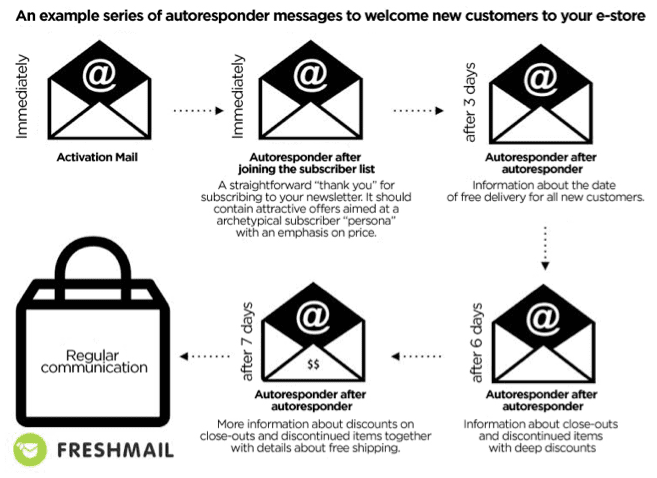
One of the best and simplest examples of EMA is the creation of welcoming emails. This is a cycle of messages sent at different time intervals to new subscribers to your newsletter. The goal of the campaign is to encourage recipients to complete their first purchase with unique, dedicated offers. This kind of gradual process not only leads to conversions but allows you to gain knowledge about the preferences of your customers.


Abandoned carts

Abandoned carts are something we all have to deal with and there is no one-size-fits-all solution. Each customer is different therefore you have to create personalized, automatic reminder messages that can later be expanded into a sequence of messages. Since price is often the issue with abandoned carts, some kind of discount can be an effective solution for enticing a customer to complete transactions. You can use a static code for all customers or dynamic codes to generate one for each customer.

Product recommendations

Using behavioral data from your website, you can easily create 4 kinds of personalized messages -
“Customers who purchased this product also purchased these products.” Remember not to display products that have already been purchased by the customer.
“Other customers bought this product together with….”. This allows you present related products.
“The most frequently purchased products in this catergory are…”. Show what’s popular and in demand.
Messages dedicated to abandoned carts and recommended products. These are based on products that have been discarded. Customers are presented with top products from the abandoned category together with the product they left behind.

Such recommendations can also be used in cyclical newsletters as a second primary message. It’s important to remember to rotate your dynamic content so that recipients don’t feel that they receive the same offers over and over.

Who should use EMA?

Every business with an online presence needs to automate their promotions with highly personalized product offers to match individual customer profiles. This is absolutely essential to succeed in online sales. You can only reach your sales potential by sending the right offer to the right person at the right time. Regular email marketing lets you personalize your message and your offer to a fairly high degree but using behavioral data about the activities of users on your site makes more precise customer profiles possible and drives conversion rates even higher.

The sales process is multidimensional and implementing as many of the tools and strategies listed here as possible in order to maximize the flow of information between them is ideal. Good email marketing systems offer dedicated integrations with CRM platforms and ecommerce by sharing API codes. Apart from these integrations, you can also sync multiple apps via Zapier through an easy drag and drop interface that doesn’t require advanced technical knowledge.

Thursday, 4 May 2017

ClickFunnels Review 2017 for Beginners. Is it the Real Deal or Scam?

This ClickFunnels review is our honest opinion of ClickFunnels and its potential for success. We include the ClickFunnels pros and cons and give an unbiased look into some of their best features. 

ClickFunnels has been around for a few years, but has exploded in the last year in particular. This is in part due to their incredible affiliate program, but also some updates and adjustments they made to their site. 

ClickFunnels price is fairly steep, which can leave many people watching this review wondering if it is worth the cost. We give our opinion on the matter and break down how quickly you could realistically make money on ClickFunnels platform.

We also give a review of the ClickFunnels member area, something we have had multiple requests to look into. While we don't give a direct tutorial of how to use it, we show how to quickly build a member funnel and what it would look like to the user. 

If you are considering ClickFunnels while watching this review, we would say give it shot. They have a 14 day trial for free that anyone can use and you will be surprised just how much you can learn in that 14 days. 

Being a ClickFunnels member also gives you access to tons of free trainings on how to use ClickFunnels and how to create effective sales funnels. Our favorite part about ClickFunnels is these trainings. They are taught by Russell Brunson, an internet marketer who has made literally dozens of multi-million dollar businesses online.

Our ClickFunnels review is overall positive. ClickFunnels is still working out some kinks and quirks, but they have the right idea and are going in an incredible direction. We think they are the future of online marketing.