Showing posts with label customer. Show all posts

Friday, 7 July 2017

105 ways to build your email list | Tips, tactics, and best practices


 One of the first steps in any email marketing campaign is pulling together a list of addresses from people likely to be interested in what you have to say or promote.

That said, building a list from scratch can seem a little overwhelming at first. After all, newbies are in a bit of a catch-22 situation: They can’t start a campaign without addresses, but they’re often so dependent on email that they don’t know how to ask customers to opt in without emailing them. So how do you build an email list without email addresses? Once you have addresses, what do you do with them? How often should your send emails? What can you do to ensure your emails are delivered and not lost in spam or junk filters?

Find the answers to these questions and more in our free eBook, Guide to Email List Management. Download it today to learn the tricks and tools to managing a successful email list.

Still need to gather more email addresses for your contact list? Fear not! With diligence and a little creativity, you can build a solid list of interested addressees through a variety of methods. Here we’ve compiled by category 105 strategies, tips, tools, and ideas to help you find viable, interested consumers to add to your email subscriber list.

General tips to keep in mind

  1. Only use email addresses you have gathered with permission. Buying a list of consumer names is a bad idea since it heightens the risk of complaints, bounced addresses, unsubscribes, or accusations of spam. 
  2. Experiment with new methods – ranging from pen and paper to online forms – and maximize the most effective ones.
  3. Methods borrowed from others may not work for you, depending on your industry or business.
  4. Once your list grows, segment audiences to increase strategy effectiveness.
  5. Avoid being pushy; if you offer value, loyalty will follow.
  6. Consider automation tools that can handle your busywork.

Fine-tune your opt-in form

  1. Make signups less invasive by initially requesting only addresses.
  2. Offer subscription options addressing content and intervals.
  3. Leverage testimonials from satisfied recipients.
  4. Mention subscriber numbers if they’re substantial.
  5. Promote exclusivity by offering subscribers something only they can get.
  6. Give away something valuable to all subscribers.

Optimize email addresses you already have

  1. Gather your addresses from transactional business communications.
  2. Share email lists with complementary businesses (with permission from your subscribers).
  3. Include a signup link in all your personal emails.
  4. Place forward-to-a-friend links in all emails.

Use your website as a portal

  1. Promote your email by social media, website, and blog. There is no limit to where you can include a signup form for your email list.
  2. Design a separate landing page specifically for signups.
  3. Treat your blog home page like an email capture form.
  4. Use Leadboxes from Leadpages in author bylines used on your site.
  5. Conduct a heat map test to identify best places for opt-in buttons.
  6. Test-drive CTA locations including your 404 page, sidebars, headers, footers, pop-up boxes, slide-ins that appear halfway down a page, or “sticky” forms that move down with scrolling.
  7. Require commenters on your own blog to provide addresses.
  8. Offer opt-ins to anyone “liking” comments on your blog.
  9. Exchange opt-in links with other businesses’ newsletters.
  10. Incorporate opt-ins within online forums your prospects might visit.
  11. Buy paid ads on websites your customers are likely to frequent.
  12. Offer subscribers free downloads of your business app.
  13. Offer subscribers a free eBook or informational guide.
  14. Establish a riveting blog that ends in an opt-in request.
  15. Post limited content on your site; offer upgrades upon subscription.
  16. Launch a viral competition in which subscribers benefit by recruiting others.
  17. The SumoMe List Builder app launches opt-in ads toward visitors about to leave your site.
  18. The SumoMe Scroll Box app launches ads toward visitors who scroll down.
  19. Custom poll creator Qualaroo can ask visitors about subscribing.
  20. Establish a highly visible confirmation page on your site that reiterates subscription benefits.

Promote signups on social media

  1. Incorporate opt-in links to your promotional YouTube videos.
  2. On Pinterest, attract subscribers via Pins leading to your signup form.
  3. Add opt-ins to your business and personal social media profile sections.
  4. Email opt-ins to anyone mentioning your business on social media.
  5. Publish opt-ins on your LinkedIn company page and within LinkedIn discussions.
  6. Create compelling images to post on Instagram; include opt-ins.
  7. Stage sweepstakes and require entrants to provide addresses; Rafflecopter runs Facebook giveaways.
  8. Create a contest inviting minute-long videos on why customers like your product. Post results on social media, asking voters to submit addresses in order to vote.
  9. Run paid Facebook ads touting you email newsletter.
  10. Online tool Woobox sets up quizzes related to your brand; participants share results on social media and provide addresses.
  11. Online tool Binkd gathers addresses from participants who tweet about your brand in exchange for entry in a prize drawing.

Capture in-store customers

  1. Print opt-in information on your receipts.
  2. Gather business cards/addresses for a weekly or monthly prize drawing.
  3. Place signs and signup sheets in highly visible places.
  4. Make opt-in by smartphone effortless by displaying your QR code.
  5. Ask all callers if they’ll opt in.
  6. Use a sandwich board to request emails.
  7. Ask for email addresses as customers sign receipts or business agreements.
  8. Add opt-in invitations to shopping bags.
  9. Gather addresses during in-store promotional events.
  10. Offer customers discounts or free products for referrals.
  11. Gather emails from customers responding to your Groupon, LivingSocial, or similar promotions.

Don’t forget snail mail

  1. Mail postcards offering incentives for subscribing.
  2. Include opt-in invitations with invoices.
  3. Include inbox requests inside every shipped package.

Look for other opportunities

  1. Use your smartphone to log addresses at business networking events.
  2. Feature opt-in offers on your business cards.
  3. Bring signup forms to trade shows, chamber of commerce events, and other business gatherings.
  4. Text customers about your pending newsletter and invite them to opt in.
  5. Place ads in local publications that prospects are likely to read.
  6. Solicit addresses when your business appears at fundraisers, festivals, artisan markets, etc.
  7. Tout the benefits of your subscriber birthday or anniversary club.
  8. Pay employees commission for securing viable addresses.
  9. Offer discounts to customers providing others’ addresses.
  10. Stage daily deals at your business, requiring participants to opt in.
  11. Book speaking engagements; offer subscribers free consultations.
  12. Gather addresses of those who mention your business on Foursquare.
  13. Justuno can automatically provide subscribers a relevant coupon code.
  14. Set up a WordPress community for your business, then post opt-ins.
  15. Use BuiltWith.com to discover tools competitors use to build their lists.

Build repeat business through credibility

  1. Create a comprehensive year-long email marketing plan.
  2. Optimize personalization tools to customize your campaign.
  3. Keep subject lines creative, clear, and urgent.   
  4. Develop a voice likely to appeal to your key audience.
  5. Keep messages brief and highly digestible.
  6. Create a not-to-be-missed email newsletter.
  7. Use variety, interspersing promotional messages with helpful information.
  8. Create emails informing customers of your latest and greatest inventory.
  9. Create emails explaining how to get the most from your business or product.
  10. Consider emails that share your company’s successes.
  11. Repurpose popular blog posts, videos, or other marketing messages into email.
  12. Ensure all visuals are crisp, high quality, and engaging.
  13. Use humor when appropriate.
  14. Optimize messaging opportunities centered around holidays and other events.
  15. Create and tout clever special events related to your business.
  16. Incorporate effective calls to action (CTAs) that are easy to respond to via link or button.
  17. Offer visually appealing, easy-to-digest layouts.
  18. Ensure all messages are mobile-friendly and easy to open on any device.
  19. Sign up for and evaluate competitors’ email campaigns and newsletters.
  20. Study industry trends and how they might work for you.
  21. Resist giving away valuable longer-form content without subscriptions.
  22. Use creative videos within emails to grab viewer attention.
  23. Tease recipients with hints about your next email(s).

Gauge your effectiveness

  1. Frequently employ A/B split testing to fine-tune audience preferences.
  2. Use surveys to ask audiences how you’re doing. Free services like SurveyMonkey, KwikSurveys, and SurveyPlanet can help.
  3. Measure your conversion rates, bounce rates, open rates, and unsubscribe rates relative to industry standards.  
  4. Constantly cull your list by deleting subscribers that haven’t interacted with your emails or brand.
  5. Include unsubscribe links allowing users to indicate why they’re unsubscribing.
  6. Listen closely to customer feedback and adjust accordingly.
Want to learn more about the nuts and bolts of using and implementing your email marketing list?


Tuesday, 27 June 2017

Build Customer Trust by Sending These 6 Emails


When sending emails to your current and potential customers, it’s important to remember that not every point of contact should be a push to sell your products or services. Building business relationships starts with building trust from the very first email. So, how do you build trust? By respecting your readers’ time, offering expert advice and tips, sharing things that benefit your customer and being honest.

Need some examples? Here are six emails that help build customer trust.

1. Welcome email
As your first contact with a new subscriber, your welcome email is handshake; make sure it’s warm and inviting. Keep it short. You want to welcome them, thank them for signing up, introduce your business and tell them how often they’ll hear from you.
You can also include a few bullet points about what they’ll be receiving in terms of email content. Be sure to ask your recipient to “whitelist” you by adding your email address to their address book.
To see examples, check out this post: 10 Examples of Highly Effective Welcome Emails.

2. Alert emails
Consider sending alert emails when appropriate. For example, if you’re an allergist, you could send an alert email about the high pollen count in your area. A travel company can send weather alerts. If you ship products to your customers, send an alert with an estimated arrival date. Alert emails are timely and informational. It’s an effective way to keep your customers in the loop, which builds your relationship.

3. Newsletters ­
With every newsletter you send, you educate your audience about your business while building trust at the same time. The purpose of your newsletter isn’t to sell, but to inform. Tell your audience about recent changes, highlight an exceptional employee and mention upcoming events. You can include all sorts of content in your newsletter.
Get in the habit of sending your newsletter on a regular basis so customers come to expect it. Newsletters are like lunch dates. These digital meetings give you and your contact a chance to catch up.

4. Oops emails
Did you make a mistake? If so, admit it. Apologize for sending out the wrong deal, an inaccurate fact, or a broken link. It’s an opportunity to build trust. Admit your mistake and explain how you’ll correct the problem in the future. Here’s an example:

Build Customer Trust by Sending These 6 Emails

5. Educational emails
Remind your readers why you’re their go-to expert by sending out short articles, videos or infographics that are of interest to them. According to the 2015 Edelman Trust Barometer, industry experts are twice as credible as CEOs. So make the most of your opportunity to impress clients (and earn their trust!) with your knowledge and expertise.

6. Freebie emails
If your business or service is giving something away, let your audience know about it via email. We’re talking about no-catch free stuff (or services). For example, a landscaping service might give away 20 tickets to the Home & Garden Show. You could give away free memberships or a free consultation for services, many B2B companies giveaway free content like ebooks or whitepapers.
What kind of emails do you send to build trust with your subscribers? Share in the comments section below.


Source

Thursday, 22 June 2017

Incredibly Useful Instagram Tips for Small Businesses


IT’S no secret that Instagram is a channel your small business can no longer neglect. As of September 2015, Instagram had over 400 million monthly active users.


That’s quite a bit more than Twitter’s reported 327 million monthly active users.
But here’s the deal:
You mostly hear about Twitter needing to be the channel to focus your small business social media marketing on and not too much is said about marketing on Instagram.
  • Are companies not buying into what the Instagram platform offers?
  • Perhaps it’s the lack of tools and automation available on other channels?
  • Is it because small businesses don’t know what to do?
That ends today as I show you 4 incredibly useful tips small businesses can get more out of Instagram.

Know Who Your Audience Is

Look, there’s no point in jumping into marketing on Instagram if you don’t even know who you are marketing to. If your messaging doesn’t align with your audience and the channel, you will be fighting an uphill battle.
You’ll need to understand who you are marketing to. This is typically accomplished by creating personas of your target customer.
Doing this process will help you to better understand who you are marketing to and what messages resonate with them.
Aside from knowing who you want to follow, you can also study who is already following you.
There are several tools out there that can give you this insight, or you can be like me and use Microsoft Excel to get Instagram data for you.
With Excel, you can filter by keywords, number of followers, number of users they are following, or even the amount of posts they have made on Instagram.
In the end, it doesn’t matter how you get the data – the key is to look at it closely to understand who your audience is.

Creating Engagement on Instagram

Once you know who your ideal audience is, you’ll have a better idea how to best go about creating engagement with them.
Of course this will probably be different for everyone depending on what industry you are in and what type of content resonates with your audience as there are a variety of ways to create engagement. I’ll touch on a few ideas of how to create engaging posts.
Perhaps, you sell a physical product like bowling balls.
A great way to subtly market your product to your audience is to not only show your product in use, but to also show the success or accomplishments that can be achieved by using your product.
For example, take Ebonite Bowling. They are a manufacturer of various bowling products including bowling balls. Check out this post that not only shows one of their products in use, but also demonstrates the success of using it.
What’s nice about this approach is that there is not any direct selling occurring. Instead, Ebonite let’s their product market itself by showing that you can also be successful by using it.
A few other ways you can create engaging Instagram posts are:
  • Sharing behind the scene videos of your company
  • Giving sneak-peek previews of upcoming products
  • Showcase employees/the company
  • Participate in weekly hashtags (#TBT, etc)
  • Show time-lapse videos of how your products are made
  • Promote your brand evangelists using your product
By creating engaging content on Instagram, you will help expand your reach through people commenting, liking, and sharing your content.

Find New Audiences

What happens when you feel like you have hit a wall in growing your audience?
It’s sometimes easier to partner with other Instagram pages in order to reach a new audience. Especially, an active audience.
This is typically called a “shout for shout” or “shout out”.
What this means is that you will post something to your account that promotes someone else’s account. In exchange, the account you are promoting will post something to their account that promotes your account.
You can do this the old fashioned way by manually identifying large Instagram accounts that have an audience demographic similar to yours. Once identified, you will need to contact them to see if this type of exchange interests them.
If your following is similar in size to their following, typically you can do an even swap. Meaning that you each post promoting each other without having to pay anything.
Should you want to get a larger account to send out a shout for you, they will probably want to be compensated. You’ll need to decide what you can afford and what is fair to both parties.
There is another option to get access to new audiences without having to do a “shout for shout” exchange. However, this will definitely cost you some money.
You can use a service that essentially arranges the shout out for you. Instead, their service allows for a one-way shout out. Basically, you pay a fee to the site in order for them to facilitate the shout out with an account of your choosing.
One such site is ShoutCart. While I have not used them, the option is there if you want a quick way to reach a new audience.
You can filter the results by industry, audience size or price in order to identify accounts that may be a good fit for you.
One thing to note when ordering, you will have the option to have your post live on the Instagram account for a set time or indefinitely. If you choose a set time, then your post will be removed from the account after it has been live for that set time.
Depending on the amount of followers an account has, chances are your shout out will get pushed pretty far down a user’s timeline within two hours. However, this is something you should test and monitor as everyone’s audience will be different.

Streamline Efforts Through Tools & Automation

The last Instagram tip I would like to cover is automation. On channels like Twitter, Facebook, or LinkedIn there are quite a few social media tools to help with automation.
Unfortunately, with Instagram there are not too many.
However, I have identified several Instagram tools that can help with certain aspects of marketing your small business.
  • FameBit – Find, hire and work with influential stars on Instagram
  • FollowAdder – Automated social networking Instagram management software
  • Iconosquare – Get key metrics about your Instagram account
  • Instagress – Accelerate your life on Instagram for more targeted likes, comments and follows
  • Keyhole – Real time hashtag tracking on Instagram
  • Latergramme – Schedule and manage your Instagram posts
  • Ninja Outreach – Find thousands of Instagram influencers with a simple keyword search
As with any social network, there is not a one-size-fits-all tool. You will need to take a step back and see what areas make the most sense in utilizing a tool. I will say that you will need to use automation with caution. Using tools should help you be more efficient with your social activities.
However, there is one thing that social media tools can’t replace. And that’s interaction.
In the end, it is up to you to use automation to help with efforts that don’t necessarily need a human touch or are repetitive. Interaction and engagement should be a manual process.

Get More Out of Instagram for Your Business

There’s no doubt that your small business can take advantage of Instagram marketing. It may differ from the approaches that you have taken on other social channels in terms of messaging, media, and automation.
While I have given several tips that you can use on Instagram, it’s up to you to test and see what does or doesn’t work. If you aren’t documenting your activities, how will you know if it’s working?
Instagram might be one of the newer social media networks, but success is driven by the same core activity that works on all the other channels. Engagement.
You might not get much engagement early, but as the account grows your business will build relationships with the target audience. Over time, this will lead to compounding engagement on your business account that will help you get the most out of Instagram.
I’d like to hear about how you or your small business gets the most it can out of Instagram. Please be sure to let me know in the comments below.

Wednesday, 21 June 2017

7 Ways to Use Marketing Automation to Grow Your Business [GUIDE]


We know that small business owners have no shortage of tasks on their daily to-do lists, and we’re here to help you shorten it even more.

Implementing automated features make attracting and maintaining customers a snap. In this guide, we’ll cover the specific automated steps you can implement for email and social media marketing. Before we start, let’s talk about the top four benefits of automation so you understand why it’s so valuable:

1. Save time
One of the biggest benefits of automation is that it allows you to save lots of time. By setting a few marketing emails on auto-delivery, you won’t have to create and send individual emails every time you need to communicate with your list. If you use an automated platform for social media updates, you can schedule a series of posts at one time.

2. Reach customers in a timely manner
By using automated features, you’ll reach your customers quickly. For example, you can automate a welcome email that is sent 24 hours after a new contact is added to your list. This guarantees that new contacts get valuable information about your business in a timely fashion, even while you sleep.

3. Ability to work ahead
As a small business owner, it’s vital to ‘work ahead’ as much as possible. With automation, you can set up emails and social media posts in advance.

4. Turn prospective customers into paying customers
Automating some of your marketing tasks can help you convert interested customers into paying customers. In fact, a report published by Regalix showed that nearly 86 percent of businesses believe marketing automation is one of the most efficient ways to nurture and manage new leads.

Are you convinced yet? Excellent! Now let’s get down to the nuts and bolts of it all. Here are seven ways you can properly utilize marketing automation:

1. Capture emails through sign up forms
Before setting up automation, we suggest setting up an email sign up form on your business’s website. These simple forms help you collect names and email addresses from interested customers or clients.

The steady stream of new contacts that comes in through this form will give you an authentic list of email addresses to draw from to send emails to. Your efforts to build your email list should be ongoing, and a sign up form is a hassle-free way to keep names coming in with little effort on your part.

VerticalResponse has an email sign up form that you can use. It’s simple to set up and activate, and all of your new contacts go right into your VR account. From there you can automate emails to send out to your new and existing contacts.

If you prefer, you could also use a third-party service to create sign up forms that work as pop ups, sidebars, or sliders on your site.

Consider trying OptinMonster. If you’re using WordPress, ThriveThemes has a plugin you can use to collect customer information. Both of these sites make it easy for small business owners to establish “information collection points” on their websites. There is a cost to use these services, but you don’t need any website or coding experience to get started. 

2. Automate welcome emails
With a sign up form in place, one of the first marketing items you’ll want to automate is your welcome email. Since every new contact receives a welcome email, it makes sense to automate it.

If you decide to use the VerticalResponse sign up form to collect email address, the new contacts are automatically added to your list. You can go into your account, create a welcome email and set it up to deliver the warm greeting within 48 hours. You want to make sure that new contacts receive a welcome email shortly after they sign up for your email list, while their interest is still peaked.

The welcome email should outline the perks of receiving messages from your company and include links that direct customers back to your website.

If you need help creating a welcome email, we have several resources to check out:

10 Examples of Highly Effective Emails
7 Tips to a Stellar Welcome Email
7 Reasons Your Business Needs a Welcome Email 

3. Send a series of event reminders
Let’s say you have an event coming up or a big promotion. You can use automation to set up a series of emails that reminds your audience about it.

For example, when an insurance broker is hosting a day of free consultations, the owner should set up three emails to automatically send to customers. The first email describes the event in full; the second email is a reminder to sign up for a specific time slot before the consultation day is booked. A day before the event, a third email encourages people to take advantage of the few openings left and adds an incentive of free coffee and donuts.

All three of these emails can be created ahead of time and sent over the course of two weeks. All of the emails should include links back to your website where customers can find out more information.
You can apply this same concept to an upcoming sale, a charity event, a customer appreciation event or an appearance at a local trade show. The idea is to set up a series of emails that reminds your audience about a particular event.

4. Treat your loyal customers
Segment your list by pulling out the names of your most loyal customers and develop an automated email campaign that focuses on rewarding them. Consider writing an email that ‘Gives Thanks’ to your repeat customers for their loyalty and offers something in return. Maybe it’s a 10% off coupon, a voucher for a free service, the chance to be the first to try a new product, discounted shipping or some other kind of gift. You can set this email up to go out every other month for six months to encourage your loyal customers to keep buying.

For inspiration, take a look at this email from Ghurka, a leather accessory store, which honors loyal customers.

5. Encourage active customers to buy again
You can also automate a series of emails to entice recent buyers to buy again. If a customer has made a purchase or signed up for a service within the last 2-3 weeks, put them in their own group and prepare to create an automated email series specifically for them.

For example, in the first email you can thank them for the purchase and showcase additional merchandise you have in stock. Here’s an example from Crate&Barrel:


The second email could offer a discount on a similar product or announce the arrival of a new accessory. The second email could also be a gift guide that highlights several of your hottest items.

6. Bring old customers back
Similar to encouraging recent customers to buy again, you should also think about ways to re-engage inactive customers too.

Take a look at your email list and pull out the names of customers who haven’t purchased anything from your business in the past 6-8 months. Create a series of emails that are designed to get them back on your bandwagon.

The first email can simply say, “We miss you” and include a special offer. The second email, which you should send a week later, could contain a survey asking why the customer has strayed. The survey results can also offer valuable insight that you can use to maintain customers in the future.

7. Automate your social posts

With your email automation underway, you can now switch gears to social media automation. If your business uses more than one social site, you can use a social media management tool to automate the process.

Management tools let you schedule posts ahead of time, which drastically reduces the number of times you have to log in, create messages, and post them. With automated tools, you can set aside an hour per week and schedule posts for the entire forthcoming week.

For time-strapped business owners, automation prevents social neglect. After all, you don’t want your customers to get used to a minimally updated Facebook page or sparsely posted tweets.

So, which social media automation tools are the best? There are several options. It’s important to note that all of these apps offer a free plan, so definitely take them for a test drive and see which one fits your business before committing long-term.

HootSuite. This app syncs with several social media platforms including Facebook and Twitter. You can access all of your social accounts from one dashboard.
TweetDeck. If you’re an avid Twitter user, TweetDeck can help you schedule posts and monitor feeds.
IFTTT (If This Then That). For the more advanced social media user, IFTTT is a great option simply because there are more automation features to choose from with this one. As an example, you can easily link it to your business blog, and when a new post is added, a tweet will automatically go out to advertise the new content. You can also turn to content curating platforms. These tools give you a list of content that is relevant to your readers and enables you to share it with little fuss. This way you don’t have to scour your feeds looking for valuable content to share; the search is already done for you.

Swayy and Pocket are good content curation apps to start with. All you need to do is enter a list of general topics that you’d like to see in your feed and you’ll immediately get dozens of content options in your search findings. As you share this content, each platform hones in on your preferences and gives you more specific content that’s tailored to your needs over time. A word of caution
Automated marketing is a fantastic tool for small business owners, but you’ll want to use it in moderation. Not everything can, or should be scheduled in advance. For example, when breaking news happens that’s relevant to your industry, you’ll want to create day-of social media posts and emails. When a new employee comes on board, or you’ve decided to run a last-minute sale, you won’t be able to rely on automation either. Just remember, like any other resource, automation is another tool you can keep on your pegboard and use it as needed.

Share with us on social which parts of marketing you currently automate and how it works for you.


Source

Tuesday, 23 May 2017

The Foundational Guide to Your Online Marketing and Sales Funnel


Online sales and marketing is complex. I mean seriously complex.
I’m going to try my hardest to dumb it down. Not because you’re dumb, but because it’s complicated.
This guide will be broken up into 5 stages, taking you step-by-step through a comprehensive breakdown of the online marketing and sales funnel from top to bottom:
To skip straight to the section you're interested in most, just click on the link in the table of contents above.
If you have any questions let me know in the comment section.
Let’s get into it!
If you want to download this article as a PDF to keep it as a resource, just click here!

Marketing and Sales Funnel Stage One: Driving Traffic


The first step of your online sales funnel is making all about driving traffic to your website.
There are two primary ways to do this, SEO and advertising: organic traffic and paid.

1. Use SEO to drive people to your blog and website

SEO, or search engine optimization, is a broad term for an endless number of strategies all focused on getting your business to the top of a search results page (SERP) when someone types in something related to your business.
SEO is the foundation of content marketing: creating content (usually a blog) which answers the questions your target market has.
For instance, it’s entirely possible you found this article by typing something like “simple guide to marketing funnels” into Google. This article appears because it contains the keywords you typed in, as well as dozens of other reasons (like link-building, page authority and more).

2. Use advertising to drive traffic to your website

The alternative to SEO (though of course they can be done at the same time) is paid ads: paying for people to see your business.
First option is to pay for Google Ads...
Depending how much you pay, this will guarantee your business is on the first page of Google search results for your target keywords.
marketing and sales funnel guide
Google ads also include “display ads,” which are predominantly those top and side-bar banner ads you see everywhere online.
Important Points about Google Ads:
They’re often referred to as PPC Ads, which stands for “Pay-per-Click”. This is because the dominant budget structure is based on your business paying every time someone clicks on your ad.
The amount you pay changes based on how competitive your keywords are (as in, how many people want to have their ads shown when someone types them in) as well as how prominently you want your ad to be featured.
Pricing varies, somewhere between $1 a click and $75.
Second option is to pay for Facebook Ads…

Facebook Ads feature on the Facebook newsfeed, either right in the middle amidst user’s statuses and updates, on the sidebar below the trending stories, or on mobile newsfeed (which doesn't have a sidebar).
One of the coolest features of Facebook Ads is its targeting. Where Google allows you to drive traffic from people searching for something related to your business, Facebook allows you to show your brand exclusively to people likely to be interested in it.
Important Points about Facebook Ads:
They’re cheaper, but have about around 1/10th the click-through-rate of Google Ads.
My first recommendation for getting the most out of Facebook advertising is to inform yourself as much as possible.
Look up “custom audience targeting,” “website custom audience targeting,” and “lookalike audience targeting.” Build an audience at least 100,000 people strong, but no more than 300,000. Create many different ads (try Facebook's Power Editor Chrome plugin for that) and test them against each other until you find the design that works for your target market.
For more on Facebook ads, check out my article “How B2B Content Marketers can Use Facebook Ads to Generate Leads." Alternatively, check out "5 Facebook Ad & Landing Page Combinations Critiqued.
No matter what strategy you choose to drive traffic to your website, you need to ensure that, when they get there, they engage with you in some way (to keep them on the path to becoming customers).
Which leads us to generating leads…

Marketing and Sales Funnel Stage Two: Generating Leads


Lead generation is the stage of your funnel in which an anonymous website visitor becomes a real person - someone you can communicate with and show how awesome your business is.
And it’s a critical component. After all, it doesn’t matter if you’re getting one website visitor a month or one million, if none of them are becoming customers you’re in the same position either way.
Lead generation puts you on the right track to positively influencing the chance of a website visitor becoming a customer. Without it you’re just crossing your fingers and hoping.
There are a few major pieces of the lead-gen funnel you need to know about: 
1. Free-trial lead generation 
2. Opt-in lead generation 
3. Landing pages

1. Free Trial Lead Generation:

Free-trial leads are considered “warmer” leads than opt-in leads or subscribers. They’re likely shopping around between your business and competitors.
The act of moving a free trial lead to a paid plan is called “onboarding” and is done a couple primary ways: account managers/sales associates and email nurturing.
Account Managers: Facilitate (generally B2B) onboarding through personal email, platform demos and sales calls. This strategy for onboarding is time-heavy and works best for high-priced services. That said, it can be made easier with an automation and CRM platform which allows for in-depth lead details and keeps a schedule of communication.
Email Nurturing: For companies whose free-trial numbers are a bit beyond the capability of even the largest account manager department, the best option is a complete email-marketing strategy. Ideally triggered by the action of your leads, your business sends emails based on your free trial lead’s interests.
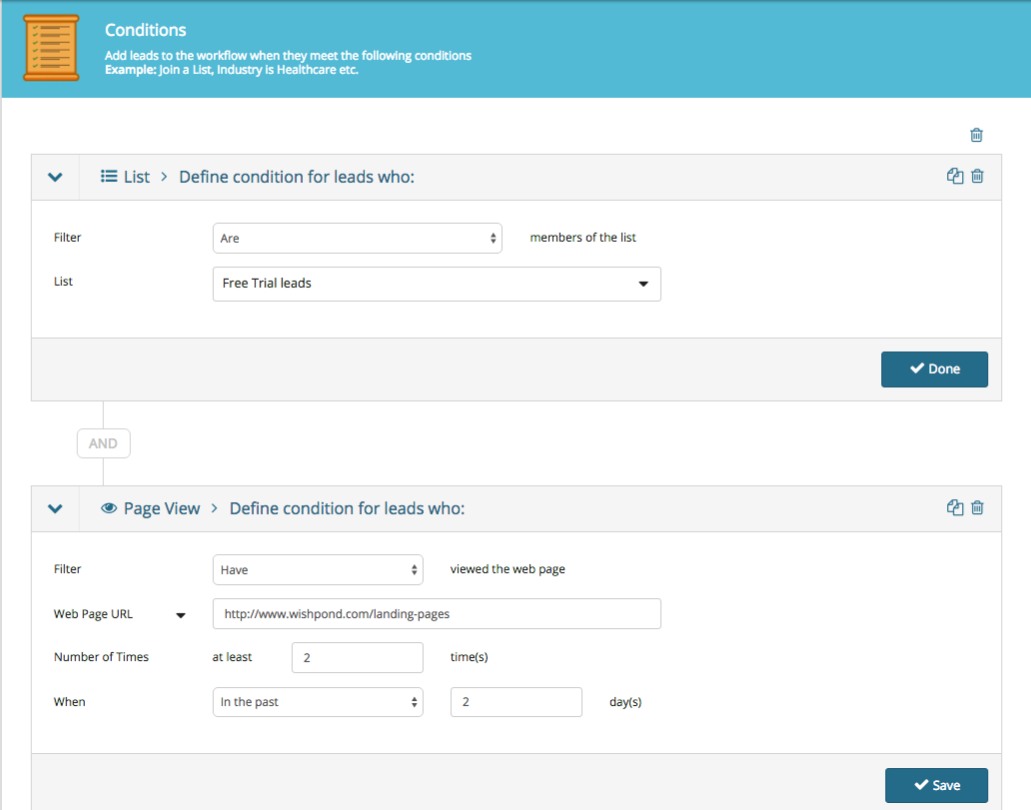
For instance, let’s say your free trial lead visits one of your business’ product pages twice in two days. You might want to send them an email asking them if they have any questions about the product or offering a platform comparison sheet focused on that specific product.
Here’s the simple set of conditions you’d set to trigger that email being sent in a marketing automation platform:
marketing and sales funnel
I’ll get into the actions this might trigger below.
Important Points about Free trial Leads:
To onboard a free trial lead it’s essential you give them each and every selling-point your business offers. But it’s equally essential you do this in a less-than-salesy way. I recommend delivering buying guides, case studies, competitor comparison charts, and making your exchange as personal as possible.
For more on onboarding free trial leads, see the section on late-stage lead nurturing below.

2. Opt-in Lead Generation:

Your business can generate opt-in leads by offering valuable content to people in exchange for their email address.
Essentially, your business creates valuable, educational content interesting to your target market. Either through blog subscription (i.e. a reader of your business’ content decides they want to receive it regularly and subscribes via a form or website popup) or email-gated content (i.e., a visitor to your site or blog is incentivized to provide their email address in return for an email-gated comprehensive resource).
Important Points about Opt-in Leads:
Opt-in leads aren’t equivalent to free-trial leads (which are already semi-nurtured) and as such they’ll need more nurturing before they become clients or customers.
Even so, the benchmark percentage of opt-in leads who end up actually closing is lower than 10%.
Which is why we need to generate as many of them as possible, and also ensure they’re as qualified as they can be. That, of course, brings us to landing pages….

3. Landing Pages:

Landing pages are how you get the opt-in of most of your leads. For the purposes of this guide, I’ll be more accurately describing squeeze pages in this section (which are simply landing pages optimized for lead generation).
For instance… 
marketing and sales funnel guide
Creating a landing page like this one places a visitor’s attention on the single conversion ask: there’s no navigation bar, no sidebar links, and the focus of the page is on the CTA button.
Software company Axway increased their marketing ROI by 291% and saved $100,000 per year by building custom landing pages for their PPC ads. Instead of sending traffic to their homepage they built a dozen landing pages designed for conversion. It just makes sense. 

Click here to check out Wishpond’s landing page platform and start building your own optimized funnel, completely free up to 200 leads.

Marketing and Sales Funnel Stage Three: Nurturing Leads


Just like there’s no point in driving traffic to your website if you’re not converting them into leads, there’s equally no point in generating leads if you’re not going to turn them into sales.
The best strategy of email marketing is what’s called an email drip campaign, so called because of those fancy irrigation systems which slowly drip water onto a plant or seed.
Essentially, you deliver a set series of emails (6, initially) over the course of a couple weeks from the moment your lead gives you their information. These emails are designed to inform and educate your lead, develop trust and a relationship, and ultimately encourage them to find out more about your business and eventually become a customer.
Let’s get into the specifics...

Email Drip Campaigns:

A critical component of lead generation is segmentation: you need to know what your leads are interested in so you can effectively nurture them towards a sale.
For many businesses this will be straightforward (particularly if you do one thing). For others (Wishpond for example) it’s a bit more complicated.
Businesses might have a few different selling-points. If a lead is particularly interested in one of them, selling them on another might be completely ineffective.
The best strategy for nurturing opt-in leads is to do so based on the subject they converted on initially. For instance, let’s say someone converted on an opt-in page for an ebook on landing pages, here’s how we’d set up an email drip campaign on that subject:
Firstly, write your emails… Although you should test the frequency and content of your lead-nurturing emails, the rule of thumb is 4:1:1: four educational, one transition email, and one sales email:
  1. First article: Basic - simple but highly relevant
  2. Second article: Transparency - builds rapport
  3. Third article: Resource - highly valuable for every business
  4. Fourth article: Personal - “Mistakes I’ve made and what I learned” with some business exposure
  5. FIfth article: Comprehensive - long-form, shows your business clearly
  6. Sales: Personalized and informal. Prompt a conversation, VIP demo, or free trial.
For a lead interested in landing pages, they might look like this:
  • Email #1 Subject Line: “The next step for your landing pages”
  • Email #2 Subject Line: ”We just did something with our landing page that you have to try”
  • Email #3 Subject Line: ”Free image resources we've compiled since 2013”
  • Email #4 Subject Line: “My most influential landing page A/B tests from 2015”
  • Email #5 Subject Line: “How to set up a sales funnel with multiple landing pages (step-by-step guide)”
  • Email #6 Subject Line: “Setting up a time to talk landing pages”
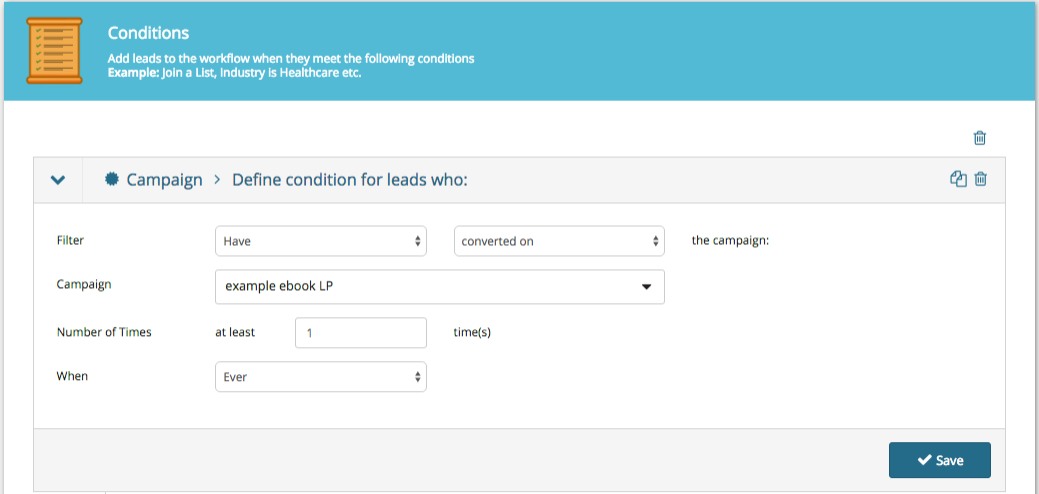
Secondly, set the conditions of your email drip campaign.
guide to marketing and sales funnels
This basically just says that all leads who have converted on an opt-in page (in this case, for a landing page ebook meet our conditions and will be sent our nurturing emails.
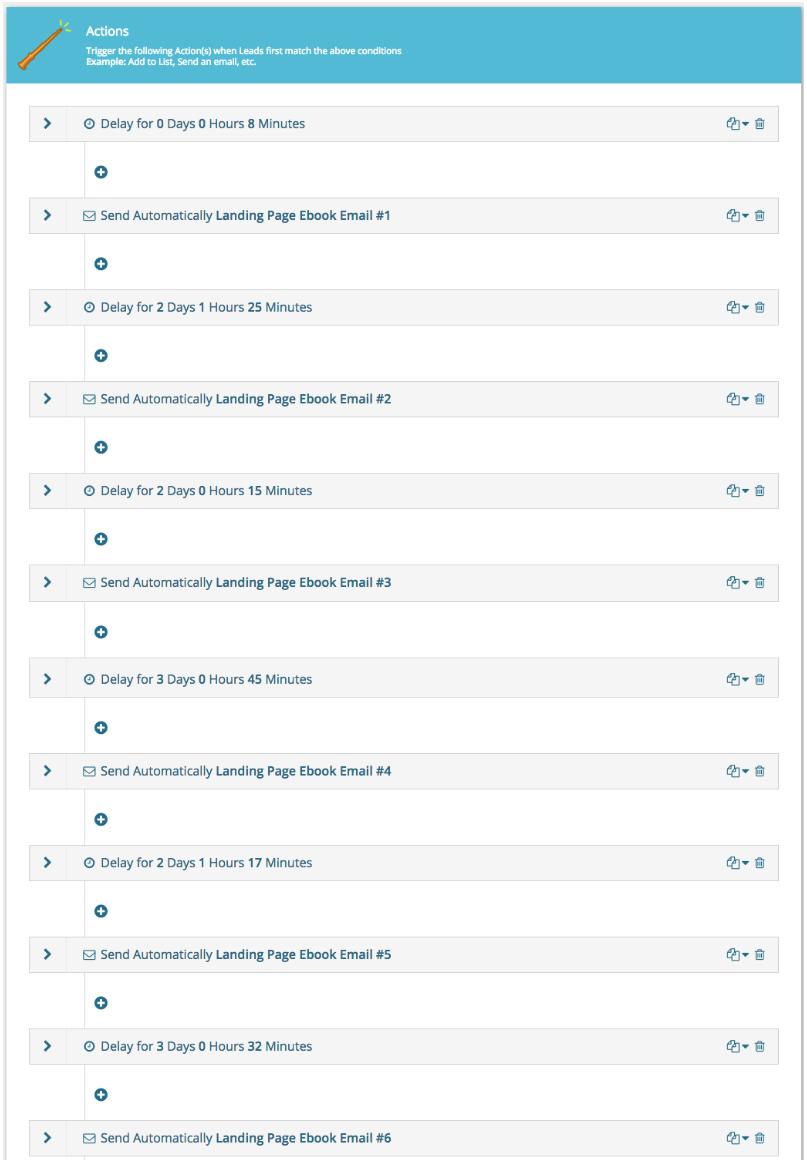
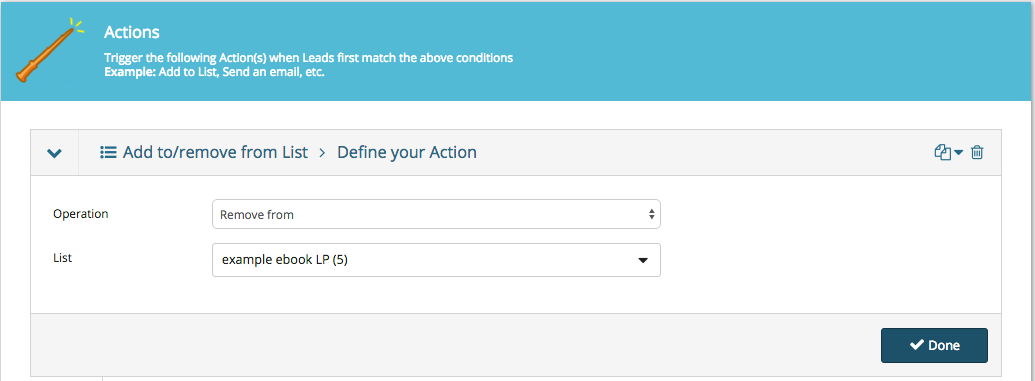
Thirdly, set the actions for this workflow. We need to determine what happens when someone meets the conditions above:
guide to marketing and sales funnels
I’ve set a 7 minute delay after the initial condition is met (conversion) and then two or three days between all the subsequent drip emails being sent. I send them around the same time every day to better personalize the campaign.
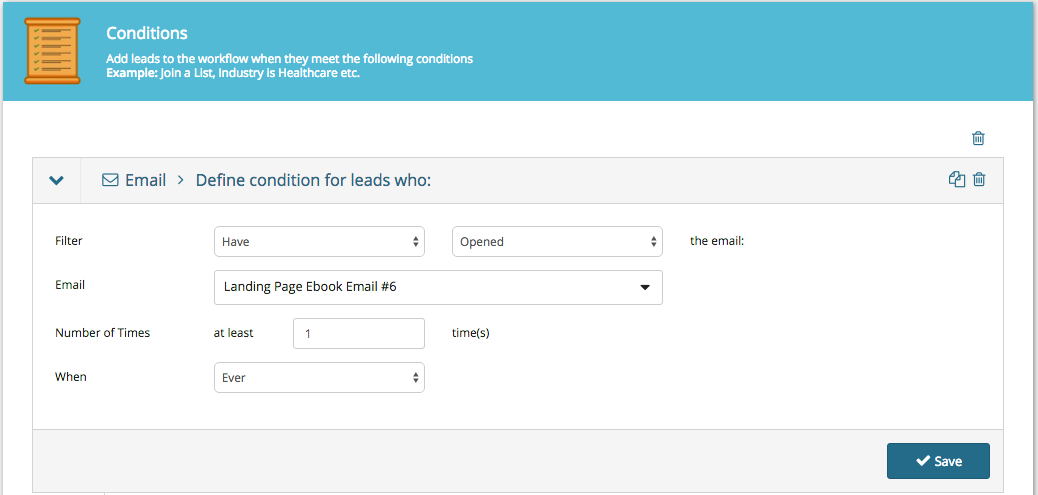
Next we have to set a separate condition to stop our workflow and move our leads to the next stage of our sales funnel...
guide to marketing and sales funnels
Important Points about Email Drip Campaigns:
The most crucial part of email marketing drip campaigns is testing your content. You’d be amazed how impactful a simple subject line change can be on a campaign’s open or click-through rates.
A few lead-nurturing best-practices to keep in mind:
  • Keep it personal. Use first names, casual language, and prompt a back-and-forth. It’s far harder to unsubscribe or refuse a request from someone you’ve spoken to personally or have a relationship with.
  • Keep it focused on the subject they’re interested in. Segment carefully. Test the resource email I’ve recommended above.
  • Keep it short and to the point. Tech and B2B leads receive dozens of emails every day (at least). Make yours easily skimmable and ensure it communicates value quickly.
  • Have someone monitoring the “from” email account. If a lead being nurtured does respond don’t let that communication be lost.
For more on creating email marketing drip campaigns, check out my article "How to Create Email Drip Campaigns to Nurture Leads"

Marketing and Sales Funnel Stage Four: Closing Leads


Now it’s getting exciting. We’re a simple step away from turning a hot lead into a closed lead. They just need that little nudge.
This next stage is a short and simple one, very similar to the one before...

Late-stage Lead Nurturing Campaigns:

A late-stage lead is someone who has expressed interest in your platform beyond the fact that you produce valuable content.
This is a delicate stage, as it’s essential that your business is paying attention to the actions of your leads, or you could miss the moment they’re most interested in a paid conversion.
Another term for a late-stage lead is “hot.”
Here are a few common actions of leads who might be heating up:
  • They’ve visited your company’s product, pricing or plans pages. You can set this as a condition by choosing “URL + contains.”
  • They’ve downloaded one of your more sales-oriented pieces of content, like a buyer’s guide or competitor comparison table.
  • They’ve gone to your “About Us” page.
  • They’ve attended a webinar and asked a service-focused question in the Q&A session. The webinar host can manually make note of this in their lead profile.
Similarly to the early-stage lead nurturing, late-stage is a simple email drip. This time however, the content is a bit different.
We’re trying to answer three primary lead questions with late-stage lead nurturing:
  • How does your platform address my pain points?
  • What do you offer that your competitors don’t?
  • How does your service or platform work?
Here’s my recommendation for the five emails of a late-stage email drip campaign:
  • Email #1 Subject Line: “2015 marketing automation platforms buyer’s guide”
  • Email #2 Subject Line: “5 use cases to inspire”
  • Email #3 Subject Line: ”Some kickass case studies from the past few months”
  • Email #4 Subject Line: “A video breakdown of the Wishpond platform from top to bottom”
  • Email #5 Subject Line: “Re: January discount for people we like”
Remember, all of these emails need to be tested. The recommendations I have above (for buyer’s guides, use cases, case studies, platform breakdowns and a promotion) are simply that, recommendations.
Once this campaign is finished, your lead will have either converted to a paid plan or not. Simple.
If they don’t, your funnel can’t simply forget about them.
A lead who doesn’t convert when you want them to isn’t a lost lead, but simply a lead working to their own schedule.
As a result, you need to move them (rather than drop them)...
guide to marketing and sales funnels
This keeps your leads within your brand’s communication strategy and keeps you top of mind.
Important Points about Late-Stage Lead Nurturing:
Often by the time your lead becomes “late-stage” they will already be exploring your business as possibly addressing their pain-points. As such, you don’t want to keep nurturing them if they’re already ready to convert.
The simplest way to ensure your business reacts at the right time (and doesn’t under or over-shoot) is to set up something called lead scoring.
Lead scoring is a feature of marketing automation which assigns values to the actions of your leads.
If a lead goes to your pricing page a couple times in one day you know they’re thinking about a paid conversion. You don’t want to keep communicating with them like they’re a new blog subscriber, but rather push them to act now (perhaps through an exclusive, time-constricted discount or something). 
Lead scoring allows you to do that. Two visits to a pricing page might be the conditions for a lead-score setting of 10, which triggers a late-stage email series or even a sales call.

Marketing and Sales Funnel Stage Five: Retaining Customers


That’s where most sales funnel articles would stop. We’ve generated our lead and nurtured them to a sale.
But this ain’t no ordinary article.
Let’s take it a bit further, because it’s really not too much work to optimize your retention strategy with marketing automation...

Top-of-Mind Campaigns:

It’s substantially cheaper to re-sell to previous customers than to generate new ones (five to ten times cheaper) and they spend around 60% more on average.
So investing in retention is a good policy, particularly because it’s so incredibly easy to set up...
For B2B companies, every time your salespeople or drip campaigns secure a lead’s patronage, their contact details should be added to a “Customers” list (either automatically with a simple workflow, or manually by a sales associate/account manager).
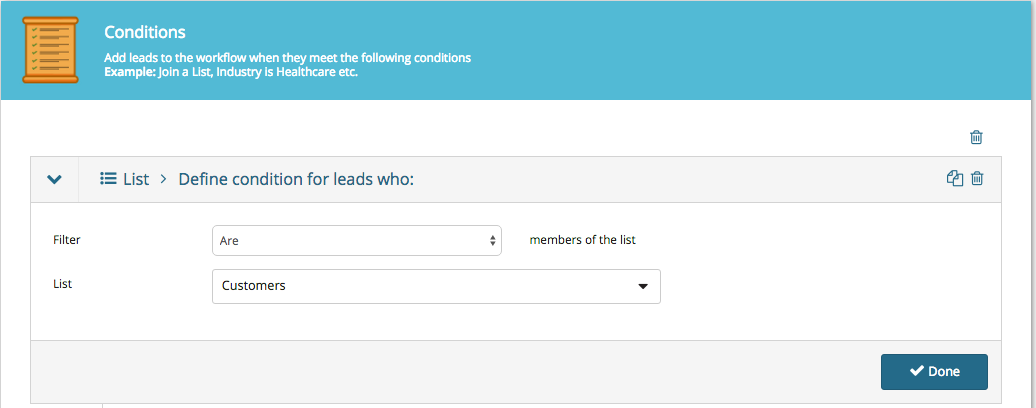
Create a workflow for all people who are added to your “Customers” list:
guide to marketing and sales funnels
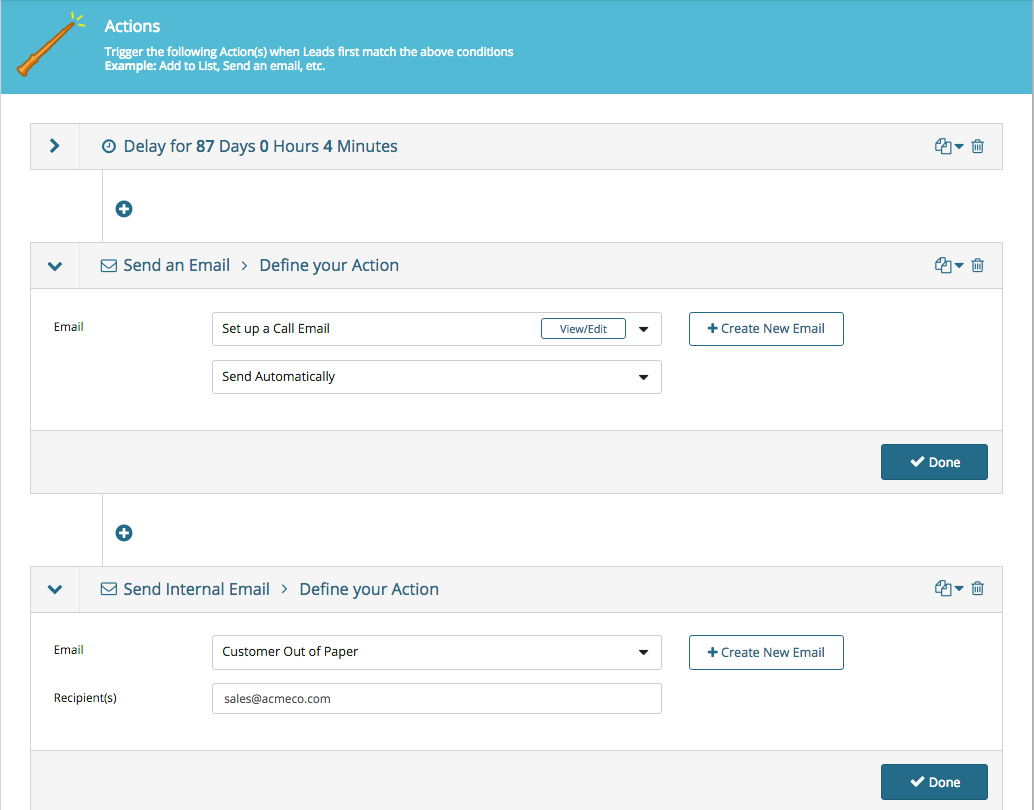
Every time you add someone to your “Customers” list they’ll meet the workflow’s conditions and the actions below will be started:
guide to marketing and sales funnels
The image above is more an example for B2B companies with three-month sales cycle (for instance, you market a company which sells stationery or paper which runs out roughly every 3 months). We set an automatic “are you ready to buy more paper?” email with an 87-day delay.
You’ll also see that we’ve added the action of sending an internal email to the sales team notifying them that one of their accounts needs to be called.
For SaaS or B2C customers, it’s more likely that we’d simply send a marketing newsletter when a sale or platform update is coming up.
That said, you can absolutely automate monthly or bi-monthly “touching-base” emails with marketing automation workflows.
For more on re-engaging leads and customers, check out my article "5 Ways to Engage Email Subscribers that Won't Be Ignored".
Important Points about Top-of-Mind Campaigns:
Marketing automation should make your life easier. It allows you to schedule and optimize communication without thinking about it.
That said, it shouldn’t pinhole you into one single strategy which can’t be changed.
Your marketing automation platform should be flexible and easily-altered. Have a new email or subject-line which has better open or click-through rates? You should be able to plug it in. Have a new lead-generating campaign or ad campaign? You should be able to easily add those new leads to an existing workflow, List, or drip campaign.
10 years ago the problem of marketing automation tools was that they were too rigid.
Yes, if you spent six months (and had a developer) you could create something which did what you wanted it to, but changing it seemed to break the whole process, like a popsicle stick castle - sure it looked pretty, but try to add a new campaign to the bottom and the whole thing topples to the ground.
Fortunately, that’s no longer the case. Check out Wishpond’s marketing automation platform (totally free up to 200 leads) if you don’t believe me.

Conclusion


Hopefully this comprehensive guide has given you a better idea of how a marketing and sales funnel works, as well as how your business might implement one.
If you have any questions about any stage don't hesitate to reach out in the comment section below.