Showing posts with label google analytics. Show all posts

Wednesday, 21 June 2017

10 FREE SOCIAL MEDIA MARKETING TOOLS


10 FREE SOCIAL MEDIA MARKETING TOOLS

Buzzsumo
Used by many brands, Buzzsumo hits the nail while generating the right content on social media! It's simple, straightforward and gives you, in a matter of seconds, the current search rate of your "look-alike" content 

Canva
Canva is a market place for designer tools. All you need is a bit of creativity and a clear vision of your design and Canva gives you much more than what you asked for. 

Hashtagify
Hashtagify helps you know how your hashtags rank in the social channels. type your desired hashtag in the search bar and you'll get the top 10 hashtags related to it, direct and to the point.

Buffer
Buffer is Easy and extremely efficient to schedule your social media posts. It's just a click away process and the best part is the weekly reports of how your tweets have performed!

Hootsuite
Hootsuite is similar to Buffer in scheduling your social media posts. if you are new into social media marketing I would personally recommend starting with Hootsuite as it's comparatively easier to understand.

How Sociable
How Sociable is to literally find out how sociable your brand is! A free account in How Sociable gives you access to monitor 12 social media accounts simultaneously which honestly, is quite a successful start for any business. 

Social Mentions
Social Mentions is perhaps the easiest way to monitor your brand's mentions in the wide web. All you have to do is mention your brand name or any target keyword and give it a second before you have your results bubbling on the screen.

Tweet Deck
Tweet Deck allows you to maintain, monitor, schedule and analyze your tweets. With lots of options available, it is perhaps the best social media monitoring tool for Twitter.

Google Analytics
If you are looking to analyze your social presence, Google Analytics is what you should be looking for! It's deep, insightful and although it requires time and effort to study its various features, it's a life savior, precisely giving you what you want, at all times!

FollowerMonk
Designed by Moz, FollowerMonk gives you all the necessary details of your twitter page like who your followers are, their geographic location and even influencers who can help you

SproutSocial
SproutSocial is a holistic tool as it helps you schedule, monitor and analyze your presence in the social world. It's prominent as it also includes social CRM tools and team collaboration tools, that sets it apart form the rest of its competitors!

Tuesday, 13 June 2017

7 Advanced Email Tools to Pump up the Volume on Your Marketing


Creating an effective email full of engaging content for your readers is crucial for achieving a good open rate, strong inbox placement, and generating business, too. But how can you take your emails from good to great? Here, we’ve listed some advanced email tools you can use in conjunction with your VerticalResponse account to turn up the volume on your marketing:


1. Popup Domination 

Once you have an email sign up form set up on your website, how do you get your visitors to take notice? A pop-up form! Yes, pop-ups may have been huge annoyances in the past, but they’ve come a long way. Popup Domination allows you to determine the amount of time a visitor is on your site before they see the sign up form, and how often. They also offer analytics, testing, and provide a variety other cool features. You get all these features and a guarantee that your list will grow for a one-time fee.

2. COLOURlovers Photocopa

Add a little oomph to your email or website design by creating a color palette based on any image. Colourlovers is a free service. Simply, upload your own photo from anywhere on the web and add it to the gallery for others to use as inspiration or keep it private for only your use.

7 Advanced Email Tools to Pump Up the Volume on Your Marketing

3. Litmus Scope

Have you ever received an email that you loved and wished you could recreate it? Litmus Scope can help you out. Currently it’s only integrated with Gmail, so if you don’t have a Gmail account, you’ll need to set one up. Litmus Scope requires that you either know HTML (to make edits) or that you use the Canvas tool in VerticalResponse Classic. Below, a screenshot from our VerticalResponse newsletter illustrates what Litmus Scope does. The left side is the scoped email and the right side shows is HTML code for it.

7 Advanced Email Tools to Pump Up the Volume on Your Marketing 7 Advanced Email Tools to Take Your Marketing to the Next Level

4. Premailer
If you want your emails to match your website, meet Premailer. Just paste in your website URL and Premailer will create inline CSS to use in the HTML of your email. For your email to work best on all email programs, your CSS should be inline, and a lot of websites use External Style sheets. This works fine for websites, but if a browser-based email program is in the mix, all your hard work will be ignored. Premailer is a free program, and they give you the code you need to use without having to set up an account.

5. Email Spam Test
Here at VerticalResponse, we work hard to ensure your email gets safely delivered to your subscribers’ inboxes. However, if your content and HTML aren’t up to snuff, it can cause delivery issues. Email Spam Test can help you identify any issues before you send your email. To use Email Spam Test, you’ll need access to your email’s HTML. Once you’ve run a test, you’ll receive a score and a report of things that may need to be changed. Here’s an example below:

7 Advanced Email Tools to Take Your Marketing to the Next Level


6. Dasheroo

Your VerticalResponse account provides reporting on the emails and social posts that you create. But, if you want to dig deeper and track email reports over time, or track other social accounts like LinkedIn, check out Dasheroo. It enables you to track the following:

  • Performance of your most recent emails (subject line, date, sent, opens, clicks, bounces and unsubs)
  • List size
  • Engagement (trending open and click rates for past 30 emails)
  • Trending Bounce and Unsub rates for past 30 emails.
The best part? Being able to see all this next to your Google Analytics, Adwords, Facebook, Twitter and other apps all in one place – for free. Find Dasheroo in our VerticalResponse Integrations Marketplace.

7 Advanced Email Tools to Pump Up the Volume on Your Marketing


7. VerticalResponse

We couldn’t write a blog post about email tools with out mentioning some of our own features, of course. You need a sign up form to grow your email lists, and you want something easy to use. No sweat, use your VerticalResponse account to create a sign up form. Embed it on your website, or use a hosted version with various templates. You can share your sign up form on Facebook, Twitter, or anywhere you can share a URL. There are just a few steps to set it up and it is customizable so you can add any fields you want to collect. The best part? It’s free to set up and use.

These seven tools should help you pump up the volume on your marketing for little to no cost. What other products do you like to add to your email tools? Let us know in the comments.


Source

Thursday, 8 June 2017

Start Blogging! 10 Reasons Why You Think Time Wasted Might Be Time Well Spent


 Yes it’s true, if you are considering a blog for your business, or revisiting one you haven’t posted to in a while, there is a time commitment…but DON’T RUN AWAY FROM READING THIS! First and foremost you got to this blog didn’t you? I blog about 2 times per week and I try to make it relevant to helping small businesses grow using email marketing and some pretty cool marketing tools & techniques. But that’s what this blog is all about.
Blog Sharing Buttons
So you’re asking yourself, “Why do I need to spend time I don’t have writing about god-knows-what?” Well there are a bunch of reasons that I’ve outlined below. And what do you write about? I’ve given some ideas in this blog post Writing Your Email Newsletter, What Do You Have to Say? Eventhough it’s geared towards email marketing, the ideas translate nicely into ideas for your blog. So here are 10 reasons it makes sense to start blogging for your business:
1. Get Shared – People will retweet you and post your blog content to their Facebook pages if they think it’s worthy. This could potentially give you access to new readers and new customers. You can track how many people have retweeted your blog content by going to Backtweets.com, entering your blog post URL and paging through all of your retweets.
2. Gain a Website Presence – If you don’t have a website yet, it’s easy to set up a blog quickly. San Francisco retailer Timeless Treasures does a great job at this. Then you can post about new products you might have or new services with your address and phone number so that folks know where to find you.Email List Sign-up
3. Build Your List – You can get new readers/prospects by adding an opt-in form to your blog so new readers can be included on your email marketing list. Then you can send them newsletters with the hopes of converting them to customers. VerticalResponse allows you to easily publish an opt-in form to your TypePad blog.
4. Search Engine Rankings – You can host your blog on your domain to get more traffic. This could give you higher rankings in the search engines with your specific keywords. For instance in each blog post we do we link the term “email marketing” back to our domain verticalresponse.com. As a result for that particular keyword, we’re pretty high in the natural rankings for that phrase.
5. Get Closer to Your Readers – So many customers want to know there are human beings behind the companies they do business with these days. Blogging is a perfect platform for you to easily do this. Your posts don’t have to be long and they should be easy-to-read. One thing that works great for me is that I pretty much write the blog like I would speak, conversational and friendly. Cathedral Ridge Winery has a great blog called the Barrel Room Buzz and they talk about everything from harvest to recipes that go well with their wines. This makes readers feel closer to the companies they are doing business with.
6. Send Your Email Recipients to Your Blog – You can include your links and excerpts of your blog posts right in your email marketing campaigns. This spreads out your message to all of your recipients who could then forward your email to their friends.
7. Quick Change – You can change your content and update your blog in seconds. Use your website as either a brochure site or a retail store, use your blog as the voice of your company and let your readers in the front door of your company.
8. More than 140 Characters Allowed! – You can have more content on the blog than you can on Twitter, or that you’d want to on Facebook. Use these social media outlets to send people to your blog and build up your own traffic to your domain, not theirs.Blog Traffic Graph
9. Analyze – You can tell what type of content you write attracts the most people. You can either use Google Analytics or most blogging software will tell you what is causing your traffic to spike. Then you can write posts that readers want to read more.
10. Get Feedback – As opposed to many static websites, you can ask your readers to comment on your articles. For instance at VerticalResponse we have 3 different blogs. One is specific to product changes that are going to be happening. We can solicit feedback from customers before we release the new features to gauge how they feel about it.
So if you think you’re wasting your time on blogging, think again! There are tremendous benefits to committing some of your busy time to communicating via a blog. Start today!

Monday, 8 May 2017

A Guide to Setting Up Google Analytics for WordPress


Google Analytics is a versatile reporting and tracking system that turns out valuable data regarding the performance of your website. Launched in 2005, it is an easily operable system, even for beginners. It also has many advanced features that can help with the creation of complex reports, track visitors’ movement paths through the site, and monitor conversions of goals you set at specific intervals. The service is free, although a premium option is also available for advanced users and corporations.

The benefits of Google Analytics

The data received through Google Analytics provides in-depth knowledge regarding the various performance aspects of your website. Through these reports, you can track the performing and non-performing areas also. You can track marketing campaigns, integrate Google Adsense and Adwords to see reports regarding revenues earnings site-wide. You can also track e-commerce dealings, campaigns and keywords to identify the best revenue sources.

Google Analytics account

The first step of using Google Analytics is to create an account on the Google Analytics website. You need to sign up with your existing Google account and start creating a new account there. Be sure to enter your account name, website name and URL address in the requisite fields. Then you need to select the “Data Sharing Settings” at the bottom of the displayed page. By default, all four types of data are selected. Click on “Get Tracking Id” to proceed to the next phase.

In this context, you may also configure the “User Management” tab in the Admin area. Here, you may set up accessibility options for different users of your website with regards to Google Analytics reports. There are four permissions available – ‘Edit’, ‘Collaborate’, “Manage Users” and “Read and Analyze”. In this page, you will also be able to view all the webpages where you have enabled in Google Analytics reporting.

Tracking code

Agree to Google’s “Terms of Service” page for continuing to the next page. You will get the tracking id here. It will start with the prefix ‘UA’. You need to copy this code and come back to your website. In your website’s Google Analytics Settings Tab, copy this code to the “Tracking Id” text box and click on “Save Settings”. This will link your website to the Google Analytics site and enable exchange and processing of data between them.

Adding Google Analytics to WordPress

After creating your WordPress website, the next step of setting up Google Analytics is to add the tracking id to your WordPress site’s pages. There are three ways of achieving this integration:
Manually enter the JavaScript tracking id before the closing <head> tag of your webpage. Repeat this for every page of your website or you may track selective pages in this manner.
In most regular WordPress themes, you may create a child theme and add the tracking id in the header.php file, in the same position as the manual entry (discussed above). More advanced and premium themes have a separate place of entering the tracking id in the Settings menu.
Use a plugin for Google Analytics and configure the “Web Property” tab by putting the tracking id there.


Google Analytics currently uses asynchronous loading to ensure the faster processing of webpages and not affecting page loading speeds. This mode ensures that the tracking code executes only after the entire page is loaded in the user’s system.

Now that Google Analytics has started functioning for your website, you need to wait for 12 to 24 hours, depending on your website’s traffic, for report generation.

Different reports in Google Analytics

The ‘reports’ area of Google Analytics provides access to the different aspects based on the data collected from your website. These reports are generated from the date of installation of Google Analytics only. There are several categories in the ‘reports’ section:

Dashboards

This section allows users to display any report from a large number of pre-made reports generated by Google Analytics. There are two sections – Blank Canvas and Starter Dashboard. You may create your own kind of reports in the Blank Canvas section. The starter dashboard is the area where you may preview the various reports available.

Shortcuts


As the name suggests, this option allows creating links with the reports you use on a frequent basis. The menu displayed at the top of every Google Analytics report has this option where you may add a ‘shortcut’ of the same. From this menu, you may also email the report as an attachment or save it in different downloadable formats.

Intelligence events

This option allows you to track daily, weekly or monthly occurrences as per your choice. These trackable events include clicks, visits, page views, sales conversions, bounce rates and so on. This page allows the creation of alerts also, which may be applied in general to all traffic or upon specific criteria fulfillment. You may choose an alert parameter among a number of them provided, with the freedom to set up the value of the alert triggering. These alerts may also be received through email.

Real time


This section generates reports involving the visitors currently accessing the website. The default ‘Overview’ page shows the number of live visitors with graphs available for per second and minute views for the last half an hour. Most visited pages and referrals, top social traffic and content are also displayed in this section.

Audience

You will find over twelve different reports in this section. Audience reports include analysis on visitor demographics, location and the platform used for viewing your website. This section is important for determining the type of customers who are interested in your website.

Acquisition


This section provides information about the origins of the people visiting your website. The reports include data about referrals, channels, paid and organic search engine traffic, along with a comprehensive breakdown of social media traffic to your website.


Behavior

The behavior section lets you know the activities of the user upon their visit to your website. These include the user’s site searches, landing pages and exit pages. This provides valuable data about the user’s preferences in the website over a period of time.

Conversions

This section offers valuable e-commerce reports regarding product and sales performance of the website. It can also track transaction speed and purchase time of the user. The conversion page may also be used for advanced reports like Goal Creation and Monitoring.

Thus, you can now install Google Analytics on your WordPress website, monitor its performance and formulate strategies and tactics for your website’s improvement with proper data analysis.

Your next step

Now that you know how Google Analytics can help you track your online campaigns why not give it a go? You can start by learning how to set up GA to track email list sign-ups so that you know which of your marketing campaigns drives you the most subscribers.
Your thoughts?

How has Google Analytics helped you improve your website? Did you use it to learn anything about your website that you didn’t expect? Share your thoughts in the comments.

Friday, 5 May 2017

How and why you should use Email Marketing Automation


Marketing Automation was one of the top trends of 2016, here is how to use it in 2017

Anyone who has run an online business, even for a short time, knows that digital marketing offers a wide range of possibilities. A survey of marketers by Regalix tells us that website and email are the most effective channel of online communication. For every retailer email is the primary tool for bolstering sales, however sending generic newsletter campaigns tends to be less and less appealing to subscribers. FreshMail’s research shows that highly personalized campaigns achieve better results and that’s our subject here.

It’s important to get to know the real needs of your customers and to send interesting, engaging content based on advanced personalization and optimization of email marketing campaigns. The potential of Email Marketing Automation (EMA) helps marketers send effective messages suited to the needs of subscribers in a defined contact or communications strategy like a welcome or nurture sequence. With offers tailored specifically to their interests the achievement of your sales goals is just a matter of defining them and allocating the resource to set them up and optimise.


Download Expert Member resource – Email sequence template
Quickly define a contact strategy for a welcome or nurture sequence to help brief designers or copywriters.
Access the Email sequence contact strategy template

What is Email Marketing Automation?


Email Marketing Automation is an ecosystem of tools and mechanisms that helps to automate ongoing conversations with customers and maintains delivery of a high degree of personalized content. This allows you to make sure that subscribers receive tailored content they simply want to read.

An important element of EMA is integration of your email marketing system and website with Google Analytics or other proprietary tracking analytics system. For the purpose of this article we will be using the free to use Google Analytics as a working example. This enables marketers to gather information about subscribers beyond the standard metrics that are part of email campaigns. All you have to do after integration is set specific goals in Google Analytics. While monitoring traffic to your site, Google Analytics pairs the email addresses with cookies in the subscriber’s browser. Later, the data of identified recipients is available in the email marketing platform. The information collected this way allows you to create more effective campaigns that are targeted on the basis of user behavior and the preferences of individual customers.

Campaigns based on GA data can be sent using specially designed autoresponders or a dedicated mailing prepared specifically for subscribers who have completed an established goal or set of goals. Both methods are highly effective in supporting the sales process. You can achieve a similar effect through the use of tracking codes - small pieces of code script that you place on an internet page. This enables you to see whether a particular page has been visited and helps to evaluate the conversion rate of email marketing campaigns.

Using data from email marketing campaigns, user behavior on web pages and individual purchase histories, marketers can plan fully personalized communication. They can identify groups of subscribers with common characteristics and target them with messages that appeal directly to their needs. Functionalities of EMA allows you to run a highly effective lead nurturing programs. You can, for example, design a newsletter with a special structure that contains one part with the main offer for all subscribers. Also an additional offer with dynamic content, which is entered automatically according to sales data ascribed to particular personas and email addresses. This way you can be certain that every newsletter contains something interesting for a particular recipient.

How to use Email Marketing Automation:

Campaigns based on behavioral data from your website

Why do visitors spend time on your website? It’s not always to buy something or to contact a company. They often simply want to see what’s new, gather information about a products and services or check a price. The lead nurturing process of turning interest into a sale can last for a few days or many months. Information gained from the use of data from Google Analytics and tracking codes lets marketers craft targeted, tailored messages that match the interests and page view history of individual customers. This makes cross-selling and up-selling much more effective.

Let’s say, for example, that particular subscriber visits your page from time to time to look at televisions, although he didn't buy anything yet. You can send him a special campaign that specifically promotes televisions at a discounted price, larger televisions at the same price, top seller from this category or highly recommended models. You can employ the same strategy in your regular newsletter as well by dedicating part of it to dynamic content that features discounts or rebates on televisions. Remember to carefully monitor your results and to stop this kind of targeted promotion after a conversion.

Autoresponders and automatic follow-ups

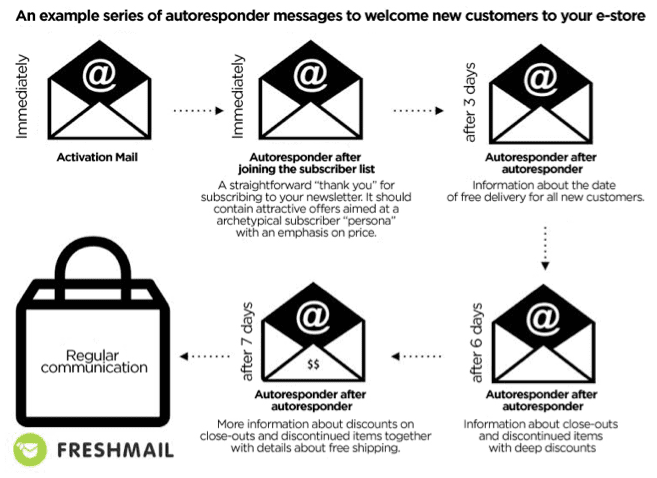
One of the best and simplest examples of EMA is the creation of welcoming emails. This is a cycle of messages sent at different time intervals to new subscribers to your newsletter. The goal of the campaign is to encourage recipients to complete their first purchase with unique, dedicated offers. This kind of gradual process not only leads to conversions but allows you to gain knowledge about the preferences of your customers.


Abandoned carts

Abandoned carts are something we all have to deal with and there is no one-size-fits-all solution. Each customer is different therefore you have to create personalized, automatic reminder messages that can later be expanded into a sequence of messages. Since price is often the issue with abandoned carts, some kind of discount can be an effective solution for enticing a customer to complete transactions. You can use a static code for all customers or dynamic codes to generate one for each customer.

Product recommendations

Using behavioral data from your website, you can easily create 4 kinds of personalized messages -
“Customers who purchased this product also purchased these products.” Remember not to display products that have already been purchased by the customer.
“Other customers bought this product together with….”. This allows you present related products.
“The most frequently purchased products in this catergory are…”. Show what’s popular and in demand.
Messages dedicated to abandoned carts and recommended products. These are based on products that have been discarded. Customers are presented with top products from the abandoned category together with the product they left behind.

Such recommendations can also be used in cyclical newsletters as a second primary message. It’s important to remember to rotate your dynamic content so that recipients don’t feel that they receive the same offers over and over.

Who should use EMA?

Every business with an online presence needs to automate their promotions with highly personalized product offers to match individual customer profiles. This is absolutely essential to succeed in online sales. You can only reach your sales potential by sending the right offer to the right person at the right time. Regular email marketing lets you personalize your message and your offer to a fairly high degree but using behavioral data about the activities of users on your site makes more precise customer profiles possible and drives conversion rates even higher.

The sales process is multidimensional and implementing as many of the tools and strategies listed here as possible in order to maximize the flow of information between them is ideal. Good email marketing systems offer dedicated integrations with CRM platforms and ecommerce by sharing API codes. Apart from these integrations, you can also sync multiple apps via Zapier through an easy drag and drop interface that doesn’t require advanced technical knowledge.

Thursday, 13 April 2017

The Beginner’s Step by Step Guide to Google PPC


WHEN it comes time to promote your product or service, one of the quickest ways to get results is with paid advertising. This is typically called pay-per-click (PPC) or search engine marketing (SEM).

There are a number of options to pick from for your paid advertising needs.
The most notable is Google Adwords.
But before you create an account and start advertising, you will need to lay some groundwork in order to get the most out of your Adwords campaign.
So let’s cover a few basics before you launch your SEM campaign.

Set Your Goal(s)

Depending on your business, you will have different goals.
For example, if you sell products online your goal will be to make a sale. If you offer a service, your goal could be a contact for more submission.
The important thing is to know the URL a user must visit in order to be a success.
Without knowing what success is, you can’t measure the effectiveness of your Adwords efforts.
In the case of an e-commerce site, this will be the URL a user gets to after successfully submitting their payment. For a service based website, the URL could be the “thank you” page they get after submitting a form.
Once you know the URL, in Google Adwords you will need to create a conversion tracking pixel.
Here’s how to do it…
In your Adwords account, click on “Tools > Conversions” – you will see a screen like this:

Click on “Select” for “Website”.
From here you will need to fill out some additional information such as:
  • Name – This is where you will name the conversion. You will want to make it something that you can easily recognise and understand in your reports.
  • Value – Here you will enter how much the conversion will be to your business. A few options will be provided like:
    • Each time it happens (same value for all conversions)
    • Value of conversion will differ (by purchase price)
    • Don’t assign a value
  • Count – Decide whether you want to count one or all conversions.
  • Conversion Windows – This setting allows you to set options for tracking conversions.
    • Conversion window – The default is 30 days and it sets the cookie on the visitors' browser. If that user in that browser comes back to your site and completes the conversion within 30 days (or whatever you have set) it will be tracked in Adwords as a conversion.
    • View-through conversion window – The default for this is also 30 days and it tracks the views of your ads. Particularly display ads on Google’s Display Network. If a user views the ad, but does not click and eventually converts on your website they will be tracked as a conversion.
  • Include in “Conversions” – Enabling this setting will simply create a “conversion” column in your reporting. If you are just starting out, enabling this is preferred.
  • Attribution model – Google Adwords gives you a handful of options to determine attribution.
    • Last click – Using the last click attribution will credit the conversion to the last-clicked ad and corresponding keyword. (This is the most commonly used attribution model)
    • First click – Choosing the first click attribution option will use the first-clicked ad and corresponding keyword for crediting the conversion.
    • Linear -When you pick the linear attribution setting, it will distribute credit equally across all clicks.
    • Time decay – Picking the time decay attribution model will give more credit to the clicks that occurred closer to the point of conversion
    • Position-based – The way that position-based attribution works are that it allocates 40% of the credit to both the first and last-clicked ads (including the corresponding keyword), and then uses the remaining 20% of attribution to spread out across the other clicks.
    • Data-driven – While this option is currently in BETA, it will split the credit for the conversion based on previous data for this conversion action. Please note that this will only be available to accounts with enough data.
Once you have entered all of your choices, you will need to save and continue in order to get your tracking code.
On the following screen, you will get a recap of your selections and an option to edit to make any last-minute changes.
Below that you will see the code for the tracking script that will need to be added to your “conversion” pages. These are essentially the “thank you” pages a user will get to after submitting a form or completing a purchase.
The code will look something like this:

You will need to copy the whole script and add it inside the <body> tags of your page template. If you are not sure how to do this, you can email the information to your web developer to implement.
After the code is installed, it will track your conversions moving forward.

Connect Google Analytics To Google Adwords

While tracking conversions are important, don’t underestimate the need to track all your website traffic.
Hopefully, you have Google Analytics installed on your site already. If not, I suggest you stop right here and get it set up ASAP.
If you are already setup with Google Analytics, you are good to go.
Once you have decided to use Google Adwords, linking your Adwords data into Google Analytics can be done in a few steps.
After implementation, you will have a better understanding of how your paid traffic interacts with your website.
But before we begin, you will need to make sure you have the following access:
  • Google Analytics – Your account will need to have “edit” permissions that will allow you to make the necessary changes.
  • Google Adwords – You will need to have admin access to the Adwords account.
Have the right access?
Cool, here’s what you will need to do in order to link Adwords to Analytics:
  • Login to your Adwords account and click on the “gears” icon in the upper right
  • Click on “Linked Accounts”
  • Click the “view details” link under the Google Analytics section and then click the “set up” link next to the site you want to link to Adwords
  • If you have multiple views, select what views you want to link. If you have one view, it will be the only one to select.
  • Either way, click “Import Site Metrics”
  • Click save
That’s it.
You have now connected Google Analytics and Google Adwords.
Virtual fist bump.
To view this data in Google Analytics, you will want to go to “Acquisition > Adwords > Campaigns”.

Here you will be able to view your campaigns and the data associated with it. You’ll notice to the right that you can see conversion data as well.
There is a ton of great insight to be had through Google Analytics.
Among some of my favourite reports are the “Keywords” report and the “Search Queries” report.
If you have been around long enough, you might know that Google Analytics used to show the keywords a user searched for to get to your site through organic search. However, a few years ago, Google removed this option and gave us the infamous (not provided).
However, if you connected Adwords to Analytics you can see the keywords you bid on that someone clicked to get to your site. While it is not organic searches, it can give you some nice insight into what people are actually searching for to get to your site.
The “Search Queries” report will show you what phrases (searches) someone ran in order to trigger your ad and click through on it.
Not only can this data help drive your decisions in Adwords, but it can also be used to influence content creation and other tweaks to your site in order to better serve the traffic your website gets.

Data Drives Decisions

By implementing these two approaches, you will have started to lay a solid foundation to more accurately track your Google Adwords efforts.
When you start to pay money, you will know that your data is being properly tracked so that you know what is or is not working by being able to analyse the data from your campaigns.
Without tracking traffic and conversions, how do you know if it is really working or not?
It’s really hard to know.
That’s why having the right data being measured and analysed, you can confidently make decisions based on your data.
Have you implemented these two techniques for Adwords yet?
Let us know in the comments how you use this to drive decisions.

Monday, 20 March 2017

How to boost the effectiveness of your blog in 2017

Creating a Bigger and Better Blog for 2017
It’s no secret that the most, if not all, profitable niches in online marketing are already highly saturated. If you think you have an idea for a new blog topic, there are probably a thousand blogs that already published the same post. And in time, there'll be more content than humans can consume – resulting in “Content Shock."
Remember that the fundamental law of supply and demand affects everything. The price for any commodity falls when supply exceeds demand. But when it comes to content marketing, you end up paying your audience to consume your content because there’s no price for them to begin with.
In addition to time, thriving bloggers now need to invest in tools and resources that help with content creation. It’s also common for bloggers to bribe their audience into subscribing with free eBooks, discount coupons, and free trial periods.
Whether you feel that your blog is better than others is immaterial. If you want your blog to stay relevant for the upcoming years, you need a solid strategy that efficiently produces and delivers great content to your target audience.

1. Review and Refine Your Content Plan

A blog that stands the test of time is built correctly from the ground up. The first thing you need to look at is your content plan. Start by getting to know your target audience from the inside and out. If you want to build readership, you need to write for them – not for yourself and see who’ll be interested in your stuff.
The online audience is attracted to value. If you consistently provide content that educates, entertains, or encourages action, then people will be naturally drawn to your blog.
To determine what topics matter to them, one strategy is to use Alexa to profile your competitors’ readers. Simply key in your top competitor’s URL to learn information about the audience such as gender, browsing location, and popular search keywords. You can also use Google Keyword Planner for more search keyword ideas.
Next, you can gain an idea of your audience's content preferences using a content research tool like BuzzSumo. Not only will it help you determine the topics and content types that get the most engagement, but it will also help you identify key influencers that can help promote your blog.
To put everything together, make sure you define your blogging milestones that will help you track your progress and tweak your strategy over time. There’s no specific rule for this, so feel free to write anything like the following:
  • Reach 1,000 subscribers in your email list
  • Make your first $1,000 through ad revenue
  • Reach 10,000 visitors per month
Now that you have a good idea on what you want to achieve with your blog, it’s time to develop a content plan for your blog to ensure that your goals will be reached.


The Smart Insights Content Marketing Matrix above should help you determine the main goals that you need to accomplish for your blog this year. Developing a content marketing strategy around your goals will make for an organised plan so you can engage and captivate your audience by producing the right content types.
Below are practical tips for each quadrant that you can use on your blog.
  • Entertain (awareness and emotion) - Use memes on social media or your content to engage your younger audience, assuming that you are targeting that demographic. If humour is not part of your blog’s core values, you can launch fun quizzes and games similar to Buzzfeed’s that reveals information about themselves.
  • Educate (awareness and rational) - Publishing how-to posts and guides about topics related to your niche will keep your audience informed with accurate data. It would be best that you apply the educational aspect of the matrix to your evergreen content, which will be discussed later.
  • Inspire (emotional and purchase) - Your audience wouldn’t want to read a ghost town of a blog. Therefore, you need to learn how to drive comments or increase the social shares of your blog posts so they will know that you have an established readership. Also, you can make use of user-generated content like guest posting and reviews about your writing to increase your profile in their eyes.
  • Convince (rational and purchase) - You need to beef up your blog with authoritative content to impose your knowledge to your audience who will view you as a thought leader in your niche. Developing ebooks, white papers, and checklists allow you to put your skills to good use. For maximum effect, you can use your exclusive content as an opt-in bribe if you are building an email list.

2. Set up Your Landing Pages

To build your blog readership, you need a lead generation strategy that can turn visitors into subscribers and potential customers. A key component for this would be your landing pages where most conversions happen.
To be efficient in converting your audience, a landing page must be well-designed. It must include all the right elements that will draw your audience’s attention and eventually lead them to the subscribe button:
  1. Headline – There are several approaches to writing an intriguing headline. A good strategy is to be specific and uses exact numbers such as "Grow Your Traffic by 200%” or “Attract 100,000 Visitors in One Month”. Also, keep your headline short and focus on the first and last three words.
  2. Description – Remember to be concise and straightforward with your description. Don’t oversell and stop after you’re done highlighting the key benefits of signing up.
  3. CTA – The call-to-action is usually embedded within the opt-in button itself. Again, be straightforward and focus on the benefits. Rather than using "Sign Up Now," try something like "Get Free Access Now" or "Download the Full Report Now."
Darren Rowse is one of the most popular bloggers in the world. The homepage of Problogger.net reflects this.
Looking at the above the fold section, you will easily read a short and clear description of what the blog is all about presented as a series of tasks. It cuts right to the chase and gives visitors a quick taste of what to expect when reading through its content.


Speaking of the content, browsing down the homepage will reveal to you a section of topics covered by the blog. The heading “I need help to…” speaks from the position of the visitor, which is a perfect way to cue them into the categories found in the blog. Clicking on any of the topics will bring them to the page that contains the posts about the topic.

3. Build Evergreen Content

You can’t count on new content to bring steady traffic to your website. That’s why you need evergreen content as the foundation where your blog rests on.
Simply put, evergreen content offers information that has relevance and value for the long-term. To write them, focus on fundamental knowledge, actionable tips, time-tested strategies, or the history behind something.
Below are other tactics that you must implement to ensure that your content stands up to the test of time.
  • Choose the best keyword possible - To help make the most out of your evergreen content, you need to determine a target keyword that is the easiest to rank for. Find one that has a relatively sizable monthly search volume and has the lowest competition. Using tools like SEMrush and LongTailPro should make the job much easier for you since both feature keyword competitiveness for every search phrase you enter.
  • Be exhaustive as possible - That means you’ll have to write content that’s at least 2,000 words long. Cramming in as much relevant information as possible will only benefit the intended audience in their pursuit of knowledge. Just as important, longer content increases your chances of ranking on the first page of search results, which should help your post to receive more visitors.
  • Regularly update your content - Since information tends to change over time, you need to keep your evergreen content updated as well to provide accurate data to your readers. By updating your content, you also keep it fresh so search engine spiders can reindex your page and possible rank it at a higher position.

Looking at WHSR's SiteGround review as an example, you will easily see how this post will be very informative for its target readers. The way the review breaks down SiteGround into its most important elements and distinguish each as pros and cons make it easier for visitors to see what makes the tool good. Also, the screenshots featured all over the page showing how fast and reliable SiteGround serves as social proof to readers.
All these elements in the content not only helps readers understand how SiteGround operates, but also allows them to make an informed decision on whether to purchase it as their web hosting or not. These are the reasons why this type of content can be described as evergreen.

 4. Learn Where to Promote Your Content

Bringing people to your blog isn’t about who has the best content anymore. It’s all about positioning and promoting your website for better discoverability.
While well-established blogs have the upper hand when it comes to the resources and connections that bring exposure, you can still keep up with them by making an effort in optimising sharing and distribution channels for your content. Social media is a great example since it is used by billions of users with different preferences.
You can also leverage the online reach of influencers by launching a blogger outreach campaign. This involves associating yourself with the main influencers who can write or share posts about your brand.
Below are other tools you can use to look for influencers:
  • Ninja Outreach - If you want a simple solution for your blogger outreach/influencer marketing needs, then this email outreach ought to do the trick. You can search for influential bloggers from the platform itself and send customised emails to each to simplify the process of reaching out to your audience with the help of publishers.
  • Traackr - The premiere influencer marketing platform connects you with the best publishers from your respective fields. You can ask for their help to promote your content and spread the word about your blog.
  • FollowerWonk - This tool can help you determine which Twitter influencers related to your industry you need to follow. It lets you analyse their followers as well so you can get a better idea on how they engage with their audience on this social media platform.
  • PeerIndex - Aside from influencer marketing, PeerIdex (formerly Brandwatch) can help you with your PR, reputation, and advertising needs. The tool also lets you gather consumer insights so you can better feel the pulse of your audience and help you come up with engaging topics to discuss with them.
You can refer to this post to learn more about promoting your blog through social media and blogger outreach.

5. Track and Measure

If you want your blog to proliferate, you need to treat it like a business that requires constant attention. Aside from using your blogging milestones as a guide, you should also specify key performance indicators or KPIs that can help you check what’s working and what isn’t.
For most blogs, below are the KPIs you need to look at:
  • Page Traffic and Traffic Sources – How many visitors do you get and where are they coming from?
  • Bounce Rate – What is the likelihood of someone exiting your blog before clicking anything else?
  • Social Media Shares – How much social media shares does your content generate?
  • Click-Through Rate – Are your headlines effective in capturing your audience’s interest?
  • SEO Rankings – Where is your site positioned in search engine results pages?
  • Email Subscribers – How many leads do you have on your email list?
  • Conversion Rate – How optimised are your landing pages in securing conversions?
One of the best tools that can help you with your tracking needs is Google Analytics, but you’ll also need analytics platforms for SEO, social media, and email marketing. You can refer to this post for a long list of the best tools you can use.

Final Thoughts

If you want to succeed as a blogger, you need to up your game and settle for anything less than your best job. The things outlined above are only guidelines on what you can do to improve. Ultimately, it’s up to you if you’re willing to put in the extra work for making your blog grow and shine through the content noise.

Source