Showing posts with label social media content. Show all posts

Saturday, 5 August 2017

6 Simple Photo Tools for Creating Social Media Visuals


Are you including images in your social media content?
Looking for easy-to-use tools to help you create images for your content strategy?
If the idea of using Photoshop makes your head spin or hiring a graphic designer isn’t an option, there are many easy-to-use, low-cost alternatives available to you to create social media graphics.
In this article, I’ll show you 6 easy tools that will help you create compelling graphics for social media.


#1: Use PicMonkey’s Online Photo Editor to Take Your Images From Good to Glorious

PicMonkey‘s free option has a wide variety of frames, special effects and font types to choose from.
With a touch of a button, you can crop and resize your photo, and add text to your images.

picmonkey image

Choose from a wide variety of free fonts on PicMonkey to create appealing images like this one with PicMonkey.

The paid option offers additional features that include more frames and photo effects.
PicMonkey is a great solution for all types of social media images. Not only can you create graphics for your posts, you also can make banners and buttons for your social media accounts, such as Facebook.


#2: Express Yourself Through Photos and Creations on LiveLuvCreate

LiveLuvCreate is an image-creation website most anyone will find easy to use.
With LiveLuvCreate, you pick from a variety of design layouts—from one image as a background to a collage of graphics. You can use images from your computer or choose from LiveLuvCreate’s library.
Choose up to three text areas with a range of font types, colors and styles.
You may also select borders, filters and photo effects for additional image enhancements.

liveluvcreate-app

An example of a social media graphic you can create on LiveLuvCreate.com.
Once you complete your graphic, you can share your creation on Pinterest, Tumblr, Twitter and Facebook, or download the image to your computer.


#3: Create Your Own Designs With Canva

Canva is a free application that offers a myriad of graphic types for use in everything from presentations and posters, to business cards and invitations. For social media use, consider Canva to help you design Facebook cover photos and blog images.

canva image

Canva offers many different layouts to help you create compelling and shareable social media images.
If you’re signed into Facebook, Canva can pull in your photos. You can also upload your own graphics from your computer, or purchase from Canva’s stock image library (most images are only $1 US).
Additionally, Canva has a unique feature where you can collaborate with other users, which is great if you need to share or edit your images with someone else.
Canva is currently under closed beta, but you can reserve your username and be placed on a waiting list. Then, you can try Canva out once you gain access to the beta version.


#4: Use Image and Photo Editing Software From Paint.NET

If you want some of PhotoShop’s capabilities, check out Paint.NET as an alternative.
Paint.NET is a free download for PCs and offers many of the same features available in PhotoShop.
It supports layers, has unlimited undo capability and offers special photo effects, including red-eye removal. You can also draw shapes, add text and recolor your images with Paint.NET.

paintnet-app

You can easily crop any image on Paint.NET and then resize to your specifications.
Because Paint.NET is a free download, tapping into the user community is the best way to get help with how to use it. Check out Paint.NET’s online forum for help, tutorials and plugins.


#5: Design Unique and Compelling Presentations With PowerPoint

It may come as a surprise to see PowerPoint on this list, but it offers another easy way to create social media images.
Any PowerPoint slide can be saved as a JPEG or PNG. Just click on Save As, and then select JPEG or PNG from the Save as Type drop-down menu.
PowerPoint then asks if you want to export every slide or just the current slide. Select Current Slide Only, and you have an image file of your PowerPoint slide. If you’re comfortable using PowerPoint, take advantage of this capability to create social media images.


#6: Make Awesome Collages With PicCollage

Don’t forget that compelling social media images can include snapshots, and when you want to creatively display these types of photos, check out PicCollage.
PicCollage is an app for iPhone, iPad and Android devices.
Once you download the app, use photos from your Facebook account or camera stream to create collages.
Select a background on PicCollage, add your photos, then text and stickers to your image. PicCollage also allows you to resize, rotate, edit and delete any of your creations. When you complete your collage, you can share your image on Facebook, Twitter and Instagram.

piccolage-app

You can choose from many different layouts for your collage. Photo courtesy of PicCollage.
Use PicCollage to creatively display photos from a client event, office party or conference. Or pull in a favorite quote and surround it with images.
With a little creativity, PicCollage helps you create social media graphics that show a more personal side to your business.

Final Thoughts
While hiring a graphic designer or learning to use PhotoShop may be the best solution, it’s nice to know you have alternatives to help you design graphics to share on social media.
When you need help to create social media graphics, consider any of these tools to help you get the job done.
Do your research. Finding the right image design tool is a bit like trying on shoes; you need to choose the best one to fit your needs. You may find that it’s best to use multiple platforms to create your social media graphics, like KJ Ammerman who likes to use Picmonkey and Canva.

picmonkey and canva image

KJ Ammerman likes to use Picmonkey for backdrops, Canva for layout and then back to Picmonkey for text.


What do you think? Do you use other image-creation tools besides PhotoShop? What other sites or apps would you recommend? Share your comments and suggestions in the comments box below.

Source

19 Tools to Create Social Media Content


Are you looking for new ways to create content?
Interested in tools that can help you?
In this article, you’ll discover 19 tools to create and share content on social media.


#1: Convert Long Form Content to Slides

Presentations are great for readers who need a little more time to digest bigger pieces of content. They also let you introduce your business in a more visually appealing way. Break your content into slides and share your professional presentations with these tools.
SlideShare

LinkedIn’s SlideShare gives you a platform to build, upload, and edit presentation decks and share them on social media. The list of sharing sites includes Facebook, Twitter, Google+, and of course LinkedIn. Email, links, WordPress shortcodes, and iframe embedding are also available to share your work.
Cost: Free


SlideBoom
SlideBoom can convert your PowerPoint presentations to Flash so you can share them with colleagues, prospects, and customers. As private or public, SlideBoom lets you share your presentations with just the right audience.
Cost: Free and paid versions

slideboom
Convert your PowerPoint presentations to Flash with SlideBoom.

Prezi
Prezi is available for your desktop or as an online editor. It makes creating an effective presentation a snap. Browse the knowledge base or upload your own presentations. You can add animations and share your content on Twitter, LinkedIn, and Facebook.
Cost: Public accounts are free and will be viewable, searchable, and reusable. Pro accounts run from $5-$20 per month.

prezi
Create dynamic presentations with Prezi.

SlideSnack
SlideSnack is a presentation-sharing tool that lets you easily upload presentation slides accompanied by voice overlays. You can share them with Blogger, Facebook, WordPress, My Webs, Weebly, Jimdo, Tumblr, Hi5, Orkut, and YouTube.
Cost: Free

slidesnack
Upload slides and add voice overlays with SlideSnack.


#2: Present Your Business on Video

Video is perhaps the most important medium for sharing and presenting content online. YouTube is the top dog with over 1 billion unique users each month, but other top video-sharing services look to take some of the market share.
Could your bustling business benefit from these top online video tools?

PowToon
PowToon features a user-friendly presentation interface and minimalist design. You can use it to create branded video and share it with prospects and customers.
Cost: Free and paid versions available

powtoon
PowToon lets you create branded video that you can share on
your social channels.

Magisto
Magisto lets you synchronize audio and visual aspects to make an emotional connection with the viewer. Share your videos on Facebook, Google+, Twitter, YouTube, or your own blog.
Cost: Free and paid versions available

magisto
Magisto lets you turn images and video into short movies.

WeVideo
With WeVideo, you get worry-free cloud access to your media, Ken Burns-style animations, voiceover capabilities, and a library of licensed music to make video editing stress-free. Sharing capabilities include Facebook, Twitter, Vimeo, and YouTube.
Cost: Free and paid versions available

wevideo
WeVideo is a cloud-based video editor.

Wideo
Wideo works in tandem with your marketing strategy to create videos in minutes. You can create professional videos online and share them on your blog, Twitter, Facebook, and Google+. If you prefer to have Wideo create your video, graphic designers are on hand to assist with your marketing needs.
Cost: Free and paid versions available

wideo
You can create video in minutes with Wideo.

Share Your Video Content
Once you create your video, here are some places to upload and share it:
YouTube
Just about everyone is familiar with YouTube for its public and private video upload freedom, customizable thumbnails, and monetization capabilities. An incredible 300 hours of videos are uploaded every minute, and according to a recent report from Digiday, there is something for everyone.
Cost: Free and paid versions available
Vimeo
Vimeo’s platform is similar to YouTube and is ideal for video sharing, discovery, and sparking creativity. You can get inspired by individuals and businesses that are passionate about video.
Cost: Free and paid versions available
Dailymotion
Live and on demand, Dailymotion is the place to watch videos of sporting events, hilarious bloopers, fashion shows, and more.
Cost: Free
Metacafe
With a youthful tone and appearance, Metacafe showcases short-form videos, gaming, television, and music.
Cost: Free

#3: Show Your Story With Infographics

Give your content a huge boost with infographics, which encourage engagement. According to Content Desk, an infographic is 30 times more likely to be read than a purely text article.
In fact, the state of visual content has grown in importance from key marketing decision-makers worldwide, supported by a recent report from eMarketer and the communications firm Lewis. They report that 94% of marketing decision-makers produce visual content.
The reasons behind the popularity of visual content may come as a surprise. According to the study, the top reasons for visual content production are not its aesthetic appeal, but its ability to encourage engagement, the social media requirements, and the customer’s reduced attention.
There are easy and affordable ways to stand out visually on social media. With minimal training, these top infographic websites let you create and share craveworthy content.

Easel.ly
Easel.ly lets you easily edit and customize infographic templates. You can share your new canvas immediately on Facebook, Twitter, and Pinterest.
Cost: Free

easel.ly
Easel.ly lets you edit and customize a variety of
infographic templates.

Piktochart
Piktochart lets you create innovative, design-intricate infographics complete with icons, images, charts, and interactive maps. Once finished, save and publish your newly minted content directly to Facebook, Twitter, Google+, and YouTube, and even convert long-form infographics to multi-slide presentations on SlideShare.
Cost: Free and paid versions available

piktochart
Design innovative infographics with Piktochart.

Canva
With Canva, you can quickly create infographics, along with presentation covers, social media images, online advertisements, flyers, and more. Canva lets you share your work on Facebook and Twitter.
Cost: Free and paid versions available

canva
Choose from Canva’s library of design sizes and styles.

Visme
With Visme, you can easily create beautiful presentations, infographics, reports, web content, and wireframes all in one place. Share your content online as a URL or on social media, embed it on your website, or download it for offline use.
Cost: Free and paid versions available

visme
Visme lets you create presentations, infographics, reports, 
web content, and more.

Share Infographic Content
Here are some platforms where you can share your infographics:
Cool Infographics
Cool Infographics is free to marketers in the design community who want to submit their work to a forum for review. In addition, the service lets you self-publish, connect, and discover visual content. It’s a way to drive more traffic to your business.
Cost: Free
Submit Infographics
Do you have an infographic you’re proud of and want to submit it for review? On Submit Infographics, you can publish and share branded designs to be stored in the site’s visual content library, which is available for the viewing pleasure of the site’s large audience.
Cost: Free and paid versions available

#4: Build Buzz With Quizzes

Want to gain interaction? Try a quiz!
Personality quizzes are fun for readers and informative to marketers. Marketers should expect to see an 80% completion percentage, so set your sights high. If your results drop below the 80% mark, consider shortening or reworking your message.
Pro tip: If you want to build your email list, remember to give your readers the option to have their results sent directly to their inbox. Quizzes give readers an incentive to share information such as email addresses, and give marketers another way to collect audience data.
Start building and sharing your own quizzes with these five sites.

BuzzFeed
BuzzFeed is one of the most popular quiz-sharing websites to date. The site’s editorial style makes it easy to create, view, and share quizzes. You can share your content on practically every device and network.
Cost: Free

buzzfeed
BuzzFeed lets you create, view, and share your own quizzes.

Playbuzz
Playbuzz is a digital publishing platform where you can create content and embed quizzes directly on your website. The goal is to share stories that people love, and it seems to be working. Playbuzz is one of BuzzFeed’s biggest competitors. Just as with BuzzFeed, Playbuzz lets you share your content on practically every device and network.
Cost: Free

playbuzz
Playbuzz lets you choose from a number of quiz formats.

Quizworks
With Quizworks, you can choose from multiple question types, view statistics, and get access to sharing tools that allow you to engage with your audience in a highly shareable way on Facebook and Twitter.
Cost: Free and paid options

quizworks
Quizworks lets you create an online quiz in minutes.

Qzzr
Qzzr is an exciting tool that lets you create personalized quizzes based on your website’s look, feel, and language. Qzzr’s sharing capabilities include Facebook, Twitter, and LinkedIn. You can also embed code directly to your blog or website.
Cost: Free and paid options
qzzr
Qzzr lets you customize your quizzes to fit your website’s 
look and feel.

4screens
4screens is a responsive platform that lets you create quizzes, polls, and surveys. You can engage with readers and track leads in real time on Facebook, Twitter, LinkedIn, or from the embedded quizzes on your website.
Cost: Free and paid options

4screens
4screens lets you track leads in real time.


#5: Share Your Voice With a Podcast

Podcasting is bigger than ever. With the rise of smartphones and tablets, podcasts have become a required accessory for any long road trip or gym session. In fact, the podcast audience is now close to 60 million people in the United States, and according to Edison Research, podcast listening grew an impressive 23% between 2015 and 2016.
Podcasting will continue to grow and become easier for marketers to create, edit, and share. Try these top tools and make your podcasting dreams a reality.

Audacity
Audacity is open-source audio software that lets you record audio, convert tapes and records into digital recordings or CDs, and add your own audio effects to cut, copy, and mix your own podcasts.
Cost: Free
audacity
Audacity makes it easy to record audio for your podcast.

Podbean
Podbean lets you create and share professional podcasts in minutes without any programming knowledge. You can publish directly to Facebook, Twitter, Pinterest, Tumblr, or Instagram accounts. You can also listen for free, or upload, publish, manage, and promote your podcasts with one of Podbean’s paid plans.
Download availability: iOS and Android
Cost: Free and paid options

podbean

Podbean makes it easy to create, manage, and 
promote your podcast.

Share Podcasting Content
Here are some places where you can upload and share your podcast:
SoundCloud
You can record and upload audio content to SoundCloud. You can share your work privately or publicly to blogs, sites, and social networks such as Twitter, Tumblr, Facebook, and Foursquare.
Download availability: iOS and Android
Cost: Free
Podomatic
Podomatic lets you create and discover thought-provoking podcasts and share your favorites with your friends on Facebook.
Download availability: iOS and Android
Cost: Free
Archive
Internet Archive is a non-profit library of free books, movies, software, music, websites, images, concerts, and podcasts. You can upload content, donate, watch, and listen.
Download availability: Web only
Cost: Free
Stitcher
Stitcher boasts the ability to stream the latest in news, sports, talk, and entertainment radio anywhere, on demand. Stitcher is the easiest way to discover the best of over 65,000+ radio shows, live radio stations, and podcasts. You can “stitch” together your favorite shows into customized station playlists and save them for easy access later.
Download availability: iOS, Android, and Kindle Fire
Cost: Free
Conclusion
Achieving higher reader engagement is all about knowing your audience. After you get a better grasp of your readers’ habits and online routines, you can begin to target them properly in ways they want to interact.
Consider this: According to Salesforce, almost a quarter of all adults online are on at least two social media networks. It’s no surprise that each social networking site is unique in its audience and content, making it crucial to diversify your marketing strategy to interact with your customers where they are in the medium that best fits the network.
Whether you’re looking to convert outdated or overused content, or think a complex piece of content would be best served in bite-sized pieces, don’t miss out on an opportunity to reach a larger audience by presenting content in a new way.

What do you think? Can you use these five content formats and multiple tools to reach your audience and improve engagement? Please let us know in the comments below!

Source

Wednesday, 12 July 2017

How to Build a Social Media Marketing Funnel for Bloggers


Are you using your blog for business?
Wondering how to combine blog posts with social media content to move people through the sales cycle?
In this article, you’ll discover how to use blog posts to create social media content at every stage of your marketing funnel.


#1: Define Your Marketing Goal

Creating a social media marketing funnel is directly tied to your marketing goals. To begin, think of one marketing goal you want to accomplish. Beginning with a single short-term goal is much easier than tackling long-term goals. Also, choose a realistic, measurable goal so you can identify whether you’ve reached it.
Here are a few examples of goals that would make a great starting point for a social media marketing funnel:
  • If you’re launching a new online course, aim for a specific number of pre-orders before you launch.
  • If you’re opening a restaurant, focus on making a certain number of reservations for your first quarter of business.
  • If you want to grow your email subscriber list, concentrate on increasing your rate of new subscribers from 8% per week to 10% per week.

#2: Publish Six Blog Posts to Create a Funnel to Support the Customer Journey

After you identify your goal, you want to ensure you publish content that leads people toward that goal. To do that effectively, your content must cater to people at different stages in the funnel. For each stage, write two blog posts that support your goal at each stage: awareness, trust, and conversion.


Your content should cater to people at different stages in the buying cycle.

Stage 1: Blog Posts That Create Awareness
To create awareness, think about blog posts that would attract new people to your brand and demonstrate what you can offer. Also, if your blog posts give people a quick-fix solution to a problem, you’ll earn enough trust for them to hang around and learn more.
In this first stage of the buying process, these types of blog posts work well:
  • Top resources post: Share your best resources with your audience.
  • Product and gift guides: Share about and rank products, gifts, and/or services that suit a specific purpose.
  • How-to posts: Present a problem and demonstrate a solution (or many solutions) to that problem.
  • Question-and-answer posts: Write a post in Q&A format to answer your readers’ burning questions about a product.
For example, Jane Friedman’s website helps writers navigate the publishing world, and this how-to post about how to publish a book explains a topic that would appeal to new authors who aren’t familiar with the process. The detailed post establishes her expertise in her field and offers an easy way to understand the traditional publishing process.

Create content that spreads awareness of your brand and attracts new followers.

Create content that spreads awareness of your brand and attracts new followers.

Stage 2: Your Prospect Wants to Know, Like, and Trust You
At this stage, the word “want” is important. Marketers often assume that loyalty is hard-won. However, when you help people, they naturally want to like and trust you. Your prospect becomes eager to learn more and figure out if you can help. The higher the price tag, the more content you’ll need at this stage.
Here are five blog post types that work well for building trust, likeability, and loyalty:
  • Customer case studies: Share a customer’s experience to show readers how your business helped that customer.
  • Expert interviews: You might ask an expert to give insight into an issue that’s relevant to your readers.
  • Inspirational and motivational stories: Tell a personal story to motivate and inspire your readers.
  • Opinion pieces: Persuade readers to consider an alternative point of view by challenging conventional wisdom on an issue.
  • Research breakdown: Analyze the takeaways from several current surveys or studies about a trend in your industry. Or summarize an industry report to help your readers understand how the information may affect them.
For instance, One Kings Lane sells furniture, décor, and interior design services. This expert interview about how to become more confident about choosing paint colors will appeal to an audience that’s interested in home décor and help prospects with a common problem.

Expert interviews are one way to help your prospects and build trust.

Expert interviews are one way to help your prospects and build trust.

Stage 3: Your Prospects Are Warm and Ready to Take the Relationship Further
Conversion doesn’t necessarily mean asking for the sale. To illustrate, you might ask the reader to subscribe to your email newsletter so you can nurture the sale via email. However, it’s a myth that blog posts should never contain sales information.
When you’re in business, you’re supposed to ask for the sale. It’s absolutely okay and necessary for you to tell your potential customers how you can help them and why they should buy from you. Focus on attracting and nurturing relationships 80% of the time, but you can focus on conversions with the other 20%.
Here are three types of blog posts that work well for conversions:
  • Call the reader to action: Run a challenge that motivates your readers to take action. You can organize a formal challenge where readers must sign up to participate or an informal challenge designed to foster a sense of community.
  • Invite the reader to enter a competition/giveaway: Promote a product or service by enticing readers to enter a competition by writing no more than 25 words about a given topic.
  • Launch a new product or service: Write a blog post announcing a new product and explain how the product helps your customers.
For example, when Buffer launched a tool that helps users tailor social media posts to various platforms, this blog post not only announced the new feature, but also explained the feature’s value. The post walks readers through all of the details involved in customizing posts, and then explains how the Buffer tool simplifies the process and saves time.

A blog post about a product or service can help you convert warm prospects into buyers.

A blog post about a product or service can help you convert warm prospects
into buyers.

#3: Repurpose Published Blog Posts to Create Social Media Marketing Collateral

After your six blog posts are published, break your posts down into smaller chunks you can use on social media. Create graphics, videos, and so on to support each piece of content as you roll it out.
As a model, these six blog posts support the launch of a new blogging app:
  • How to create a blog post strategy in 5 minutes or less (how-to)
  • Ten tools for creating awesome images for your blog (tool roundup)
  • How a business coach made $7K out of this mistake (customer case study)
  • Why I dropped everything to found a tech startup (inspirational story)
  • Create your content calendar in 7 days – Join the challenge (call readers to action by issuing a challenge)
  • Small beginnings: Our content tech experiment has begun (product launch)
Because you’ve started with blog posts, you can easily repurpose the content in other formats for use on Facebook, Instagram, LinkedIn, Twitter, and other channels.

RealSimple created an Instagram story based on a blog post about how to choose produce; at the end of the story, viewers could swipe up to read the original post.

RealSimple created an Instagram story based on a blog post about how to choose 
produce; at the end of the story, viewers could swipe up to read the original post.
From content in each example blog post, you can create social media content chunks such as the following:
  • How to create a blog post strategy in 5 minutes or less: Native video, SlideShare presentation, infographic, Instagram story broken into five short videos demonstrating each phase of the process
  • Ten tools for creating awesome images for your blog: Instagram multiple-image post, short tips to share on Facebook and Twitter
  • How a business coach made $7K out of this mistake: Video testimonial, quote graphics, Instagram story broken into segments throughout the day
  • Why I dropped everything to found a tech startup: Behind-the-scenes video, inspirational quote graphics
  • Create your content calendar in 7 days – Join the challenge: Lead generation ad with downloadable document, live video Q&A for each day of the challenge, Facebook group for challenge participants
  • Small beginnings: Our content tech experiment has begun: Conversion ad with a call to action to purchase, recorded video that demonstrates the product, infographic that shows the product’s value
You can repurpose just one blog post for several social media platforms.

You can repurpose just one blog post for several social media platforms.
Notice all of the ways you can repurpose just one blog post. When Dustin Stout offered free downloadable templates based on a blog post, he not only gathered email addresses, but also created a YouTube video that explains how to use the templates.
Creating the Right Amount of Content for Your Prospects
Depending on your product, prospects may take their time to make a purchase, especially if what you’re selling is at a higher price point. In that case, it helps to allow a longer lead time in your marketing campaigns. Your audience’s tolerance for information frequency will determine your lead time.
For instance, a lower-priced product like a book or gadget may require only a one-week lead time and three pieces of content. A higher-priced product like a house or a pool may require a longer lead time and six pieces of content.
Conclusion
When you build a social media marketing funnel that supports a goal, you create more targeted and relevant content on both your blog and social media. Also, you can easily repurpose your blog posts for your social media marketing.
Remember to create content for each stage of the customer journey and adjust how much content you post based on your knowledge of your product and customers.

What do you think? Does your content build a social media marketing funnel? Have you repurposed blog posts to create content for social media? Please share your thoughts and tips in the comments.

Source

Sunday, 25 June 2017

29 Ways to Collect Email Addresses for Your Newsletter


 Looking for ways to grow your list of newsletter subscribers? There are a ton of ways to get people to sign up for your weekly or monthly email marketing campaigns. I’ve put together a list for you to read, so you have heaps of options for growing your list.
  1. Include a link to your newsletter sign up form in the main navigation bar of your website and/or blog. (Or better yet, include a sign up form in the main navigation bar).
  2. Create a “sign up” call to action on your Facebook business page.
  3. Create enticing visuals encouraging people to sign up for your list, and post them on social media channels (especially Facebook, Twitter, Instagram, and LinkedIn).
  4. Attend or exhibit at a trade show or networking event and bring a newsletter email sign up clipboard or book. If you’re tech savvy, bring an iPad or mobile device with you. Ask each person you talk with to sign up. Do the same for any business cards you receive.
  5. Include a link to your newsletter sign up form in your personal email signature.
  6. Place a newsletter sign up clipboard next to every register if you have a retail store. Have your employees mention the newsletter and emphasize the benefits (exclusive discounts, events, educational info, reminders, etc.)
  7. Join your local chamber of commerce, email the member list (if it’s opt-in) about your services, and include a link to sign up for your newsletter.
  8. Host your own event. Art galleries, software companies (one here has a party every quarter and invites the neighboring businesses), retail shops, consultants (lunch & learn) can all host an event and request attendees to join your newsletter.
  9. Offer a birthday club, and give something special to those who sign up.
  10. Incentivize your employees. Give them financial rewards for adding new subscribers to the newsletter.
  11. Give something away like samples, a tour, a consultation, a free how-to guide, infographic, how-to video, etc. Have people sign up for your newsletter to qualify.
  12. Get referrals. Ask your customers to encourage friends to sign up. In exchange, give them a discount.
  13. Use Pinterest! Here’s a step-by-step guide to building your email list with Pinterest.
  14. Make and upload videos to YouTube, then include a link at the end of every video directing people to your newsletter sign up form.
  15. Post your sign up form page on LinkedIn and sponsor it.
  16. Send a postcard. Have a list of postal addresses without emails? Send a direct mail offer that can be redeemed when the recipient signs up for your newsletter.
  17. Include a link to the email sign up form in your Twitter business profile description. Here’s how to edit your Twitter profile.
  18. Use a Lightbox. When someone attempts to leave your site, display a lightbox and ask them to sign up.
  19. Include a forward-to-a-friend link in all your emails.
  20. Use a hosted sign up form landing page.
  21. Create a tab on your business Facebook page and include an email sign up form.
  22. Offer “Newsletter only” discounts and mention them on your sign up form page and on social. Don’t use those offers anywhere but in your newsletter.
  23. Ask people over the phone. If people call your business for whatever reason, don’t hang up until you’ve asked if you can add them to your newsletter.
  24. Put a fishbowl on your counter, ask for business cards and permission to sign up for your newsletter, then do a weekly prize giveaway of your product and announce it in your next edition.
  25. Post a photo of an item or an offer to giveaway on Instagram. Then, include a link in your Instagram bio asking people to sign up to participate in the giveaway.
  26. Include a call to action, a link and/or a sign up form at the end of every blog post you write.
  27. Add a link or sign up form in the footer, and/or side bar of your website.
  28. Create a Twitter lead generation card to advertise and gain sign ups for your email newsletter.
  29. Include a link or sign up form on your company’s “about us” page.
Bonus: Optimize your site for appropriate SEO keywords, and ensure your business is on appropriate online listings. You want to appear at the top of organic search results when people are looking for your products or services. This will help get your business and your newsletter sign up form found.
Have any additional ideas?  Share with us on social!

Need more ideas for your next email? Check out our list of 50 email ideas.


Source

Tuesday, 28 March 2017

Marketing Best Practices (and Real-Life Examples) for SMBs on a Budget

If you recently launched a startup or small business, you may not have enough funds to invest in expensive advertising and marketing campaigns like your larger competitors. But don’t worry, there are plenty of simple and effective marketing techniques with a modest budget that can help you promote your small business. Below are some of the most effective marketing strategies for the business on a budget.
Curate Remarkable Content
content marketing
Content marketing has become an essential and affordable marketing technique for any business, big or small. You can expand your customer base by creating and distributing relevant and valuable content to your target audience through various channels. This helps you to drive traffic to your website and attract new customers. You should continuously monitor the performance of your content through (free) tools like Google Analytics. In addition, you should review and update your content based on its past performance and focus only on creating content that generates more views.  To do this, you need to understand the likes and dislikes of your target audience and know what types of content they are looking for. A best practice is to create different types of content, including e-books, blogs, websites, brochures, and social media pages. Based on a survey conducted by the Content Marketing Institute in 2016, 86% of B2B marketers and 77% of B2C marketers use content marketing to promote their business.
Mint is an example of a small business that grew to more than 2 million customers in the span of 3 years with the use of content marketing. They created custom infographics specifically designed to speak to their target customers and then used the power of social media to distribute it.
Another success story is that of Yale Appliance, an appliance store based out of Boston, that grew its business by 40% through effective content marketing. They focused on creating blog posts that provided genuinely useful information to their readers, helping them in the buyer decision process.
Create Informational Videos
video marketing
Another creative technique to market your business is to produce informative videos that explain your product or service in a helpful manner. In general, users prefer to watch videos over reading long articles. Hence, you can create a YouTube channel for your business and post informative, as well as entertaining, videos on a regular basis.
An impressive example of this marketing technique is Anyoption’s daily market analysis videos published on their YouTube channel. These short videos are really helpful for newbie investors and binary options traders. Anyoption’s YouTube channel was watched by more than 95,000 unique visitors in 1 year. Assuming a conversion rate of just 1%, they would have acquired 950 new customers through their video marketing.
Dollar Shave Club is another great example of successful video marketing. This company spent $4,500 on a video ad that was posted on YouTube and, subsequently, got more than 10 million views, 76,000 Facebook fans and 23,000 Twitter followers. This helped them get more than 12,000 new customers, in 2 days and they went on to raise $10.8 million in financing.
Participate in Social Media Groups and Online Forums
social media forums
Social media has proven to be a versatile tool for any business trying to connect with a wide audience. Social media websites like Facebook, Twitter and Google Plus, allow companies to market their brand extensively through the inbound techniques mentioned earlier. Other forums, like LinkedIn groups, Quora questions, and Reddit pages, allow you to reach already-interested users through topic-related content. You can use these techniques to share your company’s insights and expertise by advising others. As a result, you will build an online reputation for your brand and improve its credibility. Engaging in social media conversations will also help you build an online network and drive business growth.
To illustrate, Kagome, a Japanese food brand, achieved a 25X increase in orders and subscriptions and a 4X increase in conversion rate after running Facebook ads along with newspaper pamphlets.
Similarly, a watch company named MVMT Watches used Twitter to share product deals during the holiday season. The company increased their website traffic by 189% and Black Friday sales by 353% through these Twitter campaigns.
Produce Compelling Emails
email marketing
Another simple yet effective technique to market your small business is through e-mail marketing campaigns. E-mails are an easy way to share content that is relevant to your target customers. An email campaign is not just about featuring your products, it should centre around educating your subscribers about new technologies, upcoming trends and business insights. If done right, these campaigns will help you build a referral network and nurture strong relationships with your clients.
Research has found that e-mail marketing is the most cost-effective marketing technique. For every $1 spent on email marketing; you can expect returns as high as $38. Since e-mails are more personal, delivered directly to the inbox of the customer, they are more effective and guarantee better reach compared to other techniques.
An email success story is that of Danny’s Meat & Catering. This small business used email marketing to attract new customers by advertising “free steaks on your birthday”. They were able to increase their sales by 15% in just 6 months. During this time, they also accrued 2,400 new email subscribers.
Conclusion: These marketing best practices can help you compete with big-budget companies and stand out in the sea of small businesses, even with a tight budget. Ideally, your company would execute all four marketing techniques, but picking just one (and perfecting it) will go a long way!

Wednesday, 22 March 2017

7 Types of Social Media Content That Drive Most Engagement – What Experts Say (& Real Life Examples)


A Facebook page with 1 million fans can expect only about 20,000 of them to view a particular post- an observation made by Erik Devaney in one of his Hub Spot posts. If fan views are 2% or lower, engagement, and therefore leads are bound to be even lower. At this rate acquiring customers via social can become an excruciatingly tiresome process. Organically there are limited ways of improving your visibility, but engagement is something you can explore and optimize to the make most of the views you are getting. Great social media content is a challenge to create, but content is the key to creating engagement, and that’s where you should begin.

But then, does engagement really work?

You bet it does! As discovered by TrustRadius, 80% marketers identify engagement as one of the top three metrics for evaluating social media marketing success. Also, a study conducted by Demand Metric revealed that 70% of marketers believe that interactive content effectively engages buyers. If you are investing in social, you have to invest in creating engaging content.

What are the 7 types of content that drive most engagement?

The common imperative for all engaging content is the ability to catch and hold viewers’ attention. How you do that is up to you, but to make it simpler we have for you the 7 major kinds of content that keep audiences engrossed.

1. Content written for Me by You

Write for your readers. Write your posts in the most human way possible. Ideally, your words should pull readers into the post, and you can do that only by directly addressing them and the questions they are likely to have through your writing. Preferably write in first person, avoid jazz, and don’t put effort into sounding more complicated and distant.

Write as you.

Don’t be afraid to add a dash of your personality into your content. Be authentic. In fact, it is vital for your audience to be able to discern you from the noise and personality is the way to do it.
A good example of interactive writing is this blog written by social media marketing expert Kerry Butters. The first line you read draws you into a story, and she speaks directly to you in a warm tone.

Screenshot 2016-05-04 16.26.10
This is precisely what you want to accomplish with your writing.
Quick Tips:
1. Directly address your audience and their questions
2. Keep your tone of writing warm
3. Be authentic

2. Content that inspires emotion

Jeremy Ellens says it well with “Effective Marketing Appeals to Emotions Instead of Reason”. If someone gave you $1000 and a month to market a product, you’d be well of spending at least 50% of both on creating the experience you’d want to sell. Experience is best recreated with emotion, and this is a powerful way of connecting with your audience. Apple has done this exceedingly well in this space.

Screenshot 2016-05-05 10.02.30
To do justice to deep value content and the engagement it drives, I’ve extensively discussed four sub-types of this kind of content. There are endless ways in which you can bond with your audience on an emotional level. These are a few popular methods used.

a. Tickle them with humour

Humor is likely to enhance brand recall and influence buying decisions when well integrated with your marketing message. Also, everyone needs more laughter in their lives. Bring that, and you instantly create a connect with your viewers, and then you can give them your message.
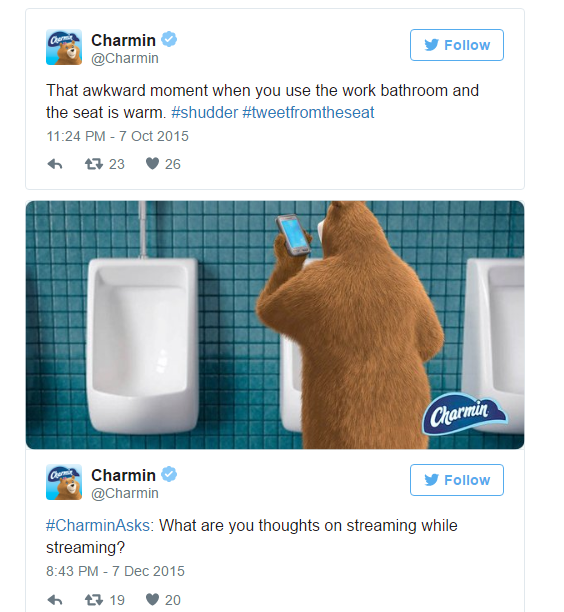
Screenshot 2016-05-04 18.35.50
Unfortunately, although we all believe that we’re hilarious, not all of us can make high-impact humour. To pull this off you’ll have to hire the right comic talent and be well informed on the preferences of your Target Audience.
Lou Dubois breaks down marketing humour well in his Inc. piece.  With examples of what works and doesn’t work, he also adds that you could take inspiration from local theatres or approach film schools for help when experimenting with humour. You could also try a potential idea on a small group of people belonging to your Target Audience and assess their reactions.

b. Put on a show for them

“Don’t sell, entertain,” quips Jessie Gould, and I couldn’t agree more. 77% of Americans are stressed out, and 39% of them claim to have no time for leisure. Gould points out that people’s feelings manifest in the way they engage with the market. Consumers seek out entertainment and you should be the one to give it to them. In fact, with a large number of brands vying for their attention, memorable entertainment is one great way of getting ahead of your competition.
Can you recall a jingle that got stuck in your head for weeks? I’m sure you can name ten. Here’s one of my favourite jingles:

Screenshot 2016-05-05 16.02.22
Always remember, the cardinal rule of marketing is to give your audience what they want and need. Give them that incentive to engage with you. Again, don’t forget to invest in understanding what your audience will enjoy and relate to. Without that, your returns may not match your efforts.

c. Share inspirational content

Inspiration is almost contagious if you’ve noticed the pull that most of us have towards inspirational content, especially in image-quote and concept-video formats. Inspiration shared as stories, of success and of failure also do very well on social media. Tyrese Gibson, who plays Roman Pearce in The Fast and Furious Franchisee does a lot of inspirational based sharing on his social media accounts. Most of these shares receive a lot of attention and interaction.

Screenshot 2016-05-05 12.05.26
While inspiration is effective in encouraging engagement, how you implement it for marketing is important. What and how you share matters. Andrew Hutchinson explains this with his three tips for utilizing quote posts to best effect: –
1. Use your own images where possible
2. Seek out the best quotes which support your brand mission
3. Don’t go overboard

d. Meet them on an intellectual level

The goal here is to share witty, clever and intelligent content to appeal to that aspect of your audience’s personalities. Everyone appreciates a think-ride. That’s where you see something and get to thinking and then arrive at a conclusion that surprises you or shows you something new. This trip is alluring, satisfying and pleasurable. But the challenge is actually creating content that can do this well. You can’t afford to overshoot and go above your audience’s heads or simply fail at communicating the effect that you desire. If making this kind of content seems hard, and it is, could always share stuff like this to get a high response.
Here’s a really cool example of intellectually appealing content:

Screenshot 2016-05-05 12.26.47
That concludes the content with emotional value section. Just to recap, you could make your audience laugh, captivate them with gripping content, inspire them or enthral them with intelligent content. While doing any of the above don’t forget to follow these tips.
Quick Tips:
1. Research you Target Audience’s preferences
2. Hire the right talent
3. Do a test pilot
4. Share, if not create

3. Content in story form

It was late last Wednesday when everyone had left the office. I was bent over my tortoise of a laptop and furiously clicking away at a mouse to get google to respond to my query, “Storytelling + Inspiration”. I was ready to vanquish the pop-up and get to the article behind, but what came up was something very interesting.
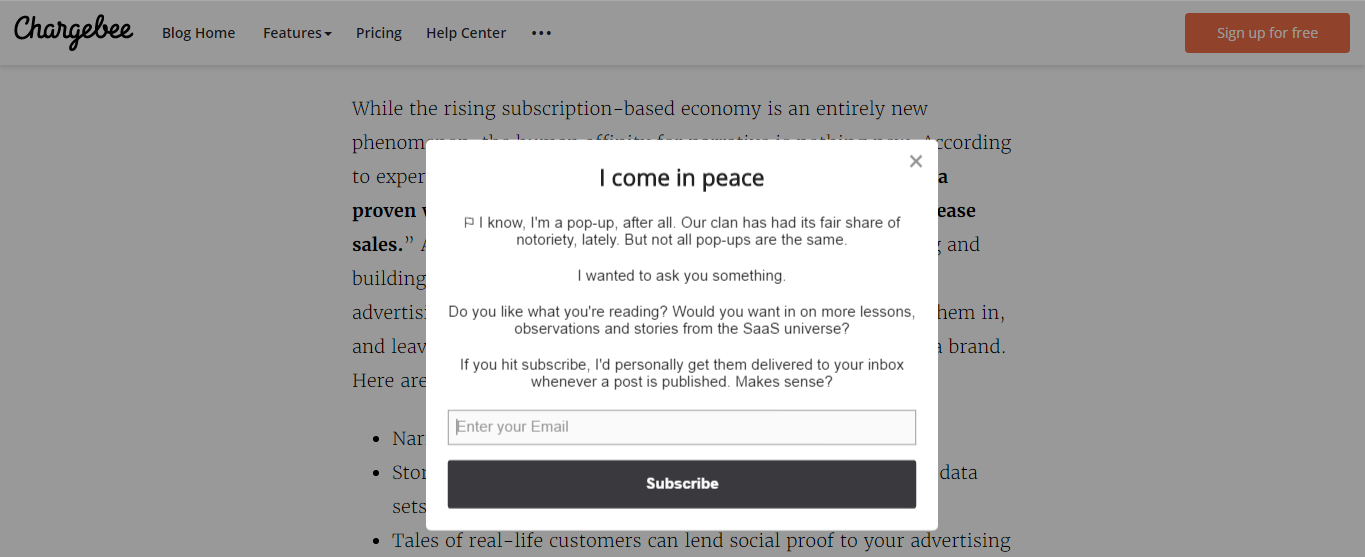
Screenshot 2016-05-05 12.30.56(2)
I’d say there are definitely higher chances of someone responding to a message like that one, what do you think?
Now that you’ve got two examples of storytelling (my own petty attempt to start this para with a story, and the writing on the pop-up), maybe you’re convinced to try it out. If you aren’t, John Solomon has three great reasons for you to get storytelling:
1. Narrative lends a personalized bent to your brand.
2. Stories can spruce up even the most boring case studies and data sets.
3. Tales of real-life customers can lend social proof to your advertising messages.
To help you make the best of your storytelling/marketing moves, James T Noble has four narrative elements that make for strong business stories.
Four Story Elements:
1. What makes you special? – build your story around this
2. Be creative – don’t do clichés
3. Get people involved – your audience could be characters, or you could get them to tell their stories
4. Think like a book – all your campaigns should fit into the same book or theme

4. Content that is open-ended

“Open conversations generate loyalty, sales and most of all, learning… for both sides,” states marketing pro-Seth Godin. Ask your audience what they want, listen carefully and they’ll tell you. This is invaluable when developing your business, but can also be applied to gaining marketing insights. Observe how your audience reacts to various types of content and they’ll essentially tell you what you should and shouldn’t be doing.
Open-ended also means freedom for you and your audience both.
Until now we’ve discussed different essences that you can infuse into your marketing for better audience engagement. Now comes the really fun part. Q n As, surveys, you could do an #AskMeAnything, or any fun contest no holds barred. This is where you get to be really creative. The idea is that when you leave a question mark hanging, give someone options or get them to play a game, it instantly awakens in people an urge to respond. Adding incentives is another way of encouraging more engagement. Jay Baer from Convince and Concert has thirteen ingredients for the perfect social media contest.
Domino’s UK did a campaign that ran between 9 am and 11 am on March 5, 2012. The promo cut the price of the pizza giant’s Pepperoni Passion Pizza each time someone tweeted the hashtag #letsdolunch. The brand received an overwhelming response of over 85,000 tweets in two hours and ending up selling the pizza at 7 pounds lesser than its original price, but the sales they made that day would have definitely covered multiple times that margin. Making games a group activity is a great way of increasing engagement.
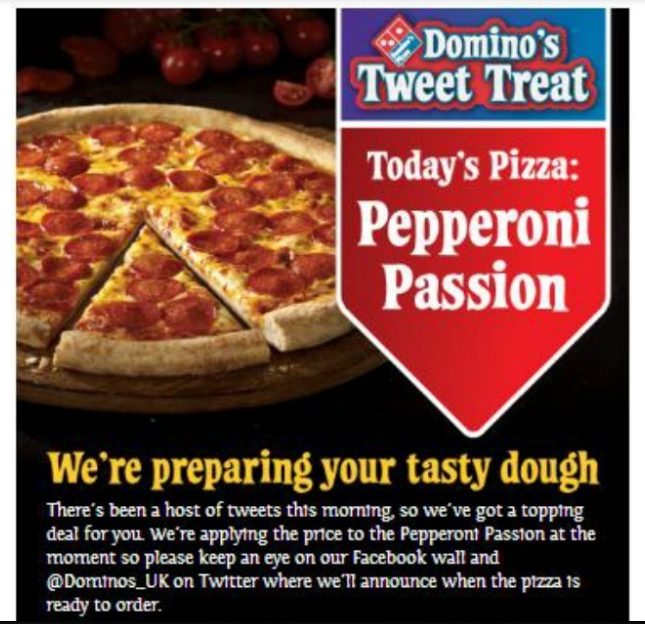
Screenshot 2016-05-05 13.14.54

Quick Tips:
1. Ask you audience what they want
2. Listen in to market buzz
3. Experiment with quizzes, voting, ask and answer questions, create discussions and fun contest with incentives.
4. Share contest results, request winners to do the same
5. Get creative – try online versions of offline games

5. Real- time content

67% of buyers responded best to content that contained timely or unique information, according to an Economist Group survey. The way we communicate is constantly changing with social, and audiences are always active. The discerning element rests in how you communicate with your audience real-time.
To leverage real-time opportunities on social, you’ve got to think on your feet and be smart about it. This skill is something developed over time, with experience. What helps is knowing what not to do and Jen Gray explains this in “Real-Time Engagement Etiquette – Avoid Social-Media Mishaps”.
Gray says, to ensure meaningful exchanges and avoid blunders, there are four questions you should ask yourself ask each time you post something on social media.
Real-time Posting Quick Checks:
1. What’s the ultimate goal?
2. Do you have something to say?
3. Is the message authentic to the brand’s voice?
4. Does the post add value to a consumer relationship?
Here’s an instance of good real-time engagement- Miramax, the film company, honoured veterans on Veteran’s day by tweeting out a blog post highlighting bravery of Civil War and World War II soldiers.
Screenshot 2016-05-05 16.37.11

6. Informational content

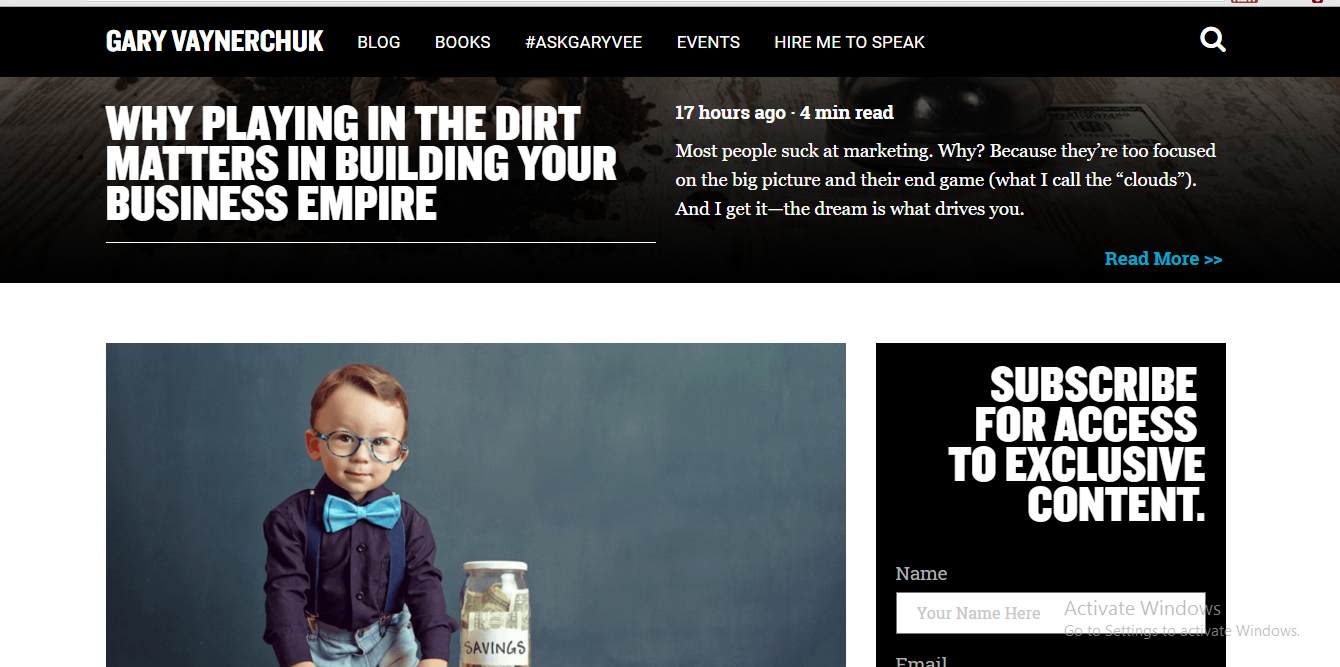
Millions of people turn to social media for information, a good part of them possibly your target audience and potential customers. “The point isn’t just to be present,” says Tim Williams, founder of Ignition Consulting Group, “ but to be useful.” You could approach informational content in one of many ways, blogs – guides, trends, popular misconceptions, insights or you could go visual with infographics, videos (vlogs), or even do a podcast. The exciting idea is how you can help your audience in so many ways, using different platforms and information formats.
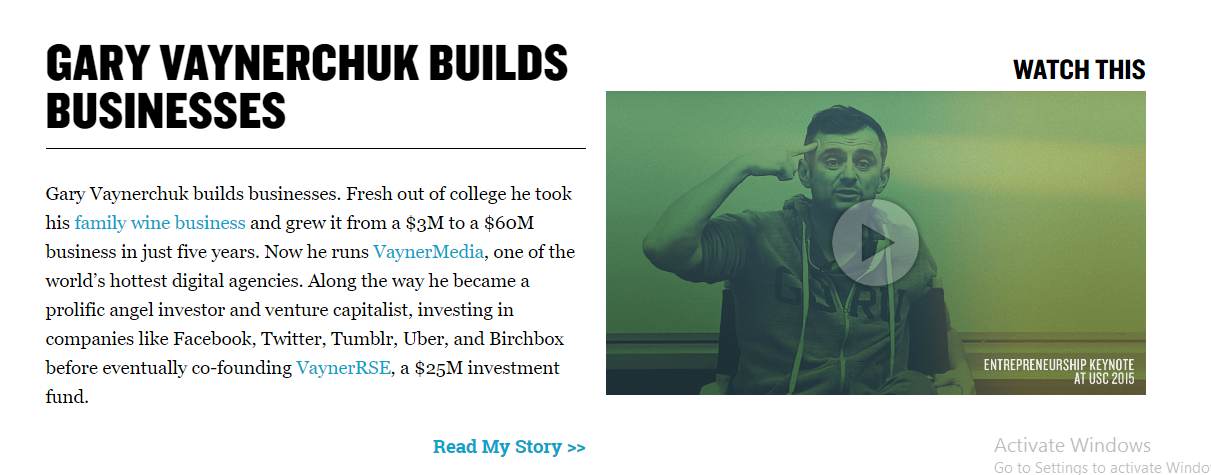
One blogger that does this really well is Gary Vaynerchuk.
Screenshot 2016-05-05 14.57.47
Screenshot 2016-05-05 14.56.49

Quick tips:
1. Play with formats – keep them fresh and fun
2. Imagine the questions your audiences might ask, and answer them
3. Write compelling headlines
If you have seconds to catch someone’s attention, you really have to be good at it! Here’s a guide to writing great headlines by Jon Morrow.

7. Visual content

By now everyone knows that visual content amplifies content and its chances of getting noticed. Jesse Mawhinney’s blog comprehensively describes the power of image communication and marketing.
There are so many ways in which you can use visuals. Certain colors even hold the ability to impact your sales, as Brian Morris explains in “10 Colors That Increase Sales, and Why”.
Quick Tips:
1. You could experiment with collages, comics, infographics, posters, graffiti, gifs and videos.
2. Be sure to A/B test everything that you try, and assess which ones your audience likes best.
Here are a few examples of attention-catching visuals as graphs, collages, gifs and other inventive formats.

Screenshot 2016-05-05 15.14.44

Screenshot 2016-05-05 15.20.14
use
USE 1
Types of visual content that you should use 
a. Infographics 
Infographics get shared 3X as many times as any other type of content on social networks (Source: HubSpot’s Visual Marketing Statistics). You can use that to your advantage.
Create infographics out of important topics in your niche and ensure that you brand them. Place your company logo and a link back to a supporting article on your blog in every social share. The tactic would probably work best if you had a unique, eye-catching style of creating infographics that your audience grew to recognize and enjoy.
There are many choices in graphic design software that you can use to create infographics without much of a hassle.
b. Graphs 
If you quote studies often, on your blog posts, social shares, newsletters and case-studies, you could turn them into graphs instead.
Graphs are better than written data for three reasons – people grasp concepts, ideas and messages more deeply when they are communicated visually, visually represented messages are retained in the memory longer and content with visuals are generally shared more.
c. Screenshots 
Screenshots allow you to illustrate what you otherwise can’t – examples in posts, ideas that your readers can use or insights that might otherwise be missed.
There aren’t any rules for screenshots. You can use them just about anywhere, even in your social media posts.
d. GIFs 
GIFs can act as quick additions to capture the attention of people on social networks. They can be great and refreshing, or even comical when used in the right context.
DrumUp lets you search and add GIFs from GIPHY when scheduling your posts on Facebook, LinkedIn and Twitter. Here are a few examples of brands using GIFs for social media marketing that you can refer to for inspiration.

8. Live-streaming

In 2017, many brands are moving past visual content to . Using live-streaming tools like Facebook Live, Periscope and Webinar hosts, brands are attempting to break the 2D content barrier and catch viewer attention.
The great news? Most live-streaming tools are free (Facebook Live and Periscope). You simply need a live-streaming strategy to get on board.
Begin by listing the easiest things that you can do using live video – interviews? news casts?
Screenshot 2017-03-13 11.20.08
Once you have done that, reach out to and enlist the right partners (expert content creators, bloggers and influencers) who can help you create that content.
That wraps up the seven types of engagement driving content. It’s over to you now. I’d love to see what each of you does with this. Share it with me and I’ll include your ideas on our next blog.